11
Using the bodypack transmitter
Using the bodypack transmitter
To establish a transmission link, proceed as follows:
1. Switch the receiver on (see the instruction manual of the receiver).
2. Switch the bodypack transmitter on (see next section).
The transmission link is established and the display backlighting of the
receiver changes from red to orange.
If you cannot establish a transmission link between transmitter and
receiver, read the chapter “Synchronizing the bodypack transmitter with a
receiver” on page 28.
Switching the bodypack transmitter on/off
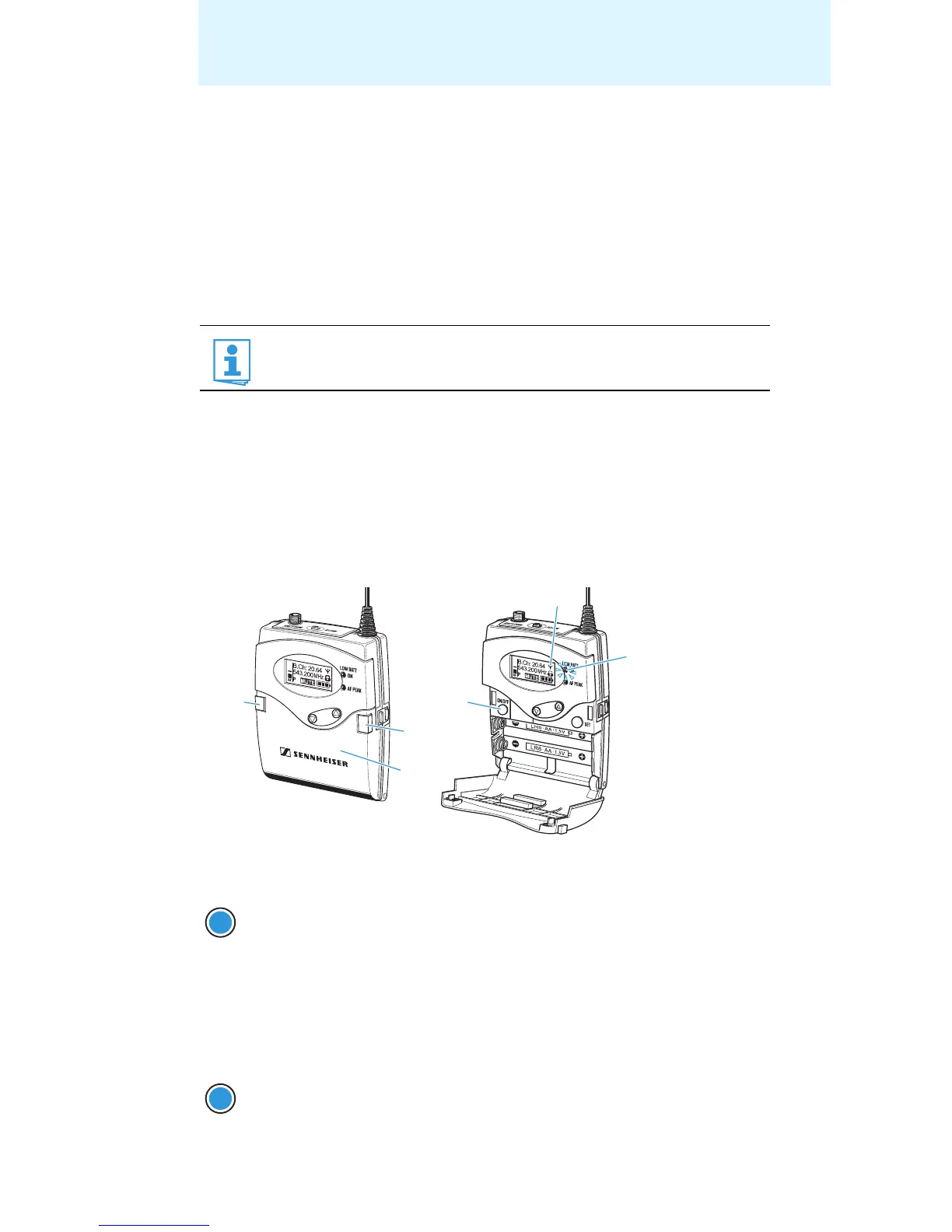
왘 Push the two battery compartment catches and open the battery
compartment cover .
To switch the bodypack transmitter on (online operation):
To switch the bodypack transmitter on and to deactivate the RF signal on
switch-on (offline operation):
It is vital to observe the notes on frequency selection on page 28.
왘 Briefly press the ON/OFF button .
The bodypack transmitter transmits an RF signal. The
“Frequency/Name” standard display appears on the display
panel. The red ON LED lights up and the transmission
icon is displayed.
왘 Keep the ON/OFF button pressed until “RF Mute On?”
appears on the display panel.
ON/OFF
ON/OFF










 To Next Page