22
Adjusting settings via the operating menu
Overview of the frequency banks and channels:
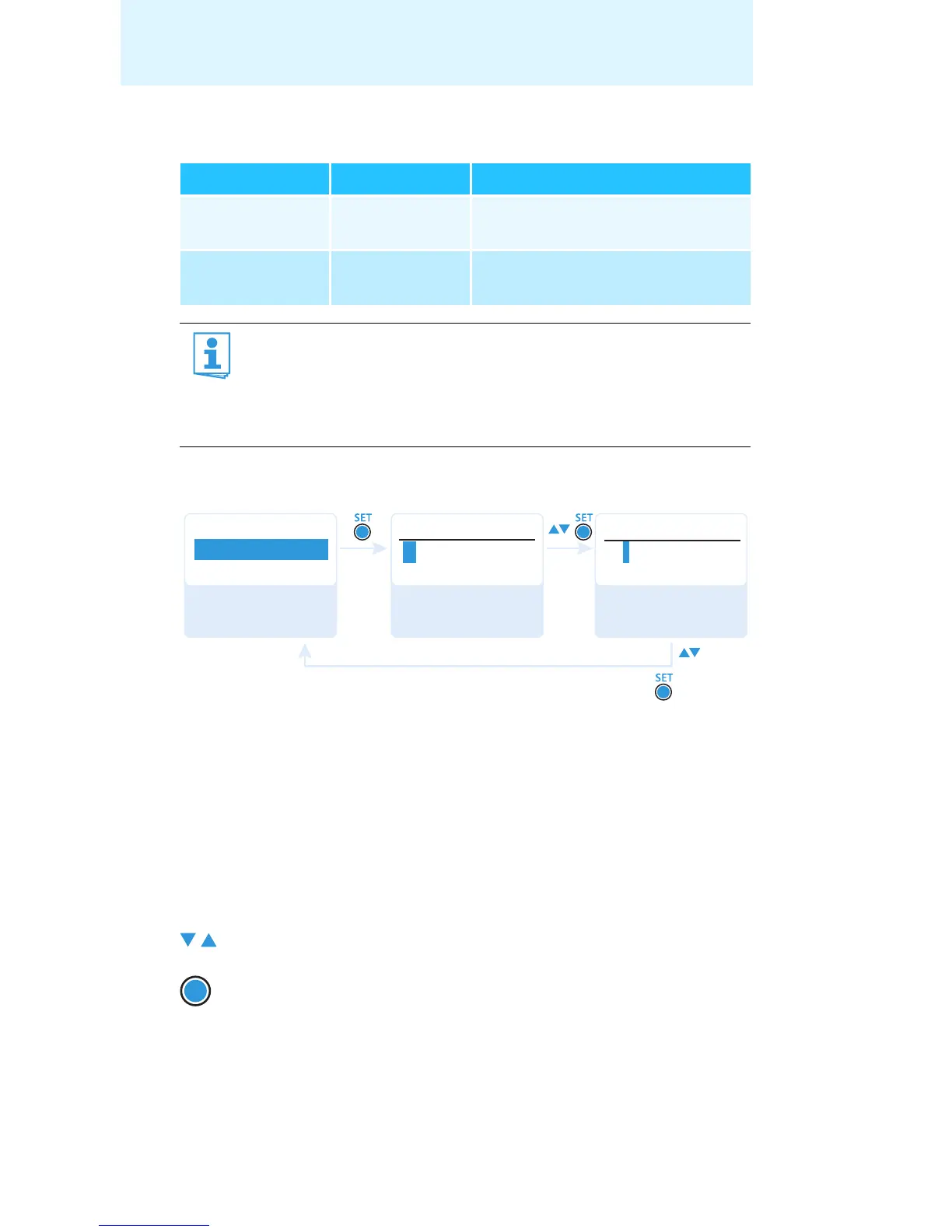
Entering a name – “Name”
Via the “Name” menu item, you can enter a freely selectable name (e.g. the
name of the performer) for the bodypack transmitter. The name can be
displayed on the “Frequency/Name” and “Name/Channel” standard
displays (see page 15). The name can consist of up to 8 characters such as:
• letters (without pronounciation marks),
•numbers from 0 to 9,
• special characters and spaces.
To enter a name, proceed as follows:
Frequency bank Channels Type
“1” to “20” up to 64 per
frequency bank
System bank,
frequencies are factory-preset
“U1” to “U6” up to 64 per
frequency bank
User bank,
frequencies are freely selectable
When setting up multi-channel systems, please observe the
following:
Only the factory-preset transmission frequencies within one
frequency bank (“1” to “20”) are intermodulation-free. It is vital
to observe the notes on frequency selection on page 28.
왘 Press the rocker button to select a character.
왘 Press the SET button to change to the next segment/
character or to store the complete entry.
Menu
Lichael
Name
Name
Name
Lichael
Michael
“Stored”
Call up “Name” Enter a character
and confirm
Enter a character;
store the setting
SET










 To Next Page