IoT into the Wild
52
13. Trouble Shooting
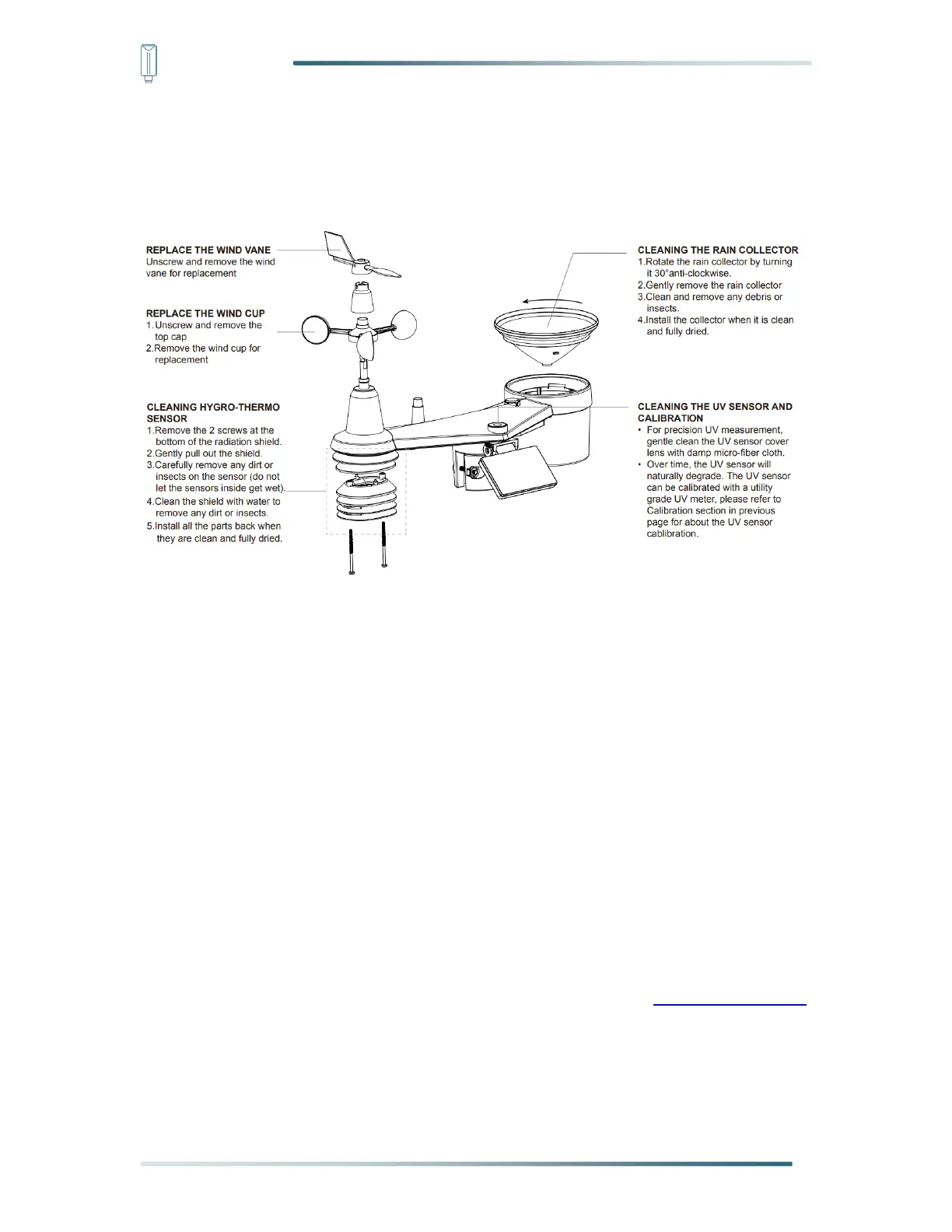
13.1 Maintenance of Weather Station
13.2 Sensors can’t join LoRa network, how to do?
1) Check the gateway frequency configuration. Make sure the gateway and sensor have the
same uplink and downlink frequency.
2) Check the real-time log and click config button of the sensor to see if there are any
sensor data packets. If there are packets, check whether the gateway is sending
downlink packets.
3) If the channels and other configurations are correct and the gateway logs do not have
packets, please contact technical support.
13.3 Support
Support is provided Monday to Friday, from 09:00 to 18:00 GMT+8. Due to different time
zones, we cannot offer live support. However, your questions will be answered as soon as
possible in the before-mentioned schedule.
Provide as much information as possible regarding your enquiry (product models, accurately
describe your problem and steps to replicate it etc.) and send a mail to: sensecap@seeed.cc


 To Next Page