EasyManua.ls Logo

SENSECAP S2120 - Pre-Installation Procedures; Wind and Rain Sensor Installation

SENSECAP S2120
54 pages
Print Icon
To Next Page IconTo Next Page
To Previous Page IconTo Previous Page
Loading...
IoT into the Wild
7
4. Pre-Installation
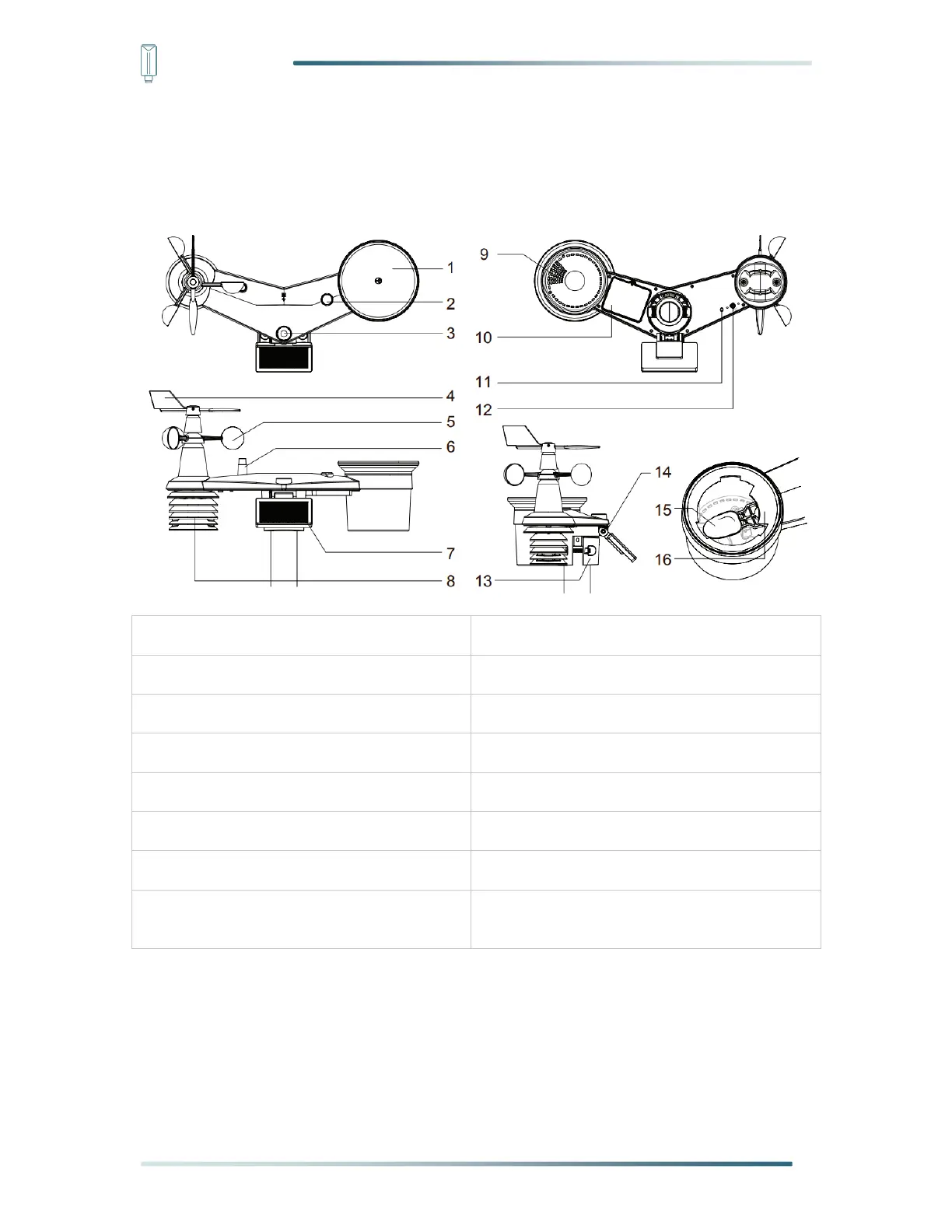
4.1 Diagram
1. Rain gauge
9. Drain holes
2. Balance indicator
10. Built-in battery box
3. UV and Light Intensity sensor
11. Red LED indicator
4. Wind vane
12. Config button
5. Wind cups
13. Mounting clamp
6. Antenna
14. Adjustable hinge of solar panel
7. Solar panel
15. Tipping bucket
8. Radiation shield, temperature and
humidity sensor, barometric pressure sensor
16. Rain sensor
4.2 Install the Wind Sensor
With reference to photo below, locate and align the flat are on the wind vane shaft to the
flat surface on the wind vane and push the vane onto the shaft. Tighten the set screw with a

Table of Contents

Related product manuals