IoT into the Wild
46
12. Device Installation
12.1 Select an Appropriate Installation Location
Before installing the weather station, please consider the followings:
1) Rain gauge must be clean every few months.
2) Avoid radiant heat reflected from any adjacent buildings and structures. Ideally, the
weather station should be installed at 1.5m (5’) from any building, structure, ground or
roof top.
3) Choose an area of open space in direct sunlight without any obstruction of rain, wind, and
sunlight.
4) Transmission range between weather station and gateway could reach a distance of
2~10 km at line of sight, providing there are no interfering obstacles in between or nearby
such as trees, towers, or high voltage line. Check the reception signal quality to ensure
good reception.
5) Household appliance such as fridge, lighting, dimmers may pose Electro-magnetic
interference (EMI), while Radio Frequency Interference (RFI) from devices operating in
the same frequency range may cause signal intermittent. Choose a location at least 1-2
meter (3-5 feet) away from these interference sources to ensure best reception.
12.2 Installing the Weather Station
12.2.1 Adjust the solar panel
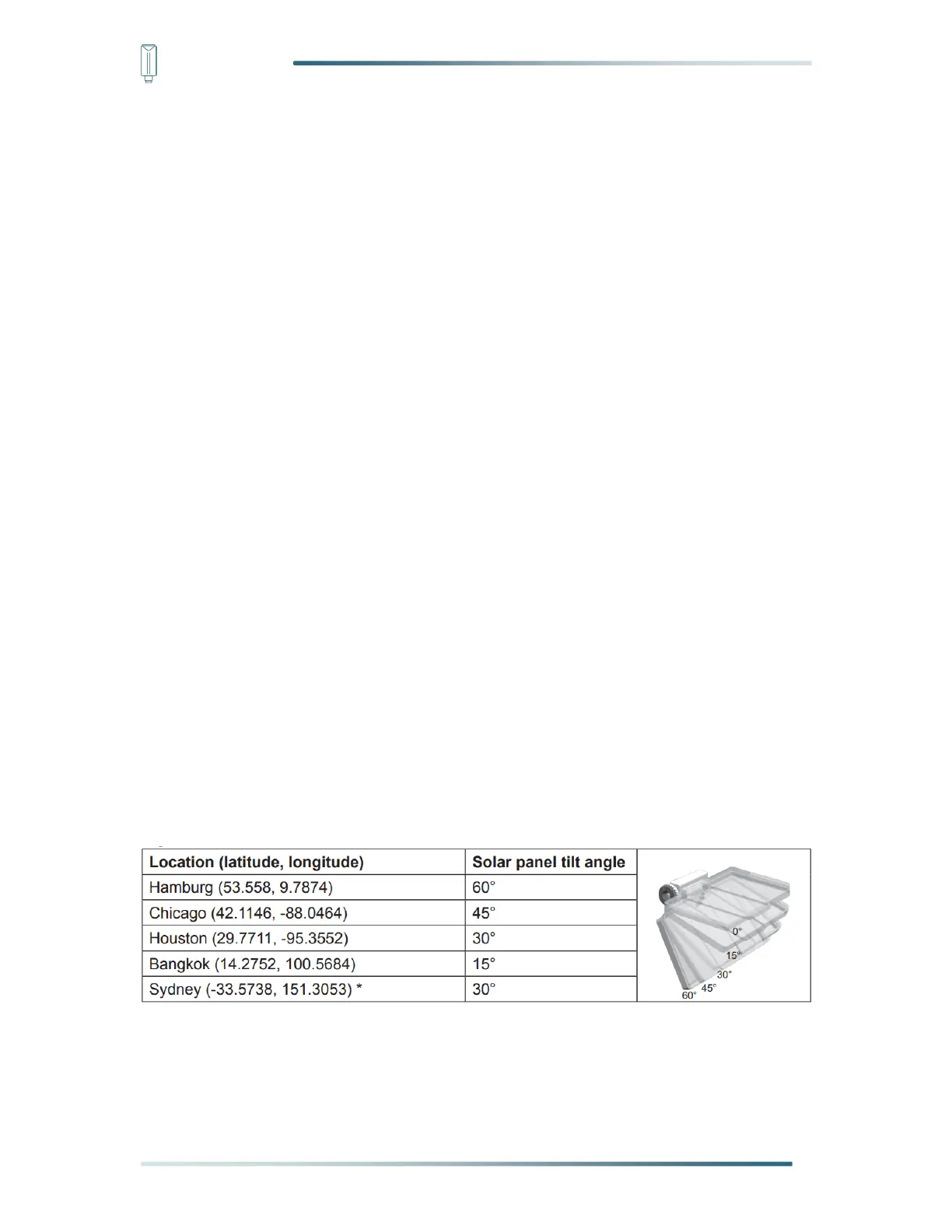
The tilting angle of solar panel can be adjusted vertically from 0° into 15°, 30°, 45° and
60°positions depending on the area you are living in. For optimal power output year-round,
please set the tilt angle that is closest to your latitude.
*Sensors installed in Southern Hemisphere must have their solar panels facing North.
Step 1: Remove the solar panel protection film.


 To Next Page