Setup
Page 36 UltraWave Product Guide
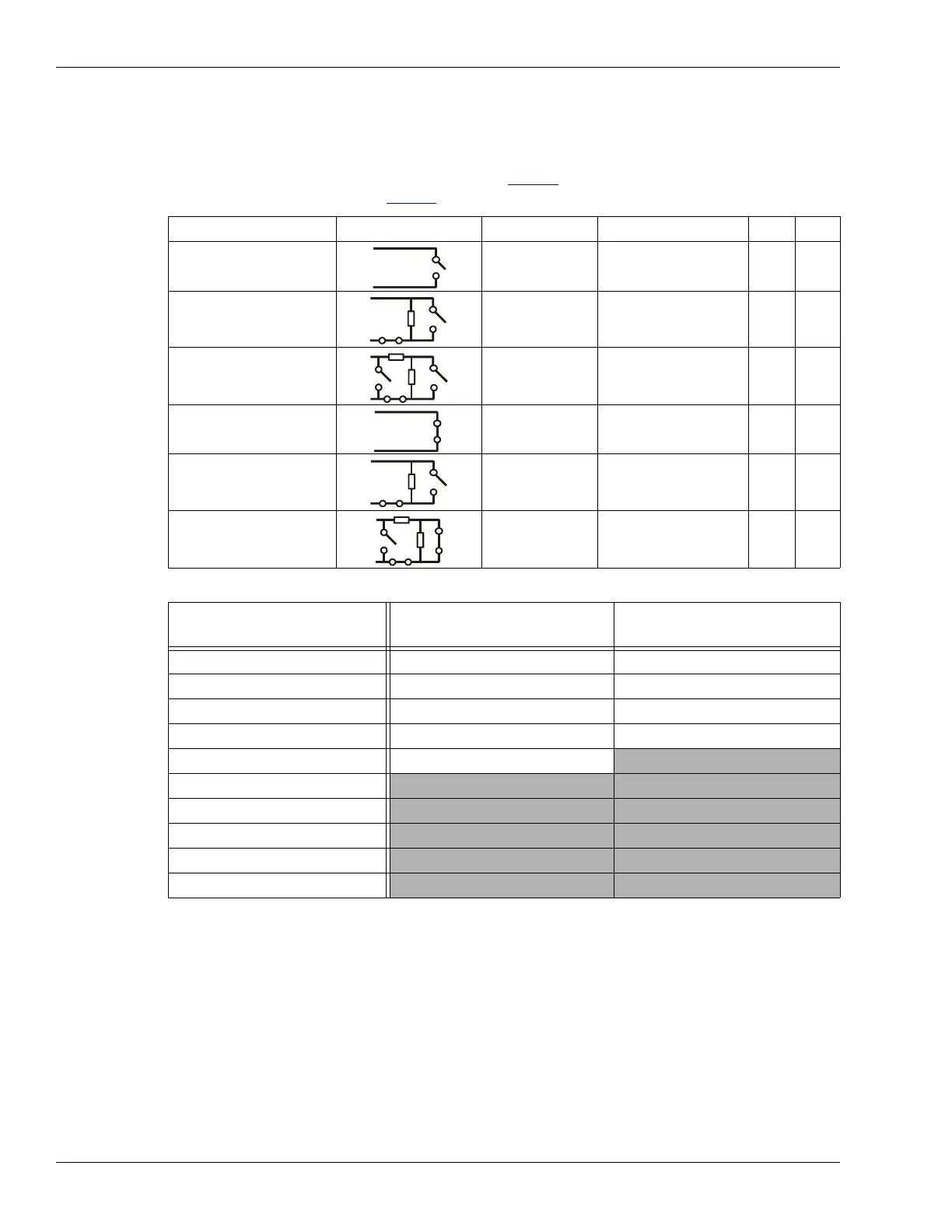
For Remote control mode applications, you define the input as normally open (NO) or normally
closed (NC) with single resistor supervision, dual resistor supervision, or unsupervised. For Local
control mode, the input requires a normally open unsupervised momentary switch input. The Filter
Window parameter allows you to set the time period for which an input must be active before the
receiver reports an event, or activates a self-test. Ta b l e 6
includes the selectable Remote Control
input wiring configurations, and Tab l e 7
includes the selectable supervision resistor values.
Input configuration procedure (Local control mode)
1. Select the Aux Cfig tab on the UCM window.
2. Set the Filter Window.
3. Save and download the configuration changes to the receiver.
Input configuration procedure (Remote control mode)
1. Select the Aux Cfig tab on the UCM window.
2. From the Supervision drop down, select the desired supervision scheme for the input.
Input option UCM selection Alarm relay Supervision relay R1 R2
unsupervised NO --- --- ---
single resistor
supervision
NO NC 5.1 k ---
dual resistor
supervision
NO NO/NC 4.3 k 820
unsupervised NC --- --- ---
single resistor
supervision
NC NO 5.1 k ---
dual resistor
supervision
NC NO/NC 5.1 k 820
Table 6 Selectable input configurations
R1 values (single resistor
supervision)
R1 values (dual resistor
supervision)
R2 values (dual resistor
supervision)
820 1.1 k 820
1 k 2.2 k 1.1 k
1.1 k 4.3 k 2.2 k
1.2 k 5.1 k 5.6 k
1.5 k 5.6 k
2.2 k
3.3 k
4.7 k
5.1 k
5.6 k
Table 7 Selectable resistor values


 To Next Page