Receiver calibration
Page 38 UltraWave Product Guide
Receiver calibration
Once the UltraWave transmitter and receiver are setup and configured, perform the receiver
calibration.
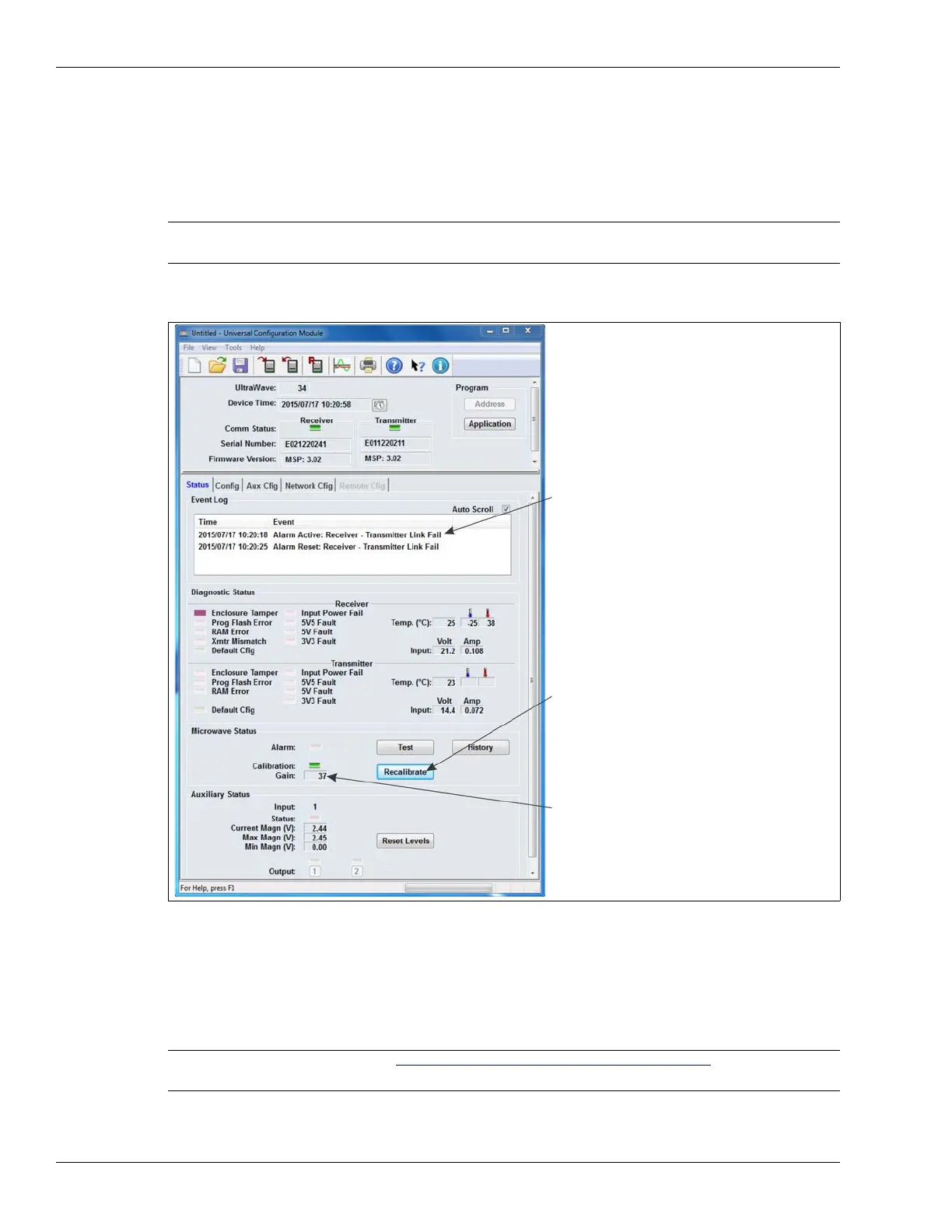
1. On the receiver’s UCM Status tab, select the Recalibrate button.
The receiver performs a self-calibration.
Optimizing the alignment
Typically, the initial alignment of the UltraWave sensor provides a strong received signal and good
detection sensitivity. However, it may be possible to improve the received signal by adjusting the
transmitter and receiver units’ alignment.
1. Note the receiver’s displayed Gain value once the self-calibration is complete.
CAUTION Ensure that the microwave detection zone is not disturbed during the
calibration process.
Figure 32 UCM Status tab
Note See Verifying the UltraWave alignment on page 43
for information
about using the unit’s received signal strength indicator LEDs.
Recalibrate button
Gain value
Link Fail alarm and reset reported during
recalibration process


 To Next Page