vMax Web Operation
3–4 700-0098 R006
3.3. vMax Web User Interface
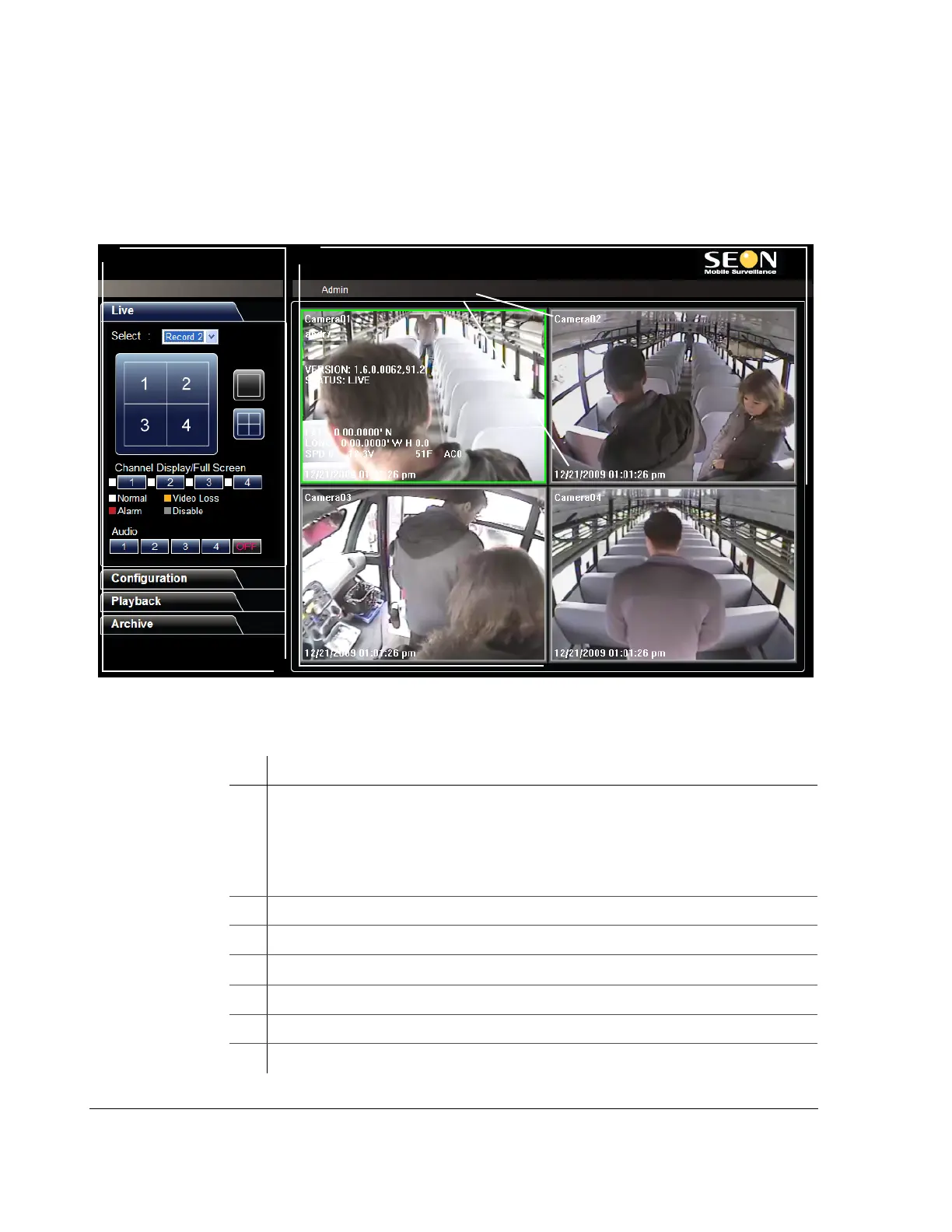
The vMax Web interface is shown in Figure 3-4. Section 1 (on the left) has four
menus. vMax Web opens with the Live tab selected and live video from the TL and
cameras displaying.
Figure 3-4
vMax Web User Interface
Table 3-2
User Interface Components
ID Description
1 Tab area.
• Live tab — live DVR video display and viewing controls
• Configuration tab — DVR setup menus
• Playback tab — search recorded DVR video
• Archive tab — archive recorded DVR video
2 Viewing Area — view multiple or single cameras and telemetry information
3 User login name
4 DVR firmware version
5 DVR information — DVR configurable; camera title, date and time
6 Overlay information — DVR ID, firmware version, and operating status
7 Telemetry information — DVR location, speed, and hard drive temperature



 To Next Page