10
SERFAS E-BIKE
12
BF-DM-C-DP C18-EN November 2019
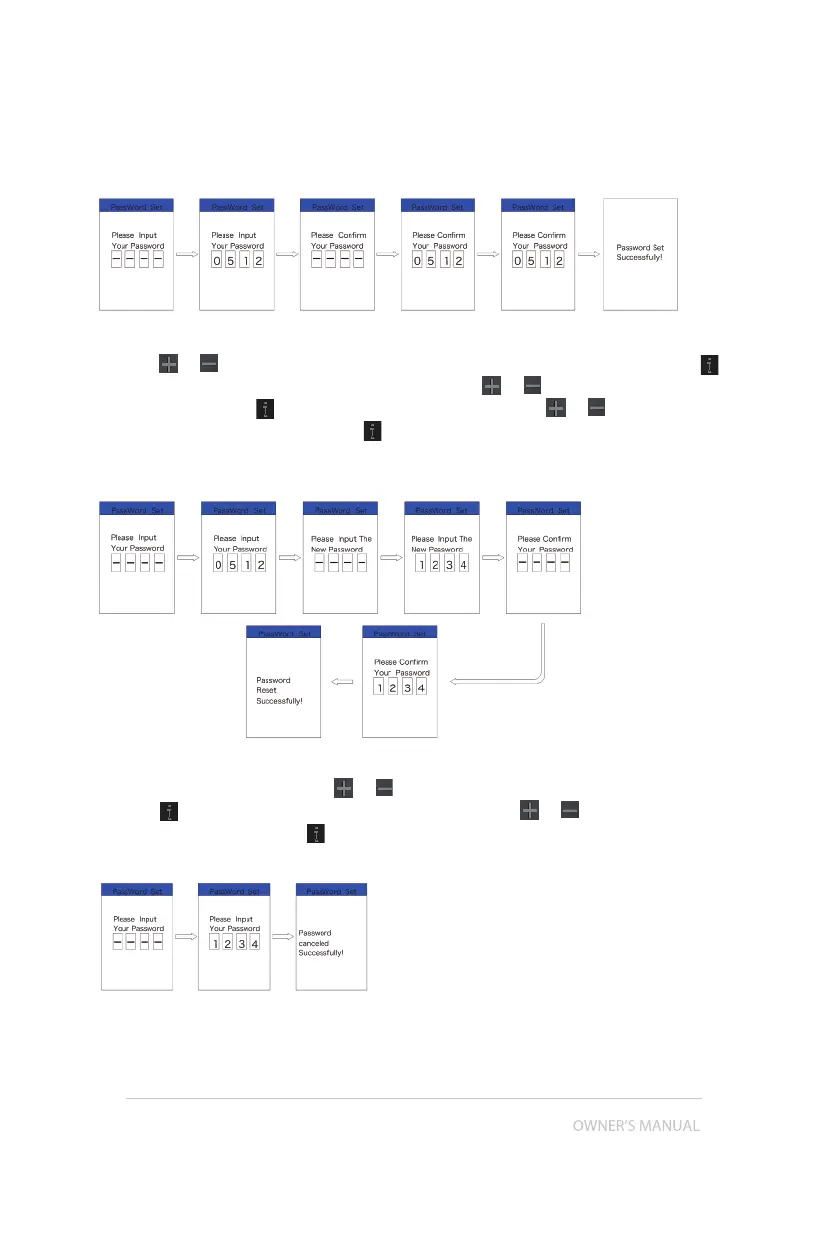
Changing the password:
Press the
or (<0.5S) button to choose Password in the menu. Then by briefly pressing
(<0.5S) to enter the password section. Now again with the or (<0.5S) button highlight “Pass-
word set" and press the (<0.5S) button to confirm. Now with the or (<0.5S) buttons and
highlight “Reset Password” and with the (<0.5S) button to confirm.
By entering your old password once, followed by inputting the new password twice, then your
password will be changed.
Deactivating the password:
To deactivate the password, use the
or buttons to get to the menu point “Password” and
press the (<0.5S) button to highlight your selection. Press the or (<0.5S) button until is
shows “OFF”. Then press briefly (<0.5S) to select.
Now enter your password, to deactivate it.


 To Next Page