Switched PRO2 – User Guide
Using the Web Interface • 89
Set Unit Defaults – System Settings Unchanged
The Set Unit Defaults – System Settings Unchanged function resets the following subset of configuration items (in
the NIC of the master PRO2 unit) to factory default values:
• Power items: Cords, lines, phases, over-current protectors (OCPs), branches, outlets.
• Sensor items: Temperature, humidity, water
*
, contact closure
*
, ADC
*
(* = EMCU unit only)
• User-configuration items related to the above power/sensor areas: Object names, thresholds, hysteresis,
nominal values, limits, system location, notification enables, shutdown settings, Bluetooth
®
options, Smart
Load Shedding options, outlet options, and more.
Note: User-configured system-level items will not be reset to factory defaults: Users, groups,
network, LDAP, TACACS, features, UPS devices, login banner, etc.
To purge/restore NV memory:
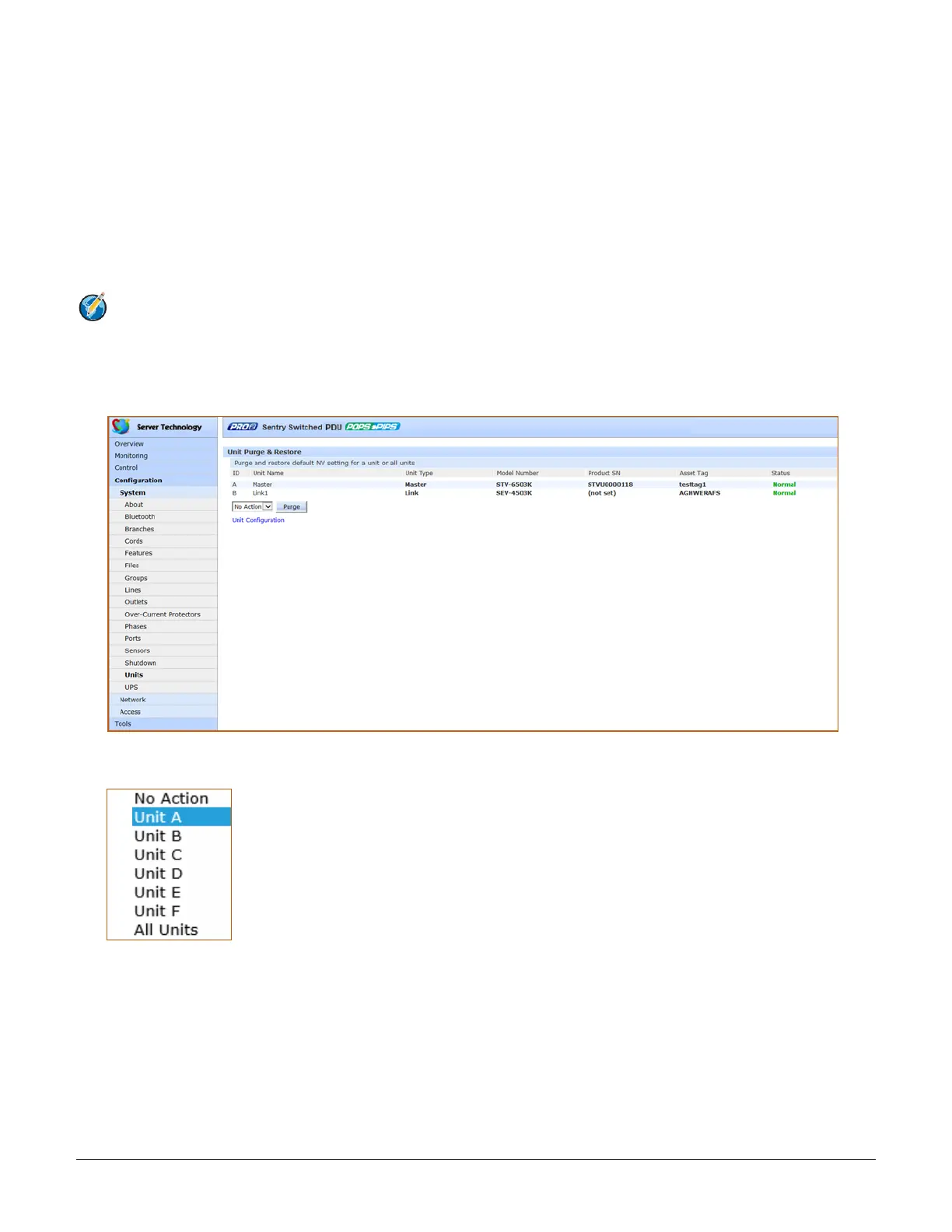
1. From the Units page, click the Unit Purge & Restore link to display the following page:
2. From the drop-down menu, select a unit as listed on the page by its internal system-assigned number in
the ID field, such as unit A, unit B, etc., or select all units.
3. Click Purge. A message displays to confirm the purge action. The units selected will have NV memory
purged and restored to factory default values.



 To Next Page