How to use the appliance
24
!If the selected option is incompatible with the
program set, the incompatibility will be signaled by a
buzzer and the corresponding option indicator light
will flash.
!If the selected option is incompatible with another
previously set option, only the most recent selection
will remain active.
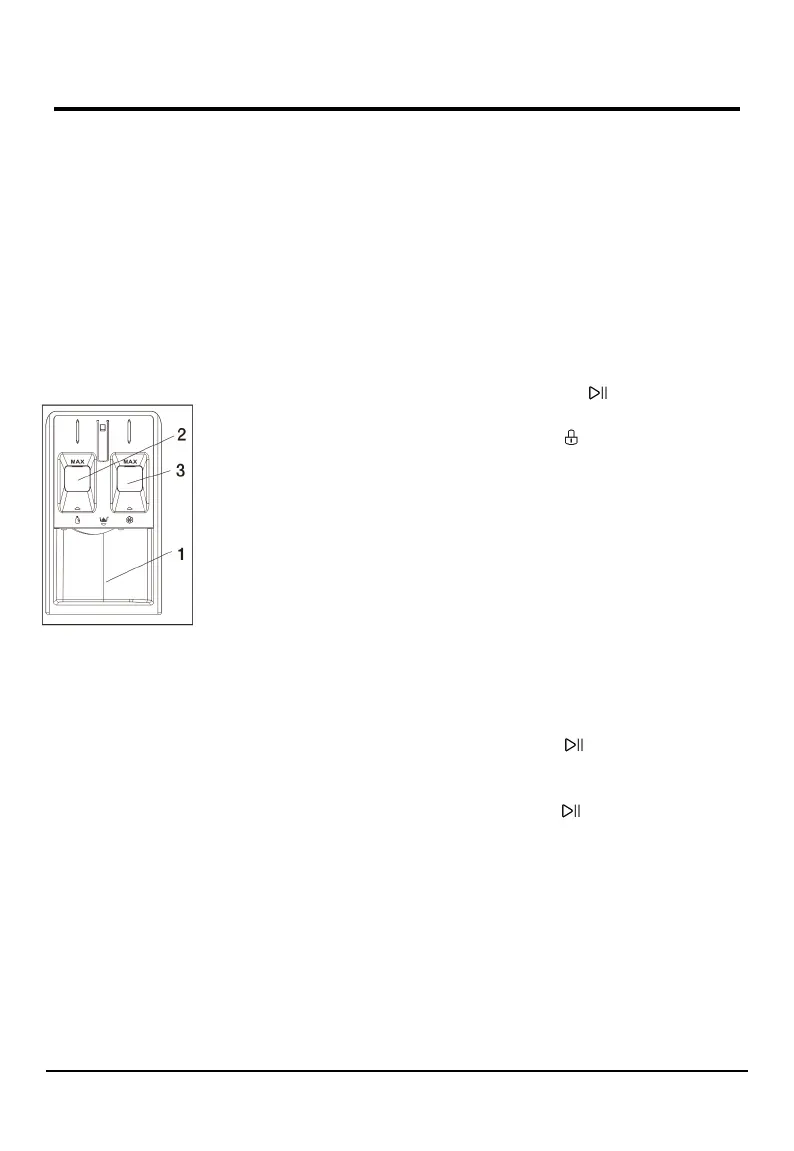
5. Add detergent
Pull out the detergent dispenser and add
detergent (and additives/softener) into the
relative compartments as described below.
Compartment 1:
Powder washing
detergent
Compartment 2:
Liquid washing detergent
The liquid detergent must
not exceed the “MAX”
level.
Compartment 3:
Additives (Softener. etc.) The fabric softener must
not exceed the “MAX” level.
Observe the dosing recommendations on the
detergent pack.
Correct dosing of detergent/additives is important,
because:
It optimizes the cleaning result.
It avoids irritating residues of surplus detergent in
your laundry.
It saves money by avoiding waste of surplus
detergent.
It protects the washer by avoiding calcification of
components.
It respects the environment by avoiding
unnecessary environmental burden.
! Do not use hand washing detergents because these
create too much foam.
! Use powder detergent for white cotton garments,
for pre-washing, and for washing at temperatures
over 60℃.
! Follow the instructions given on the detergent
packing.
6. Delaying the end of a program
To set a program to end at a later time, see the
section “Control panel / DELAY END”.
7. Start program
Press the START/PAUSE button. The relative
indicator light is lit, the door locks and the DOOR
LOCK indicator light is lit.
To avoid overflow, do not open the detergent
dispenser during a running program anymore.
The remaining program duration can vary. Factors
like unbalance in the wash load, or foam
formation, can have an effect on the program
duration.
8. Change the settings of a running program, if
needed
You can still change the settings while a program
is running. The changes will be applied, provided
the respective program phase has no finished yet.
To change the settings of a running program:
Press START/ PAUSE button put the running
program on pause.
Change your settings.
Press START/PAUSE button again to continue
the program.
If you have changed the program, do not add
detergent for the new program.
To prevent that a running program is changed by
accident (for instance by children), use the CHILD
LOCK function (see section “Control panel /
SPEED”).



 To Next Page