Troubleshooting
32
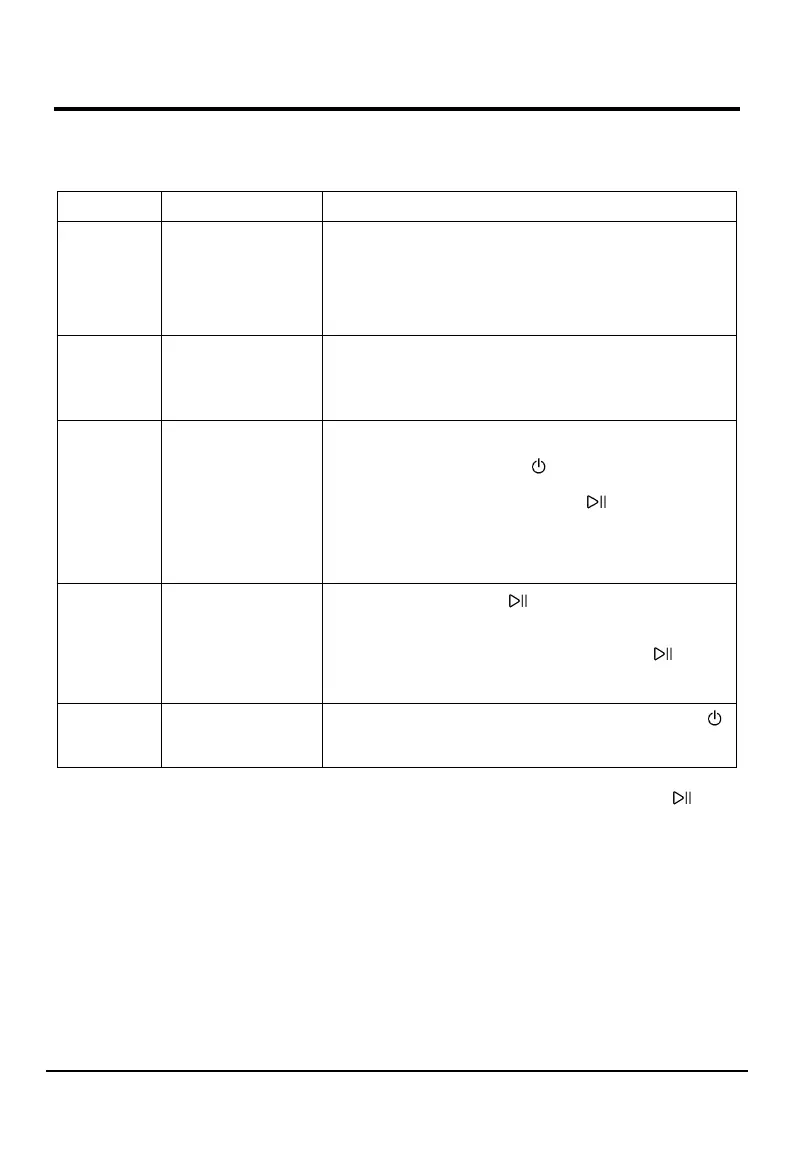
In case of the following faults, the fault state will be detected by the microcomputer system, with the buzzer
sounds issued and the following fault codes display in the control panel:
Fault codes Fault type Possible cause / solutions
E02 No inlet water
Check whether the faucet is turned on? Whether the water
supply is cut off? Whether mesh filter in the water inlet hose
and the water inlet valve are blocked? and whether the water
inlet hose of the appliance is frozen? Eliminate the above fault
causes. if the fault code still exists, please contact the service
center for repair.
E03
Abnormal water
drainage
Clean the pump filter.
Check whether the drain hose is bent, twisted or blocked?
Eliminate the above fault causes. If the fault code still exists,
please contact the service center for repair.
U4 Door lock malfunction
The door is not closed in place, and the door lock does not
work normally. Close the door again, turn the wash cycle
selector knob to the “OFF” position to turn off the power
supply, and then turn the wash cycle selector knob to select
any wash program and press the START/PAUSE button to
restart the program. Eliminate this fault causes. If the fault
code still exists, please contact the service center for repair.
If the fault code displays and cannot open the door, door lock
may be failure, please contact the service center for repair.
H
The temperature in
the drum is high
Press the START/PAUSE button to suspend the appliance
operation and wait for several minutes. When the
temperature in the drum drops to a safe range and the fault
code on the display is removed, press the START/PAUSE
button to continue the rest of the program. If the fault code
still exists, please contact the service center for repair.
EXX Other faults
Turn the wash cycle selector knob to the “OFF” position to
turn off the power supply, unplug the power cord, and contact
the service center for repair as soon as possible.
Note: Be sure to check the fault cause and eliminate the fault before pressing the START/PAUSE button again.
If the fault code is removed, the appliance will continue to run, and if the fault code still exists, please unplug the
power cord and call our customer service center for help as soon as possible.
Remember, you will be charged for a service call for problems caused by incorrect installation, as indicated on
pages 6 to 12.
Not emptying contents from pockets may cause pump or drain hose blockages, or may damage the machine.
Do not wash items which do not have a wash label, or wash items that are not intended as machine washable.


 To Next Page