SETTOPSURVEY, S.L. Bofarull 14, 08027 Barcelona (Spain) Phone: (+34) 93 340 05 73 Fax: (+34) 93 351 95 18 www.settopsurvey.com info@settopsurvey.com
42
System Configuration
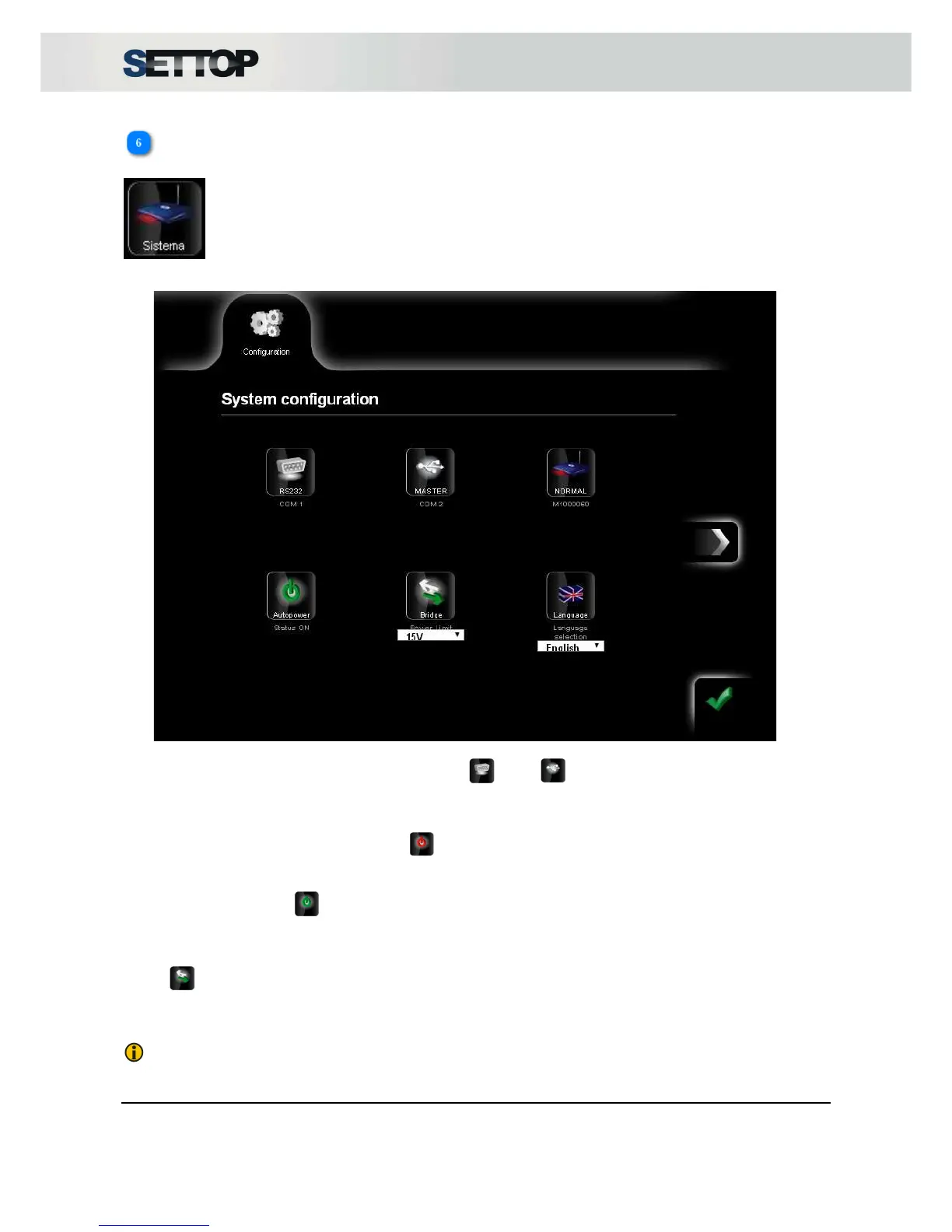
In the System section there are two subsections that show the Settop M1 configuration.
The first subsection indicates the “status” of the receiver, indicating the connection method on COM1 and
COM2 ports and if they can be connected via RS232 , USB (Master).
The second part indicates the settings options that are configurable.
When the option Auto power is set to OFF , the device does not automatically turn on when the power
supply is connected.
If Auto power is set to ON the device will automatically turn on when the power supply is connected.
Below the icon is the current configuration. To change it, you have to press OK.
Bridge is the option to power other devices connected to COM1 or COM2 from Settop M1, it should
indicate the maximum power. In the event of exceeding this limit, the power is cut off. This limit can be 15V,
20V, 25V and 30V.
NOTE: In monitoring applications the voltage is fixed to 15V.



 To Next Page