6
4. Usage and Installation
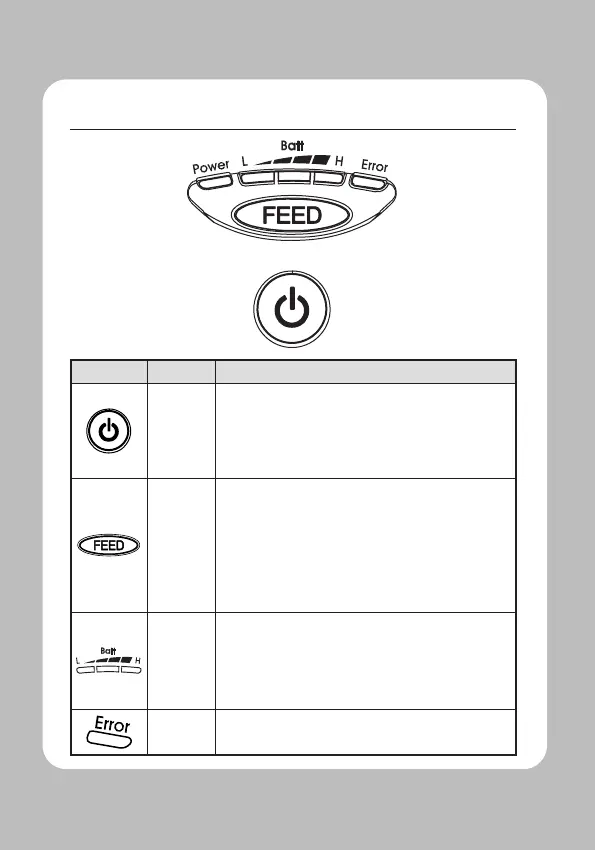
Power
Button
- This button is used to turn the printer on and o.
-When the printer is o, press this button for
approximately 3 seconds and the printer will power
on. When you press this button while the printer is
powered on, the printer will turn o.
Paper
Feed
Button
-This button can be used to manually feed the paper.
-Additionally, this button is also used to initiate self-
tests and Hexadecimal Dumping.
01
Refer to the Self Test section of this manual for
information regarding self-tests.
02 Refer to the Note in Self Test section of this manual
for information regarding Hexadecimal Dumping.
Battery
Status
Lamp
-If the Batt LED is lit, the battery is fully charged.
-If you can hear a beeping sound and LED light is
turned o, the battery is at the lowest level.
-If the battery is not charged at all, the printer turns
o automatically.
Error
Lamp
-If the red light is turned on, there is no paper or the
paper cover is open.


 To Next Page