MAINTENANCE
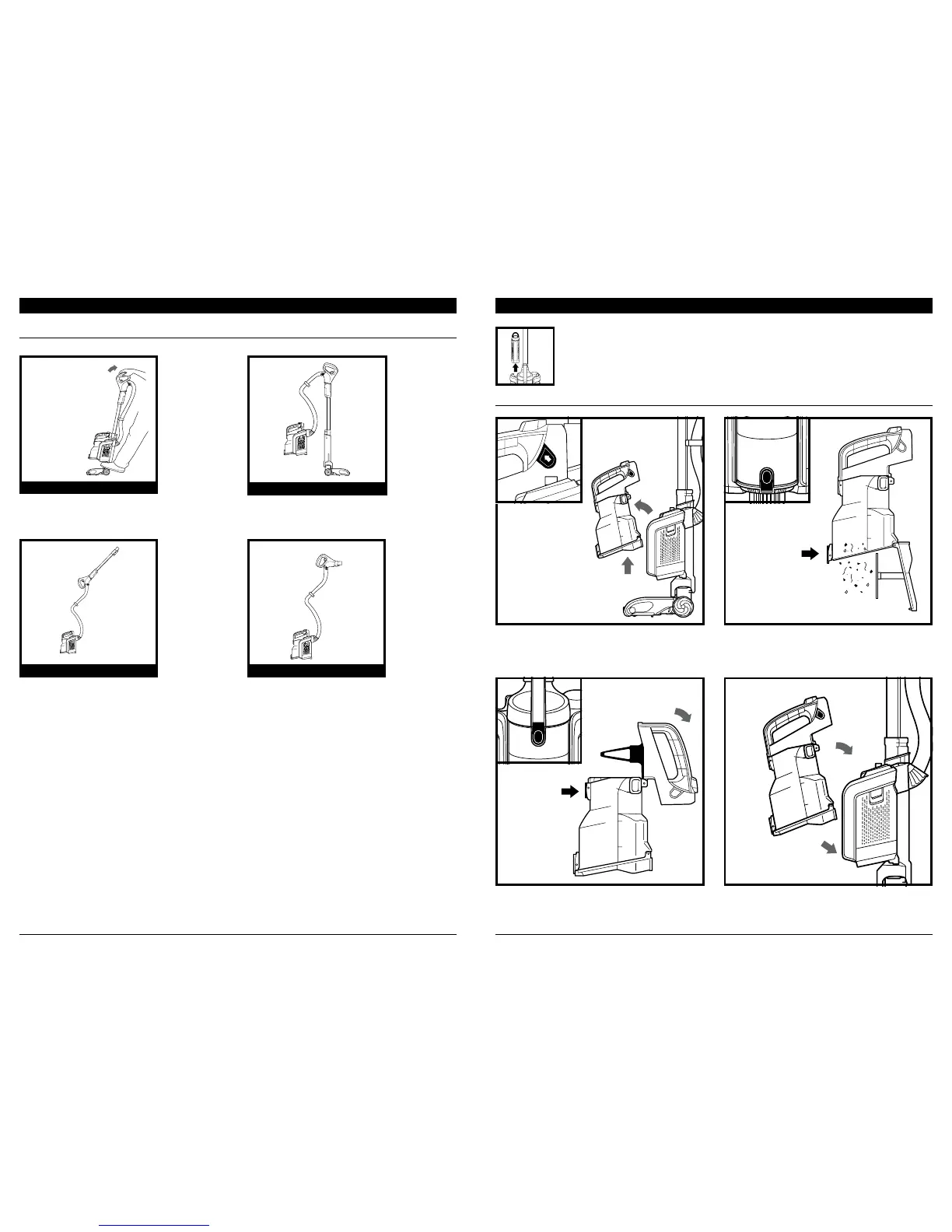
EMPTYING THE DUST CUP
To remove Dust Cup from pod, pinch and slide side
tabs. Tilt dust cup forward, then lift to remove.
To reinstall dust cup, place bottom into pod and
then tilt dust cup toward the wand until it clicks
into place.
Press lower release button to open bottom of
dust cup.
To open top of dust cup, press upper release button
and lift handle. Remove debris from Lint Screen.
IMPOR TANT: Remove the battery before performing any maintenance. To remove, lift the
handle on top of the battery and pull up.
OPERATING THE VACUUM
Lint
Screen
IMPOR TANT: See the previous page for instructions on how to detach the pod, wand, and handle.
VERSATILE FLOOR-TO-CEILING CLEANING
For cleaning carpets and hard floors. To activate
brushroll, step on floor nozzle and tilt handle back.
Use Powered Lift-Away® to reach under furniture
to clean carpets and hard floors.
UNDER FURNITURE
UPRIGHT
Use the wand in Lift-Away mode for more reach
when cleaning above-floor areas like crown
molding or baseboards.
LIFT-AWAY® WITH WAND
Use the handle in Lift-Away mode for more
detailed cleaning of above-floor areas like
upholstery or window sills.
LIFT-AWAY WITH HANDLE



 To Next Page