TROUBLESHOOTING
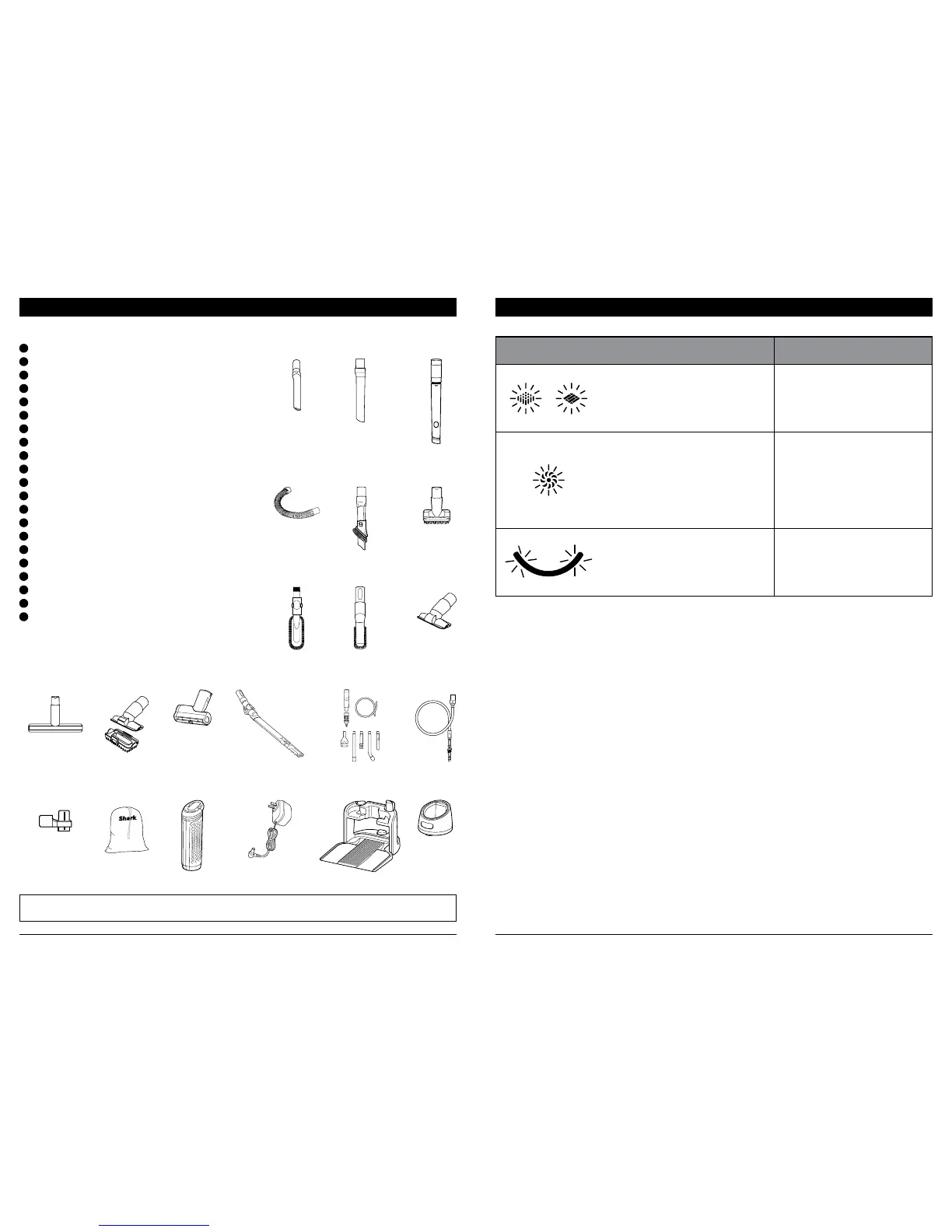
LIGHT INDICATOR WHAT IT MEANS
Floor and Carpet LEDs
flash together
Blockage detected. Turn o
unit and remove blockage.
BOOST LED flashes
Unit temperature is high.
Turn o vacuum. While
unit is cooling, look for
blockages and remove any
that are found. Filters may
also need to be cleaned. See
Maintenance section.
FIRST and THIRD BATTERY
INDICATOR LEDs alternate
flashing
Battery temperature is
not optimal, so charging is
temporarily paused. Leave
battery plugged in and
charging will resume soon.
NOTE: Not all accessories come with all units. Please see the enclosed Quick Start Guide for your unit's configuration.
To order additional accessories, visit sharkaccessories.com.
ADDITIONAL ACCESSORIES AVAILABLE ON SHARKACCESSORIES.COM
R
L
S
M
T
N
U
O
HG I
Q
K
P
J
E
B
D
A
F
C
A
8" Crevice Tool (255FLIH380)
B
12" Crevice Tool (248FLIH200)
C
18" Flexi Crevice Tool (1352FC200)
D
Flexible Hose (1356FC200)
E
Duster Crevice Tool (249FLIH200)
F
Dusting Brush (250FLIH200)
G
Multi-Angle Dusting Brush (1354FC200)
H
Anti-Allergen Dust Brush (233FLIH100)
I
Upholstery Tool (251FLIH200)
J
Wide Upholstery Tool (1355FC200)
K
Pet Multi-Tool (1353FC200)
L
Deep-Cleaning Motorized Pet Tool (49 6FFJ160)
M
MultiFLEX® Under-Appliance Wand (234FLIH100)
N
Home & Car Detail Kit (XHMCR380)
O
Precision Duster (XDETNH380)
P
Onboard Tool Clip (392FFJH380)
Q
Accessory Bag (XBGV300)
R
ION Power Core Battery (XBAT300)
S
ION Power Core Charger (XCRGA160)
T
Charge & Go Floor Dock (XCRGFD160)
U
ION Core Charging Cradle (XSCCRD160)



 To Next Page