
 Need help?
Do you have a question about the Shark Matrix RV2300AE and is the answer not in the manual?
Specific warning about laser safety for the robotic vacuum cleaner.
Explains how to use the CLEAN button for whole-home or spot cleaning.
Details on turning the robot on/off and sending it to the base.
How to enable or disable the Recharge & Resume feature.
Feature to return to base, recharge, and resume cleaning.
Steps to take when the robot's Wi-Fi connection is lost.
Steps to resolve issues with Wi-Fi connection loss for the robot.
Explanation of the AI Laser Navigation technology for mapping.
Details on targeted deep cleaning for specific areas or spots.
A chart detailing error codes and their corresponding solutions.
Contact information and resources for customer support.
Details on what parts and conditions are covered by the warranty.
Exclusions from the warranty coverage.
Instructions on how to obtain service and support for the product.
Steps to follow to start a warranty claim process.
Instructions for safely removing and recycling the lithium-ion battery.
 General
| Manufacturer | Shark |
|---|---|
| Model | RV2300AE |
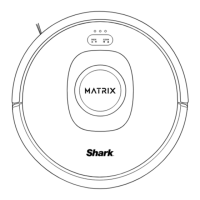
| Type | Robot Vacuum |
| Series | Matrix |
| Self-Emptying | Yes |
| Bagless | Yes |
| Smart Features | Yes |
| Battery Life | Up to 120 minutes |
| Filtration | HEPA |
| Color | Black |
| Battery Type | Lithium-ion |
| Run Time | Up to 120 minutes |
| Wi-Fi Enabled | Yes |
| Self-Charging | Yes |
| Auto-Adjust Cleaning Head | Yes |
| Multi-Surface Cleaning | Yes |
| Voice Assistant | Amazon Alexa, Google Assistant |



 To Next Page