33
Using external equipment
HDTV tuner
Component cable
(commercially
available)
Connecting an HDTV tuner
You can use the INPUT 3 terminal when connecting to an HDTV tuner and other audiovisual equipment.
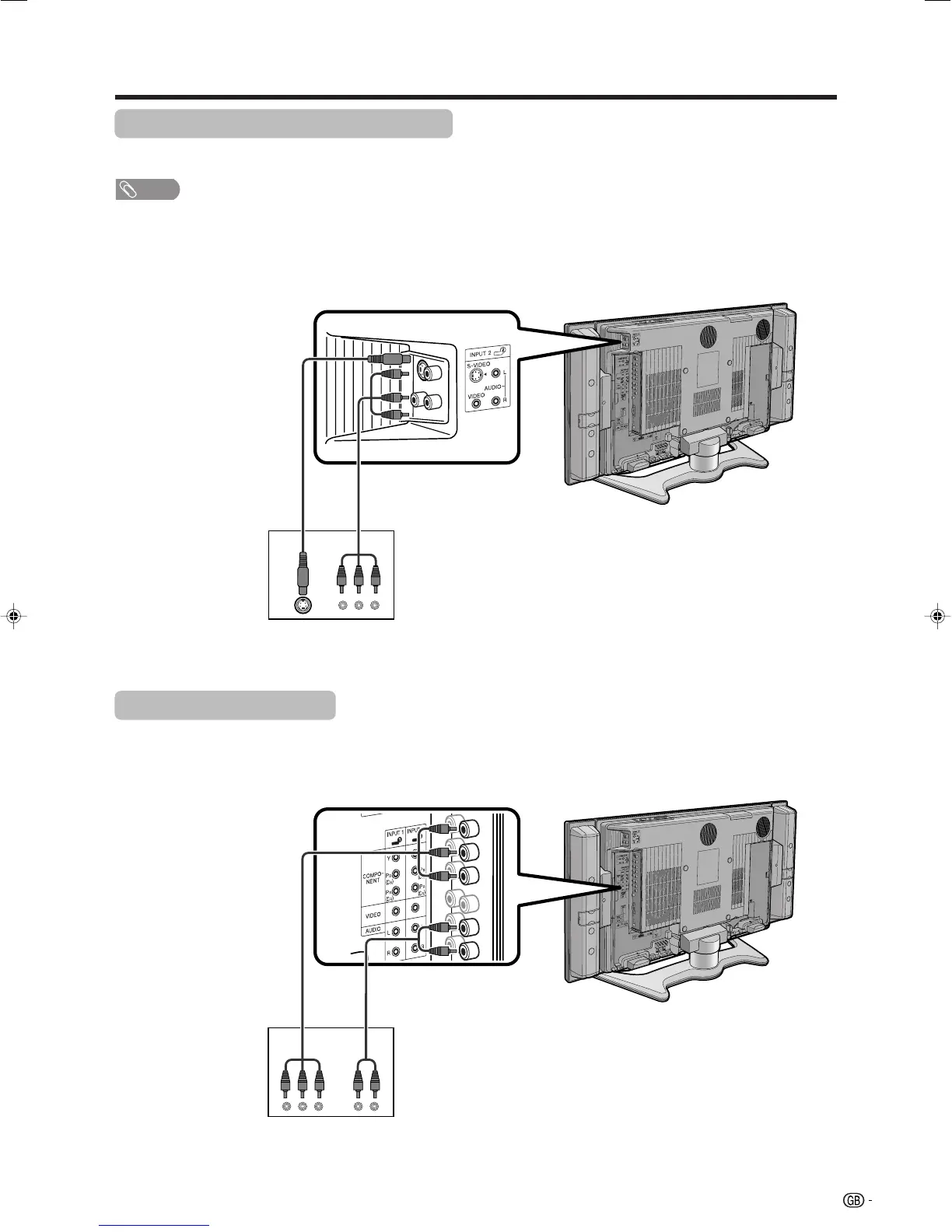
Game console/Camcorder
Composite cable
(commercially available)
S-video cable
(commercially
available)
Connecting a game console or camcorder
A game console, camcorder and some other audiovisual equipment are conveniently connected using the
INPUT 2 terminals.
NOTE
• The S-video terminal has priority over the video terminals.
• You can also connect the game console to INPUT 1 or 3 terminals to enjoy clearer picture.
To watch an image from this input terminal, you
need to select the input source (see page 31)
and the input signal type (see page 37).
To watch an image from this input terminal, you
need to select the input source (see page 31)
and the input signal type (see page 37).
When using component cable, select
“COMPONENT” for “Input select” in the menu.
Audio cable
(commercially available)
LC-32_37GA4X(E)-f 04.9.17, 7:50 AM33










 To Next Page