8
TV (rear view)
Setting the TV
Notes on setting location
• Avoid direct sunlight and place the TV in a well-ventilated location.
• Place the TV in a level location.
Preparation
Connecting the AC cord, antenna, and external equipment
to the TV
1
2
3
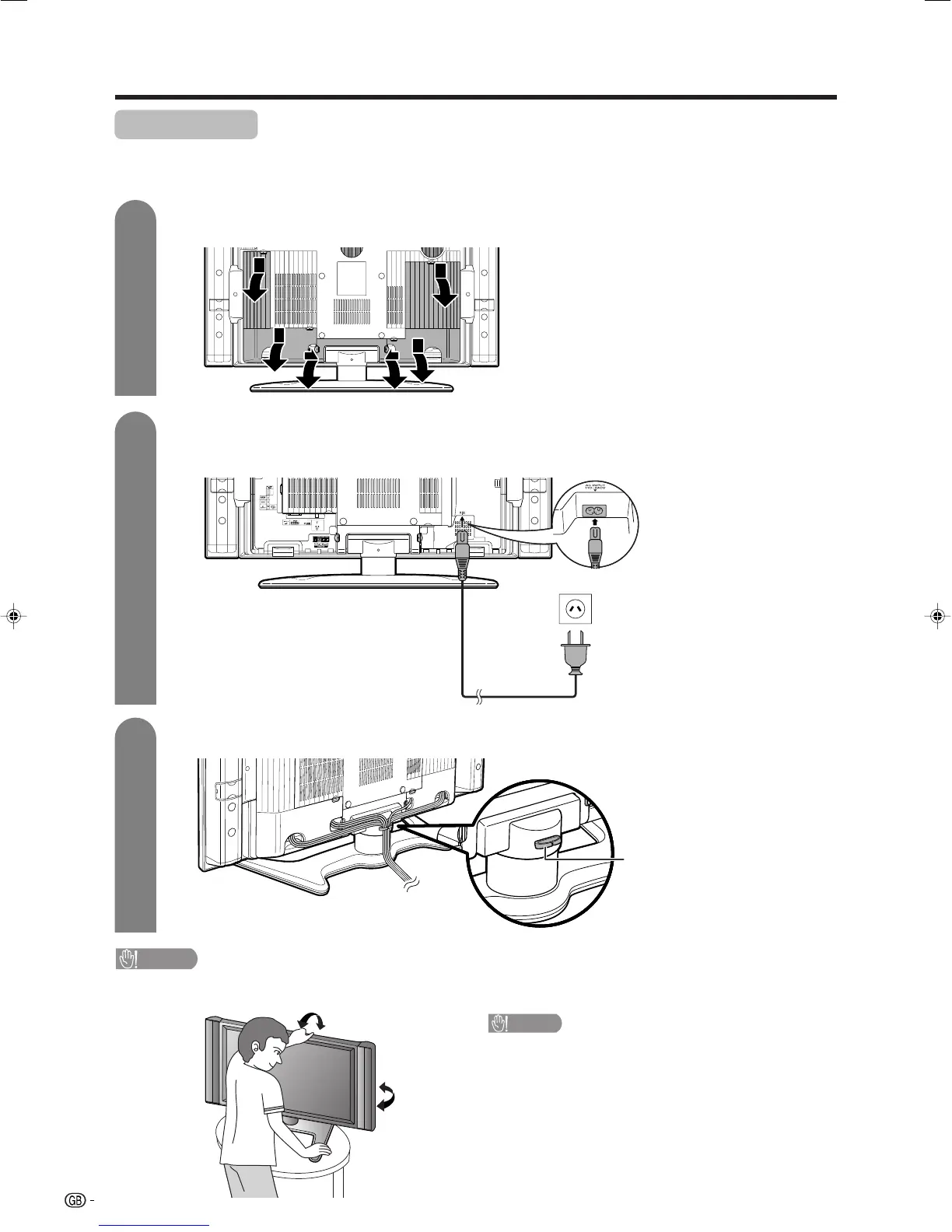
Removing the terminal cover
Bundling the cables and closing the terminal cover
CAUTION
• TO PREVENT RISK OF ELECTRIC SHOCK, DO NOT TOUCH UN-INSULATED PARTS OF ANY CABLES WITH THE
AC CORD CONNECTED.
Press down the hooks
to remove the cover
toward you.
AC cord
CAUTION
Adjust the screen with both hands. Put one
hand on the TV and tilt the screen while steady-
ing the stand with your other hand.
You can adjust the screen vertically up to 2 de-
grees forward or 6 degrees backward, or rotate 20
degrees horizontally.
See pages 9 and 32-35 for
connecting antennas and
external equipment, such
as VCR, DVD player and
PC.
Cable clamp
Insert the cable clamp in
the hole on the TV as
shown.
LC-32_37GA4X(E)-a 04.9.17, 7:41 AM8









 To Next Page