36
Useful adjustment settings
1
2
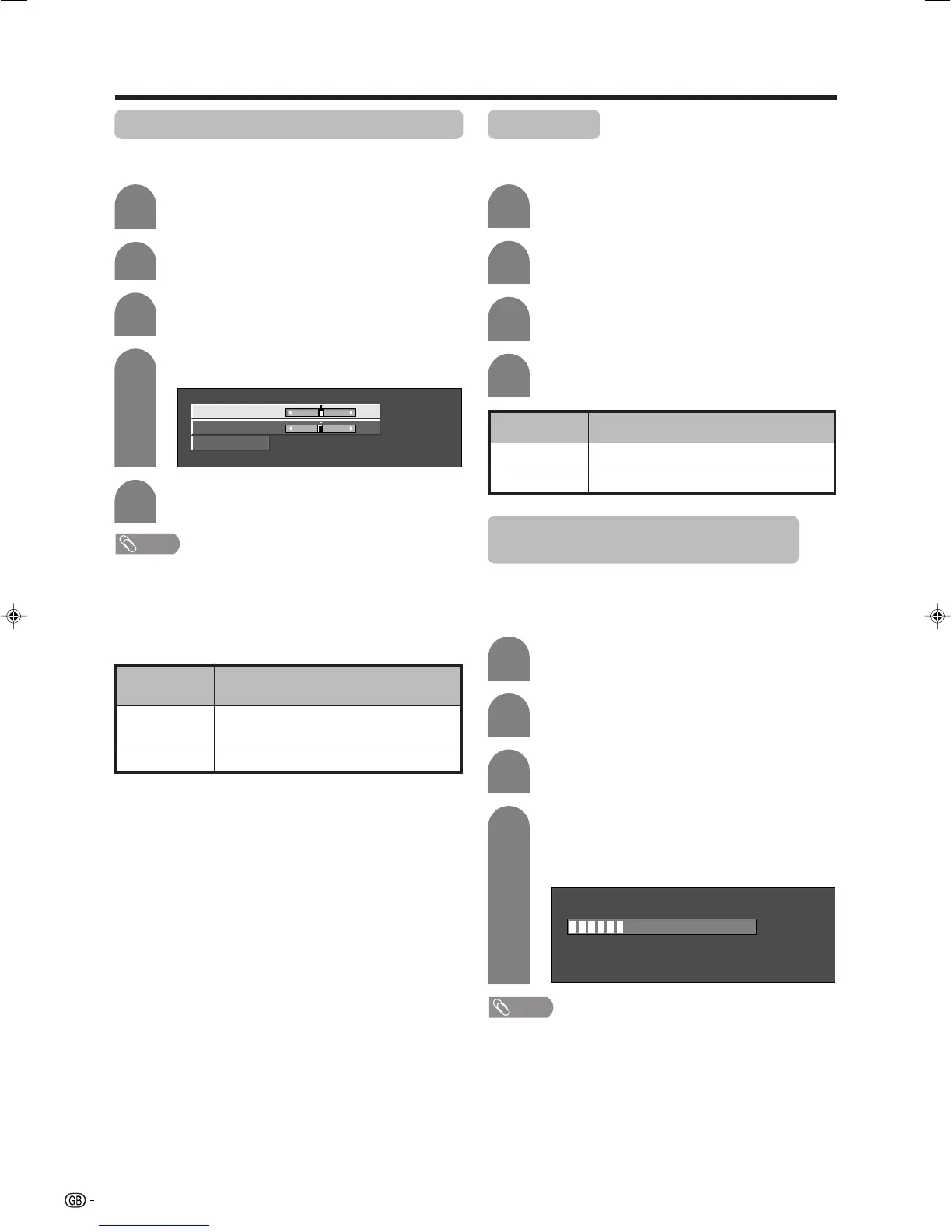
Image position (for TV/AV input mode)
For adjusting a picture’s horizontal and vertical
position.
Press MENU and the MENU screen displays.
Press c/d to select “Setup”.
Description
Centres the image by moving it to the left or
right.
Centres the image by moving it up or down.
Selected item
H-Pos.
V-Pos.
4
5
3
Press a/b to select “Position”, and then
press ENTER.
Press a/b to select “H-Pos.” or “V-Pos.”.
Reset
H-Pos. [0] –10 +10
V-Pos. [0] –20
+20
Press c/d to adjust the item to your desired
position.
NOTE
• For resetting all adjustment items to the factory preset
values, press a/b to select “Reset”, and then press
ENTER.
• Adjustments are stored separately according to input
source.
• This function is available for AV input mode and TV tuner
mode.
4
Press c/d to select “On”, and then press
ENTER.
Press MENU and the MENU screen displays.
Press c/d to select “Option”.
Press a/b to select “Audio Only”, and then
press ENTER.
1
2
3
Audio Only
When listening to music from a music programme, you
can set the display off and enjoy audio only.
Description
Audio is output without screen image.
Both screen images and audio are output.
Selected item
On
Off
1
2
Auto Sync. adjustment (PC input
mode only)
For automatically adjusting the PC image.
Press MENU and the MENU screen displays.
3
Press a/b to select “Auto Sync.”, and then
press ENTER.
Press c/d to select “Yes”, and then press
ENTER.
• Auto Sync. starts and “Adjusting the image”
displays.
NOTE
• When Auto Sync. is successful, “Auto Sync completed
successfully” displays. If not, Auto Sync. failed.
• Auto Sync. may fail even if “Auto Sync completed
successfully” displays.
• Auto Sync. is likely to succeed when an input PC image
has wide vertical stripes (ex. pattern with high contrast
stripes, or cross-hatched).
It may fail when an input PC image is solid (low contrast).
30%
4
Press c/d to select “Setup”.
• Setup menu displays.
Be sure to connect the PC to the TV and switch it on
before starting Auto Sync.
LC-32_37GA4X(E)-g 04.9.17, 7:51 AM36









 To Next Page