3-11
CHAPTER3
5
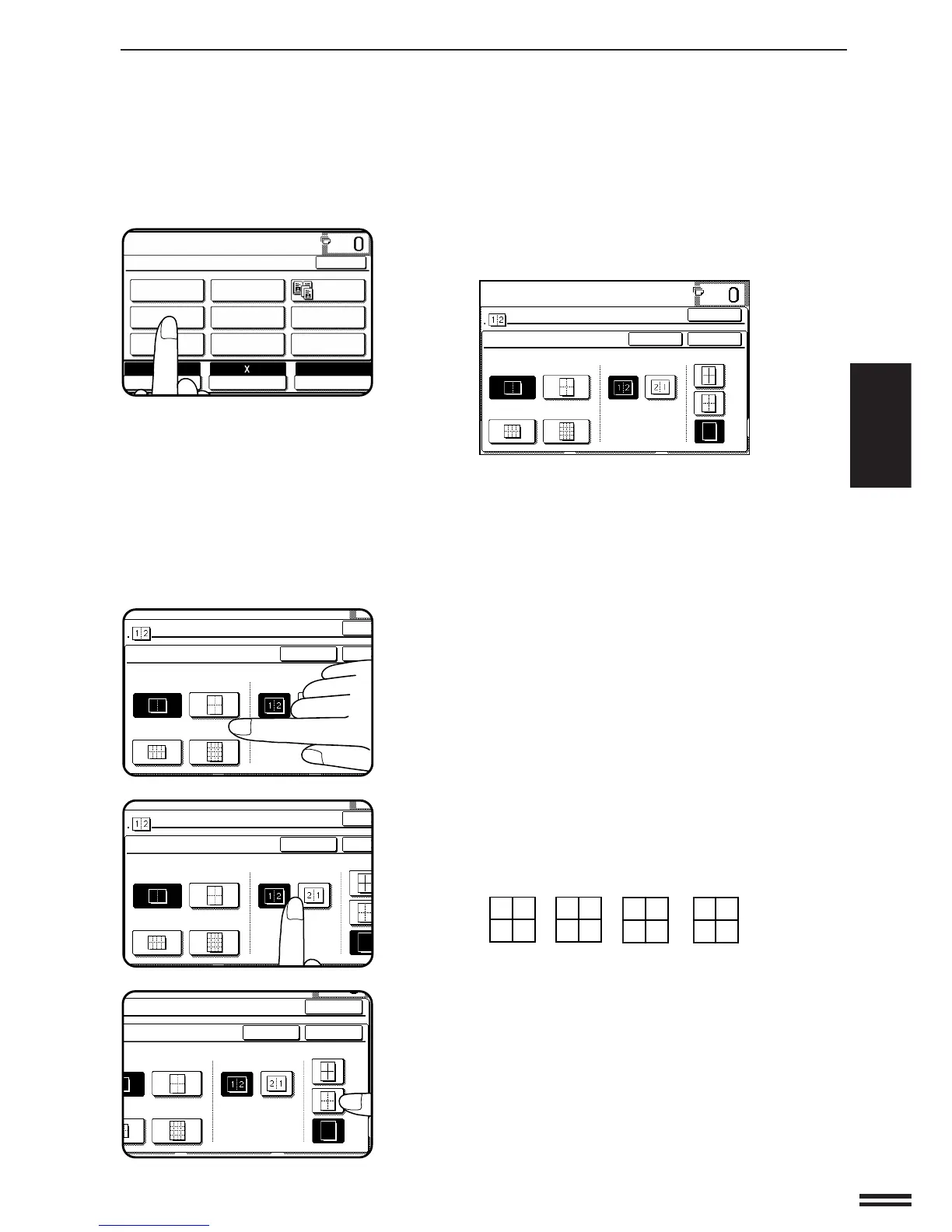
Press the “MULTI SHOT” key on the touch panel.
●
The function setting screen for MULTI SHOT will appear.
6
Select the number of originals to be included on one
sheet of copies.
●
Select “2in1”, “4in1”, “8in1” or “16in1” on the touch panel.
●
The copy ratio will be calculated automatically.
●
Portions of original images may not be copied depending on the
original and copy paper sizes and the number of images to be
copied onto a page.
●
Depending on the number of originals and the orientation of the
originals and copy paper, the image of the originals may be
rotated.
7
Select the layout of originals on the copy.
●
Select the order of originals which will be arranged on the copy.
●
For example, the following types are provided for “4in1”.
8
Select a type of border line.
●
Select the solid line, broken line or no border line.
SPECIAL FUNCTIONS Multi shot
MULTI SHOT
READY TO COPY.
MULTI SHOT
LAYOUT
CANCEL
OK
OK
BORDER LINE
2inl 4inl
8inl 16inl
12
34
13
24
31
42
1
3
2
4



 To Next Page