AR-M236/M276/M237/M277 SIMULATION 8 - 28
Operation/procedure
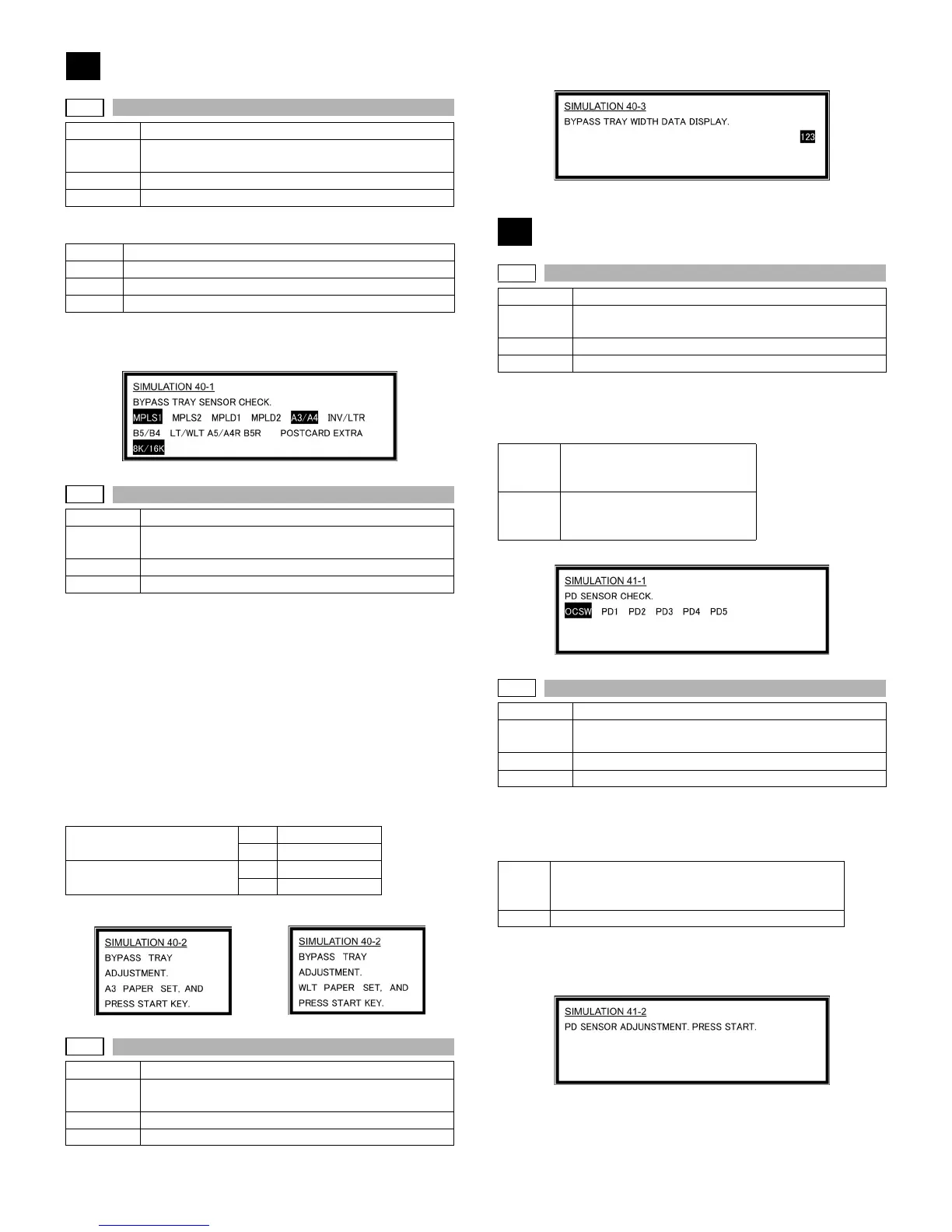
The active sensors and detectors are highlighted.
Width detection size of the manual feed tray (one of them is displayed.)
A4/A3, LT/WLT, B5/B4, INV/LTR, A5/A4R, B5R, POSTCARD, EXTRA,
8K/16K
Operation/procedure
The adjustment method is of the 4-point system. Set the guide to Max.
(A3/WLetter) position, A4R/Letter R position, A5R/Invoice R position,
and Min. position for adjustment.
1) Set A3/W Letter and fit the guide, then press the [START] key.
2) Set A4R/LetterR and fit the guide, then press the [START] key.
3) Set to A5R/INVOICE R and fit the guide, then press the [START]
key.
4) Narrow the guide at minimum, press the [START] key.
5) Set the paper detection width (+), and press the [START] key.
6) Set the paper detection width (–), and press the [START] key.
If "FAILED" is displayed in procedure 1), 2), 3), or 4), it is NG of adjust-
ment. Repeat the adjustment.
Operation/procedure
The AD conversion value of manual feed width detection is displayed.
Operation/procedure
The operation status of the sensors and detectors in the original size
detection section are displayed. The active sensors and detectors are
highlighted.
For AB series, PD1 to 5 is displayed, for inch series, PD1 to 4.
Operation/procedure
Place an A3 (or WLT) document on the document table, and press
[START] key with the OC cover open.
The adjustment is performed and the result is displayed.
The value in [ ] shows the threshold value. (Hexadecimal display)
For AB series, 1 to 5 is displayed, for inch series, 1 to 4.
During execution of the simulation, "EXECUTING" is displayed.
40
40-1
Purpose Operation test/check
Function
(Purpose)
Used to check the sensor of the machine manual feed
tray.
Section Paper feed
Item Operation
MPLS1
Manual tray length detection 1
MPLS2
Manual tray length detection 2
MPLD1
Manual feed paper length detection 1
MPLD2
Manual feed paper length detection 2
40-2
Purpose Adjustment
Function
(Purpose)
Used to adjust the manual paper feed tray paper width
detector detection level.
Section Paper feed
Item Operation
Middle position adjustment L Yes MID-L ADJ.ON
No MID-L ADJ.OFF
Middle position adjustment S Yes NID-S ADJ.ON
No MID-S ADJ.OFF
AB series Inch series
40-3
Purpose Adjustment
Function
(Purpose)
The AD conversion value of manual feed width
detection is displayed.
Section Paper feed
Item Operation
41
41-1
Purpose Operation test/check
Function
(Purpose)
Used to check the document size detection photo
sensor.
Section Others
Item Operation
OCSW Original cover state
Open: Highlighted display
Close: Normal display
PD1 to 5 Original sensor status
Without original: Normal display
With original: Highlighted display
41-2
Purpose Adjustment
Function
(Purpose)
Used to adjust the detection level of the document size
photo sensor.
Section Others
Item Operation
OCSW Original cover state
Open: Highlighted display
Close: Normal display
1 to 5 PD sensor detection level (Hexadecimal display)












 To Next Page