AR-M236/M276/M237/M277 SIMULATION 8 - 35
Operation/procedure
1. Touch the item to be adjusted.
The adjustment item and the current set value are highlighted.
2. Press the [START] key.
The display is shifted to the copy menu.
3. Select the paper feed tray and the print density.
Set the exposure level with the 10-key.
4. Press the [START] key.
Copying is started.
(Auto adjustment)
Note: When this simulation is canceled, the display returns to the initial
menu but the machine is not reset.
Operation/procedure
1. Touch the item to be adjusted.
The currently set value is highlighted beside the adjustment item.
2. Press the [START] key.
The display is shifted to the adjustment value entry menu.
3. Enter the adjustment value with the 10-key, and press the [START]
key.
When the [CUSTOM SETTINGS] key is pressed, the display returns to
the original state (adjustment item selection menu).
* Auto exposure mode
• When SIM 26-6 (Destination setup) is changed from EX Japan to
Japan, the setup value becomes 1 (Default: Japan). If, on the con-
trary, it is changed from Japan to EX Japan, the set value becomes
2 (Default: EX Japan)
• If the auto exposure mode setup value is changed, the setup value
of SIM 46-30 (AE limit setup) is reset to the default value.
Operation/procedure
1. Touch the item to be adjusted.
The adjustment item and the currently set value are highlighted.
2. Enter the set value with the 10-key.
Operation/procedure
1. Touch the item to be adjusted.
The adjustment item and the currently set value are highlighted.
2. Enter the set value with the 10-key.
If SIM 26-6 (Destination setup) and SIM46-19 (Auto exposure mode)
are changed, this setup is also changed to the default value accord-
ingly.
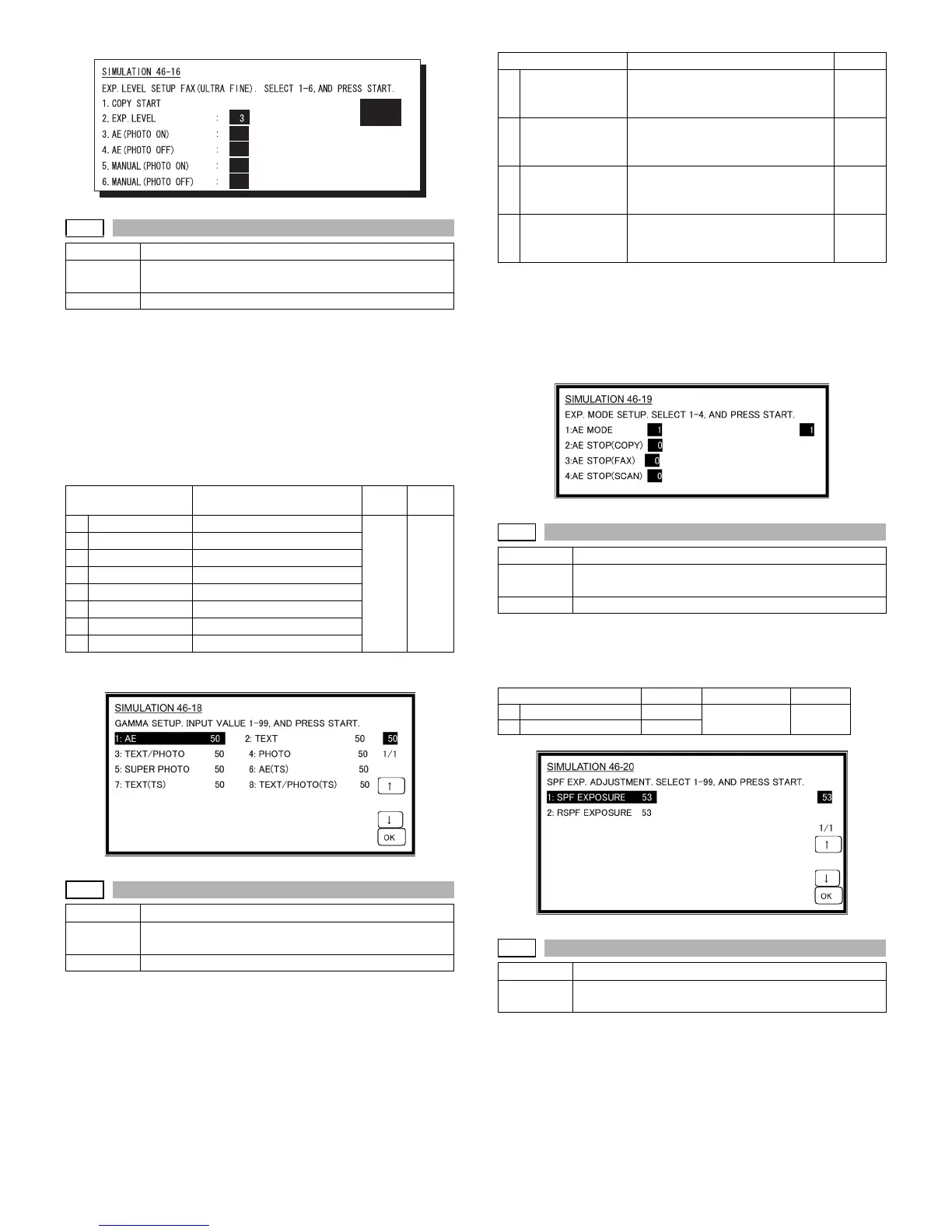
46-18
Purpose Adjustment
Function
(Purpose)
Used to adjust inclination for each exposure mode.
Item Picture quality
Item Content
Setting
range
Default
1
AE
AE 1-99 50
2
TEXT
Character Level 3.0
3
TEXT/PHOTO
Character/Photo Level 3.0
4
PHOTO
Photo Level 3.0
5
SUPER PHOTO
Super photo Level 3.0
6
AE(TS)
AE(TS)
7
TEXT(TS)
Character (TS) Level 3.0
8
TEXT/PHOTO(TS)
Character/Photo (TS) Level 3.0
46-19
Purpose Adjustment
Function
(Purpose)
Used to set the control method of the exposure mode.
Item Picture quality
50
50
50
50
1
Item Content Default
1
AE MODE
(1:EXPOSURE
2:TONER)
Auto exposure mode*
(1: Priority on Image quality,
2: Priority on toner consumption)
2
2
AE STOP(COPY)
(0:FIXED
1:REAL TIME)
Auto exposure STOP mode
(COPY)
(0: Fixed, 1: Real-time)
0
3
AE STOP(FAX)
(0:FIXED
1:REAL TIME)
Auto exposure STOP mode (FAX)
(0: Fixed, 1: Real-time)
0
4
AE STOP(SCAN)
(0:FIXED
1:REAL TIME)
Auto exposure STOP mode
(SCANNER)
(0: Fixed, 1: Real-time)
0
46-20
Purpose Adjustment
Function
(Purpose)
Used to set the exposure correction value of SPF/
RSPF for OC exposure.
Item Picture quality
Item Content Setting range Default
1
SPF EXPOSURE
SPF 1-99 53
2
RSPF EXPOSURE
RSPF
46-30
Purpose Setting
Function
(Purpose)
Used to set the AE and the limit value in AE (Toner
save).












 To Next Page