56
TRANSMISSION USING F-CODES
PROCEDURE FOR F-CODE POLLING
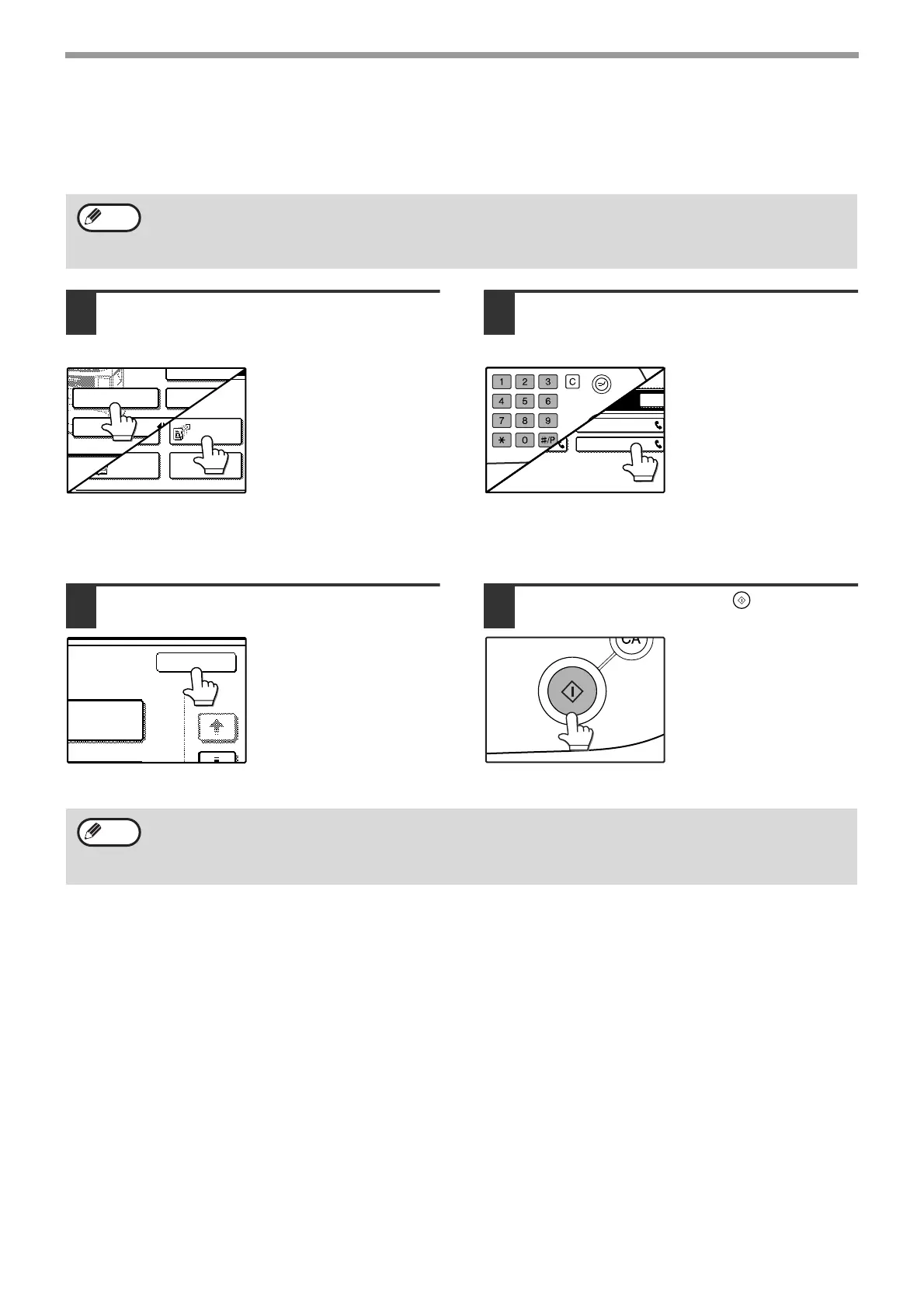
Make sure that a document has not been placed in the RSPF or on the document glass, and then follow the steps
below.
1
In fax mode, touch the [SPECIAL
MODES] key and then the [POLLING]
key.
If the address book
screen appears, touch
the [CONDITION
SETTINGS] key to
display the condition
settings screen. (p.7)
The [POLLING] key is
highlighted and the
polling icon is displayed.
To cancel the polling selection, press the [POLLING]
key once again so that it is no longer highlighted.
2
Touch the [OK] key.
You will return to the
condition settings screen.
3
Enter the fax number, sub-address,
and passcode of the other fax
machine.
To use a rapid key, touch
the [ADDRESS BOOK]
key to display the
address book screen.
See "ENTERING A
SUB-ADDRESS AND
PASSCODE FOR A
MEMORY BOX IN THE
OTHER MACHINE" on
page 53 for the procedure for entering sub-addresses
and passcodes.
4
Press the [START] key ( ).
"JOB STORED." appears
on the screen.
After communicating with
the other machine, your
machine prints the
received document.
• You must know the sub-address (SEP) and passcode (PWD) of the other machine's F-code polling memory
box.
• Serial polling (selecting multiple fax machines to be polled using a group key or by touching the [NEXT
ADDRESS] key) is not possible with F-code polling.
Note
POLLING
PROGRAM
DUAL PAGE
SCAN
SUB ADDRESS
ADDRESS REVIEW
SPECIAL MODES
DIRECT TX
CORPO. TPS
HARP CORPORATION SHARP GROUP
P
To cancel the operation
Press the [JOB STATUS] key and then cancel the operation as explained on page 24.
Only one F-code polling operation with a timer setting (p.30) can be stored.
Note








 To Next Page