76
PROGRAMMING
6
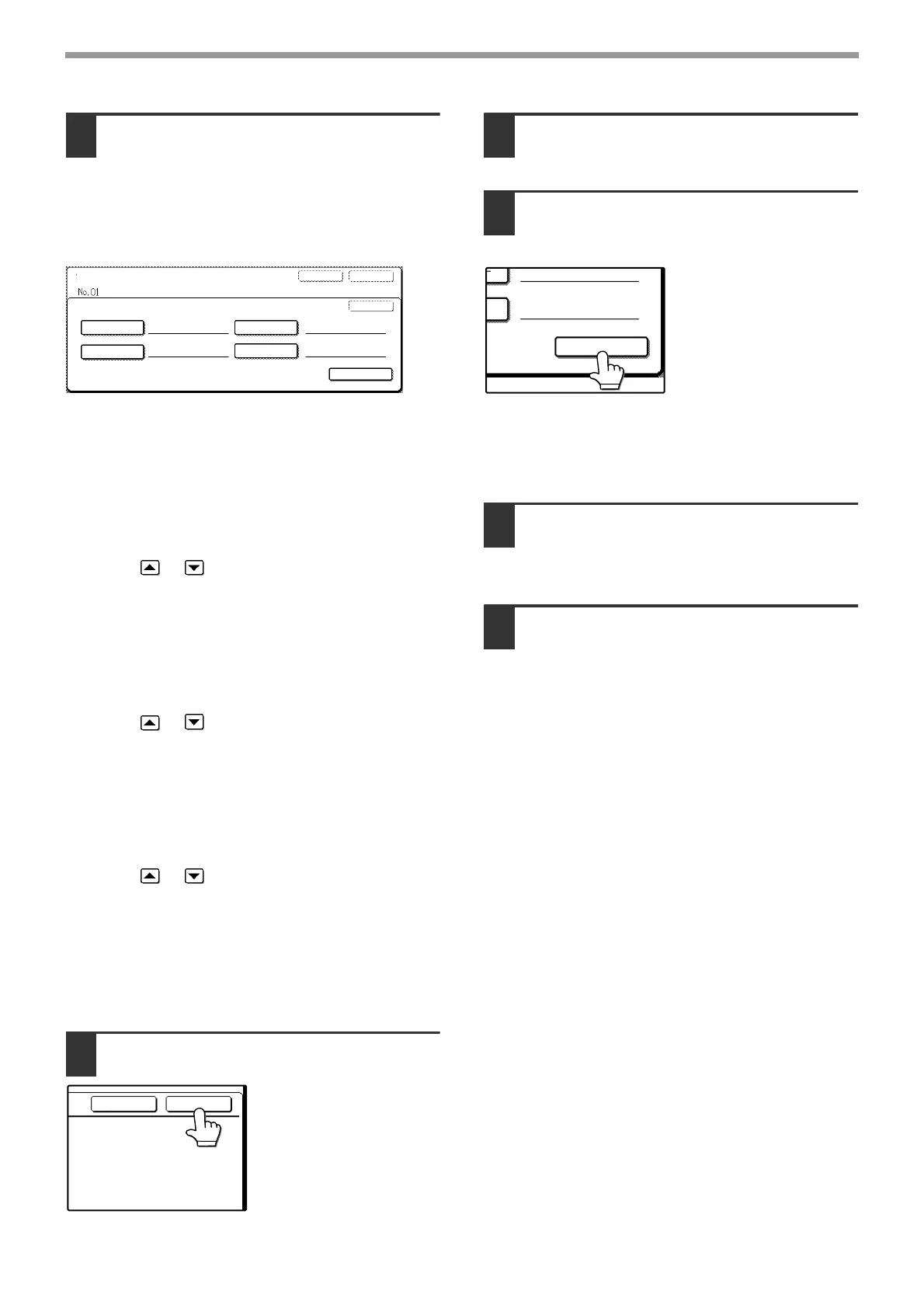
Enter the numbers of the end
receiving machines.
Touch a key and then enter the number of an end
receiving machine as explained below.
After entering a number, touch the [NEXT
ADDRESS] key to enter the number of the next
end receiving machine.
[DIAL] key
Enter the fax number of the receiving machine with the
numeric keys.
[RAPID] key
Touch this key to enter a rapid number from 01 to 99
that is stored in the relay machine. You can also enter
a 3-digit rapid number from 001 to 099 (enter the lower
two digits of the number).*
Touch the or key to enter the number.
Continuing to touch the key makes the number change
quickly.
[SPEED] key
Touch this key to enter a speed dial number from 00 to
99 that is stored in the relay machine. You can also
enter a 3-digit rapid number from 100 to 199 (enter the
lower two digits of the number).*
Touch the or key to enter the number.
Continuing to touch the key makes the number change
quickly.
[GROUP] key
Touch this key to enter a group key number from 01 to
99 that is stored in the relay machine.
You can also enter a 3-digit rapid number from 201 to
299 (enter the lower two digits of the number).*
Touch the or key to enter the number.
Continuing to touch the key makes the number change
quickly.
* The numbers entered will vary depending on the
model used for the relay machine. For more
information, consult your SHARP service center.
(Also see the operation manual for copier.)
7
Touch the [OK] key.
The screen for entering
the numbers of the end
receiving machines
appears.
8
Repeat steps 6 and 7 until all end
receiving machines are entered.
9
To check the entered numbers of the
end receiving machines, touch the
[ADDRESS REVIEW] key.
A list of the entered end
receiving machines is
displayed.
You can delete a
machine by touching it.
When a message
appears asking if you
want to delete the
destination, touch the
[YES] key.
Touch each tab at the bottom of the list to show the
numbers on that tab.
10
Touch the [OK] key.
The destination/relay group storing screen
appears.
11
If you are finished storing relay
groups, touch the [EXIT] key.
If you wish to store another relay
group, touch the [NEXT] key.
If you touch the [EXIT] key, you will return to the
screen of step 4 on page 66.
If you touch the [NEXT] key, the screen for
storing a new relay group appears.
DIRECT ADDRESS / RELAY GROUP
NEXT
EXIT
RECIPIENT
REC.
REC.
REC.
REC.
OK
DIAL
SPEED
RAPID
GROUP
ADDRESS REVIEW
CANCEL
OK








 To Next Page