GB
18
Preparations Before Using the Product
Preparing to Watch a VCR or a DVD
1 Turn on the TV and switch the TV channel to the external
“VIDEO” or “AV” channel connected to the DVD/VCR shared
output jacks.
2 Press OPERATE.
• The product is turned on.
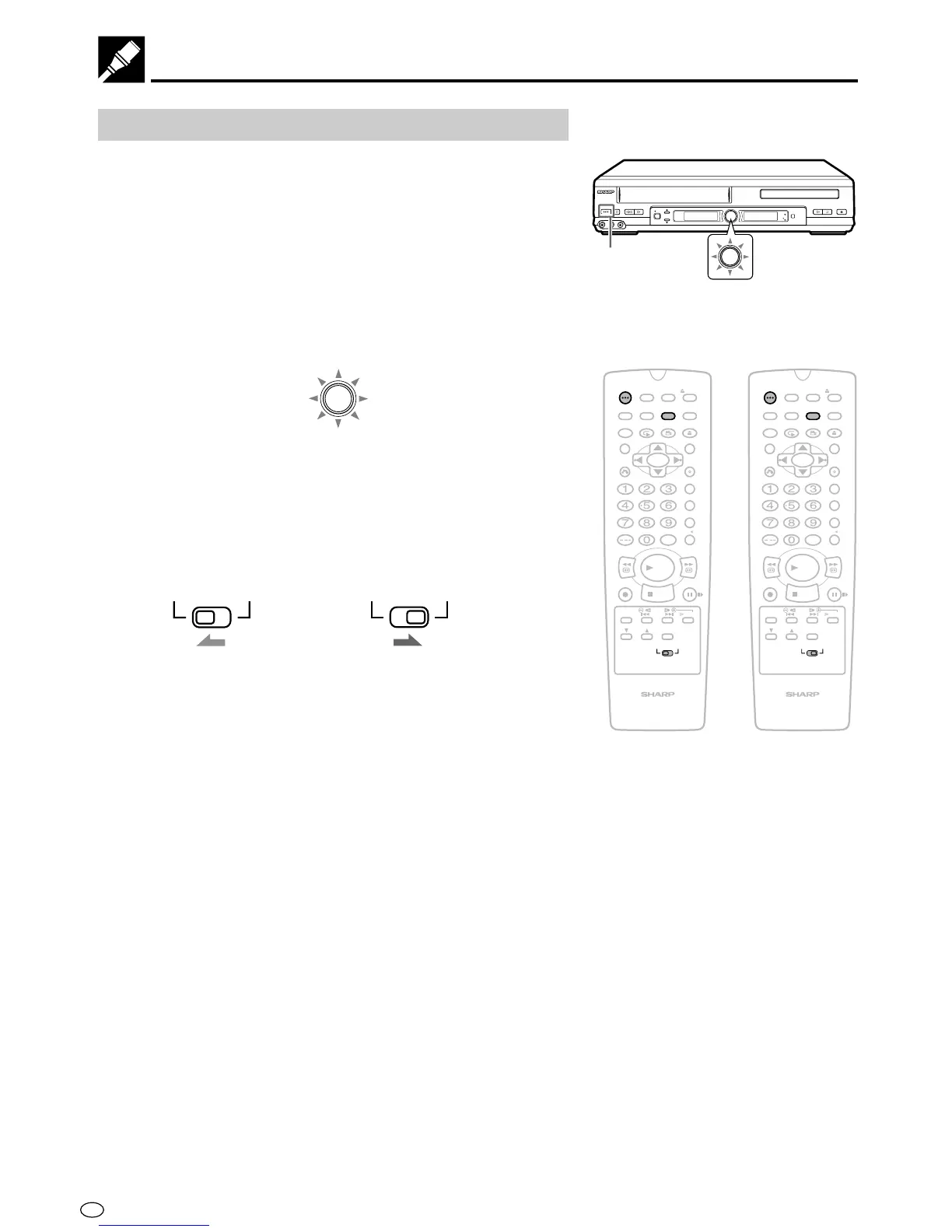
3 Press VCR/DVD SELECTOR on the remote control to switch to
the “VCR” mode or “DVD” mode.
• The VCR/DVD SELECTOR on the product lights up in orange
for “VCR” or green for “DVD”.
VCR/DVD
SELECTOR
• Each time VCR/DVD SELECTOR is pressed, the mode
changes between “VCR” mode and “DVD” mode.
• The mode can be switched by pressing the VCR/DVD
SELECTOR on the product.
4 Move the VCR/DVD CHANGE Switch on the Remote to either
“VCR” or “DVD”.
VCR DVD
VCR DVD
OPERATE
PLAY/×2
AV 2 IN
VIDEO
L
(
MONO
)
-
AUDIO
-
R
REC
CH
VCR/DVD
SELECTOR
/
EJECT/STOP
REW
TIMER
VCR
DVD
PLAY STOP
OPEN/CLOSE
OPERATE
VCR/DVD
SELECTOR
VCR/DVD
SELECTOR
The VCR functions on
the Remote will now
take priority.
The DVD functions on
the Remote will now
take priority.
/
PLAY
STOP
OPEN/
CLOSE
OPERATE
VCR/ DVD
SELECTOR
VCR MENU
DVD SETUP
TAPE
SPEED
ON
SCREEN
TIMER
ON/OFF
TITLE
DVD MENU
DISPLAY
EJECT
FUNCTION
CONTROL
PROG/
REPEAT
ANGLE
CLEAR
RETURN
REV FWD
SET
ENTER
ZERO BACK
SKIP SEARCH
VCR DVDAM/PM
INPUT SELECT
PAUSE/STILL
REC
VCR/DVD COMBINATION
SLOW
CH
VCR DVD
SKIP
DPSS
AUDIO
OUTPUT
/
PLAY
STOP
OPEN/
CLOSE
OPERATE
VCR/ DVD
SELECTOR
VCR MENU
DVD SETUP
TAPE
SPEED
ON
SCREEN
TIMER
ON/OFF
TITLE
DVD MENU
DISPLAY
EJECT
FUNCTION
CONTROL
PROG/
REPEAT
ANGLE
CLEAR
RETURN
REV FWD
SET
ENTER
ZERO BACK
SKIP SEARCH
VCR DVDAM/PM
INPUT SELECT
PAUSE/STILL
REC
VCR/DVD COMBINATION
SLOW
CH
VCR DVD
SKIP
DPSS
AUDIO
OUTPUT



 To Next Page