GB
30
VCR Setup
/
PLAY
STOP
OPEN/
CLOSE
OPERATE
VCR/DVD
SELECTOR
VCR MENU
DVD SETUP
TAPE
SPEED
ON
SCREEN
TIMER
ON/OFF
TITLE
DVD MENU
DISPLAY
EJECT
FUNCTION
CONTROL
PROG/
REPEAT
CLEAR
RETURN
REV FWD
SET
ENTER
ZERO BACK
SKIP SEARCH
VCR DVDAM/PM
INPUT SELECT
PAUSE/STILL
REC
VCR/DVD COMBINATION
SLOW
CH
VCR DVD
SKIP
DPSS
AUDIO
OUTPUT
ANGLE
PROG
DV- NC70
DV- NC70X
G-CODE
DV- NC70W
Manual Tuning
Preparation
• Press OPERATE. Then move the VCR/DVD CHANGE Switch to
VCR.
• Ensure the Video channel is selected on the TV.
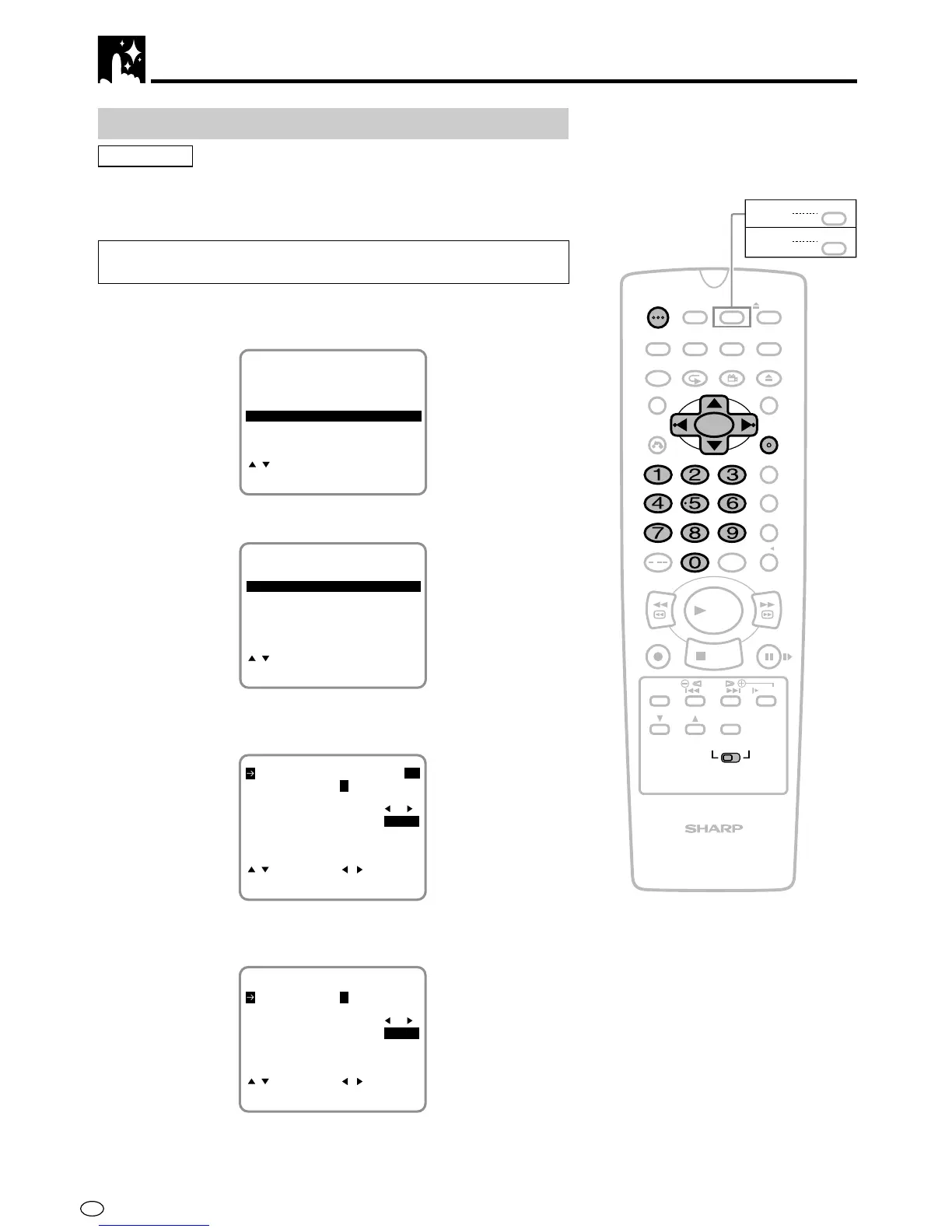
Example: Tuning Channel Position 48 to Broadcast TV Channel E7
(VCR CHANNEL 007 for system I area.)
1 Press VCR MENU. Press ' / " to select “CHANNEL PRESET”
and press SET to confirm.
MODE
MENU
SET:ENTER MENU:EXIT
CHANNEL PRESET
:SELECT
CLOCK
LANGUAGE
TIMER
G-CODE
2 Press ' / " to select “MANUAL” and press SET to confirm.
AUTO
CHANNEL PRESET
MANUAL
SET:ENTER MENU:EXIT
:SELECT
3 Select the preset channel position number 48 with the number
buttons (0 to 9) or
\\
\\
\ /
||
||
| and press ".
FINE TUNING
SKIP ON OFF
CHANNEL 002
:SELECT :CHANGE
SET:ENTER MENU:EXIT
SYSTEM I B/G D/K M
PRESET CH 48
4 Press
\\
\\
\ /
| |
| |
| to select the “SYSTEM” you desire and press ".
(For DV-NC-70X, only B/G and D/K will appear on the screen.)
FINE TUNING
SKIP ON OFF
CHANNEL 002
:SELECT :CHANGE
SET:ENTER MENU:EXIT
SYSTEM I B/G D/K M
PRESET CH 48



 To Next Page