EasyManua.ls Logo

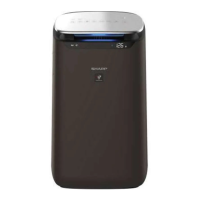
Sharp FP-J80Y - User Manual

Sharp FP-J80Y
32 pages
Go to English
Print Icon
To Next Page IconTo Next Page
Loading...
“Plasmacluster” and “Device of a cluster of grapes” are
trademarks of Sharp Corporation.
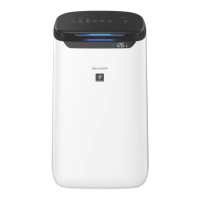
FP-J80Y
FP-J60Y
PANDUAN
PENGOPERASIAN
AIR PURIFIER
OPERATION MANUAL
INDONESIAENGLISH
* The number in this technology mark indicates an
approximate number of ions supplied into air of 1
cm
3
, which is measured around the center of a room
applicable oor area (at 1.2 m height above the oor)
when the product is placed close to a wall at the MED
mode setting.

Other manuals for Sharp FP-J80Y

Questions and Answers

  • L
    littlesoniaSep 8, 2025
    Why Sharp Air Cleaner display is off?
    • C
      coxwendySep 8, 2025
      If the front display of your Sharp Air Cleaner is turned off, it may be because the Light control is set to "Auto", and the light automatically turns off when the room is dark. Also, if the Light control is set to "Turn off", the light is always off. If you do not want the light to be off, set Light control to the "Darker" setting.
  • V
    Victoria TuckerSep 9, 2025
    Why does Sharp Air Cleaner change color frequently?
    • B
      Brandon GardnerSep 10, 2025
      The Cleanliness Monitor on your Sharp Air Cleaner automatically changes color when the dust(sensitive) sensor and odor sensor detect impurities. If you are concerned about the change, you can change sensor sensitivity.
  • C
    christophermerrittSep 12, 2025
    What to do if Sharp FP-J80Y Air Cleaner doesn't detect smoke?
    • K
      Keith AbbottSep 12, 2025
      If your Sharp Air Cleaner doesn't operate when cigarette smoke is in the air, ensure the Main Unit is in a location where the sensors can detect cigarette smoke. Also, check if the dust(sensitive) sensor openings are blocked or clogged and clean the sensor filter or the back panel if needed.
  • G
    Gregory ShortSep 13, 2025
    Why Sharp FP-J80Y display is different?
    • S
      Stephanie KingSep 13, 2025
      Outdoor and indoor environments, as well as the home environment (the volume of traffic nearby, number of stories in home, etc.) may cause a reading on your Sharp Air Cleaner that differs from weather reports or other devices. There can also be a difference in the level within the same room.
  • C
    Cynthia HendersonSep 15, 2025
    Why does my Sharp FP-J80Y make clicking noises?
    • K
      Katherine VargasSep 15, 2025
      The main unit of your Sharp Air Cleaner may make clicking or ticking sounds when it is generating ions.
  • C
    Courtney EdwardsSep 18, 2025
    What does quickly flashing error display mean for Sharp FP-J80Y?
    • E
      elizabeth82Sep 18, 2025
      When the Sharp Air Cleaner displays a quickly flashing error, it could mean that the communication between the SHARP server and the air purifier is not available, the concentration of Plasmacluster ion is descending, or the Plasmacluster Ion Generating Unit may not be inserted properly. You can also try unplugging the Main Unit, waiting one minute, and then plugging the Main Unit in again.

Summary

IMPORTANT SAFETY INSTRUCTIONS

INSTALLATION GUIDELINES

FILTER GUIDELINES

Guidance on following the manual for proper filter care and maintenance.

PART NAMES

OPERATION

START;STOP

How to turn the air purifier on and off.

OPERATING MODES SELECTION

How to select and use various operational modes like Auto, Anti Dust, Sleep, Pollen, Low, Med, Max.

PLASMACLUSTER FUNCTIONS

How to use Plasmacluster Spot Mode and turn the function on/off.

TIMER AND SETTINGS

How to set timers, lock the panel, and select display information.

PREPARATION AND INSTALLATION

Instructions for preparing the unit and installing the filters.

CARE AND MAINTENANCE

MAIN UNIT; BACK PANEL CARE

How to clean the exterior and back panel of the air purifier.

HEPA FILTER; DEODORIZING FILTER CARE

Instructions for cleaning the HEPA and Deodorizing filters.

PLASMACLUSTER ION GENERATING UNIT CLEANING

How to clean the Plasmacluster ion generating unit.

REPLACEMENT

HEPA FILTER; DEODORIZING FILTER REPLACEMENT

Information on filter lifespan, replacement indicators, and filter models.

PLASMACLUSTER ION GENERATING UNIT REPLACEMENT

Details on unit lifespan, replacement indicator, and model information.

TROUBLESHOOTING

COMMON ISSUES AND SOLUTIONS

Addresses odor, cleanliness monitor, clicking sounds, and operating issues.

DISPLAY AND ERROR MESSAGES

Explains display discrepancies and error codes for troubleshooting.

SPECIFICATIONS

MODEL SPECIFIC DATA

Provides detailed technical specifications for FP-J80Y and FP-J60Y models.

POWER CONSUMPTION

Details on rated power, standby power, and energy conservation.

Sharp FP-J80Y Specifications

General IconGeneral
BrandSharp
ModelFP-J80Y
CategoryAir Cleaner
LanguageEnglish

Related product manuals