23
LC-30HV4E
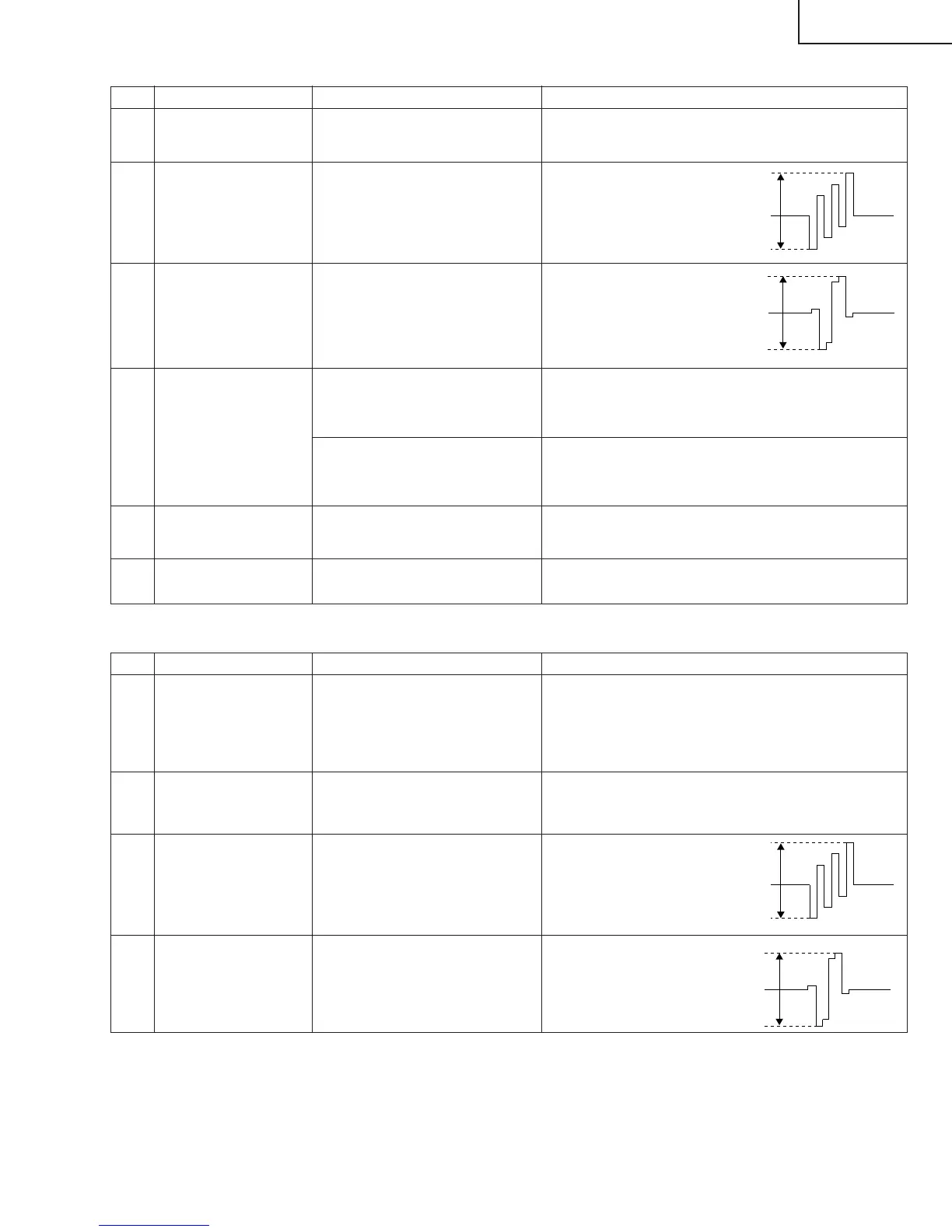
(4) SECAM signal adjustment
1 Setup 1. Set colour system to SECAM.
2. Select SECAM source.
100% colour bar signal including 100% white, such
as split field colour bar.
Adjustment items Adjustment conditions Adjustment procedures
2 MAIN SECAM Y
LEVEL adjustment
Adjust pin (1) of P801 to 0.70 ±0.025 Vp-p.
3 MAIN SECAM COLOR
GAIN adjustment
Adjust pin (3) of P801 to
0.53 ±0.025 Vp-p.
4 MAIN SECAM Cr
LEVEL adjustment
Adjust pin (5) of P801 to
0.53 ±0.025 Vp-p.
0.53V
0.53V
1 MAIN PAL Y LEVEL
adjustment
Adjust pin (1) of P801 to 0.70 ±0.025 Vp-p.
2 MAIN PAL COLOR
GAIN adjustment
Adjust pin (3) of P801 to
0.53 ±0.025 Vp-p.
3 MAIN PAL Cr LEVEL
adjustment
Adjust pin (5) of P801 to
0.53 ±0.025 Vp-p.
4 MAIN CONTRAST
adjustment
Adjust the output (TP815) of IC810 to have 0.90±0.025
Vp-p from the pedestal level.
Press the DUAL screen button. Select the special DUAL screen settings for adjustment
(so that the same video source is reflected on MAIN/
SUB).
5 SUB PAL Y adjustment Adjust TB1274_SUB output (TP806) to
1.5 ±0.05 Vp-p.
0.53V
0.53V
(3) PAL signal adjustment
6 SUB PAL COLOR
GAIN adjustment
Adjust TB1274_SUB output (TP805) to
1.13 ±0.05 Vp-p.
Adjustment items Adjustment conditions Adjustment procedures


 To Next Page