LC-32/37A33T
2 – 3
Preparation
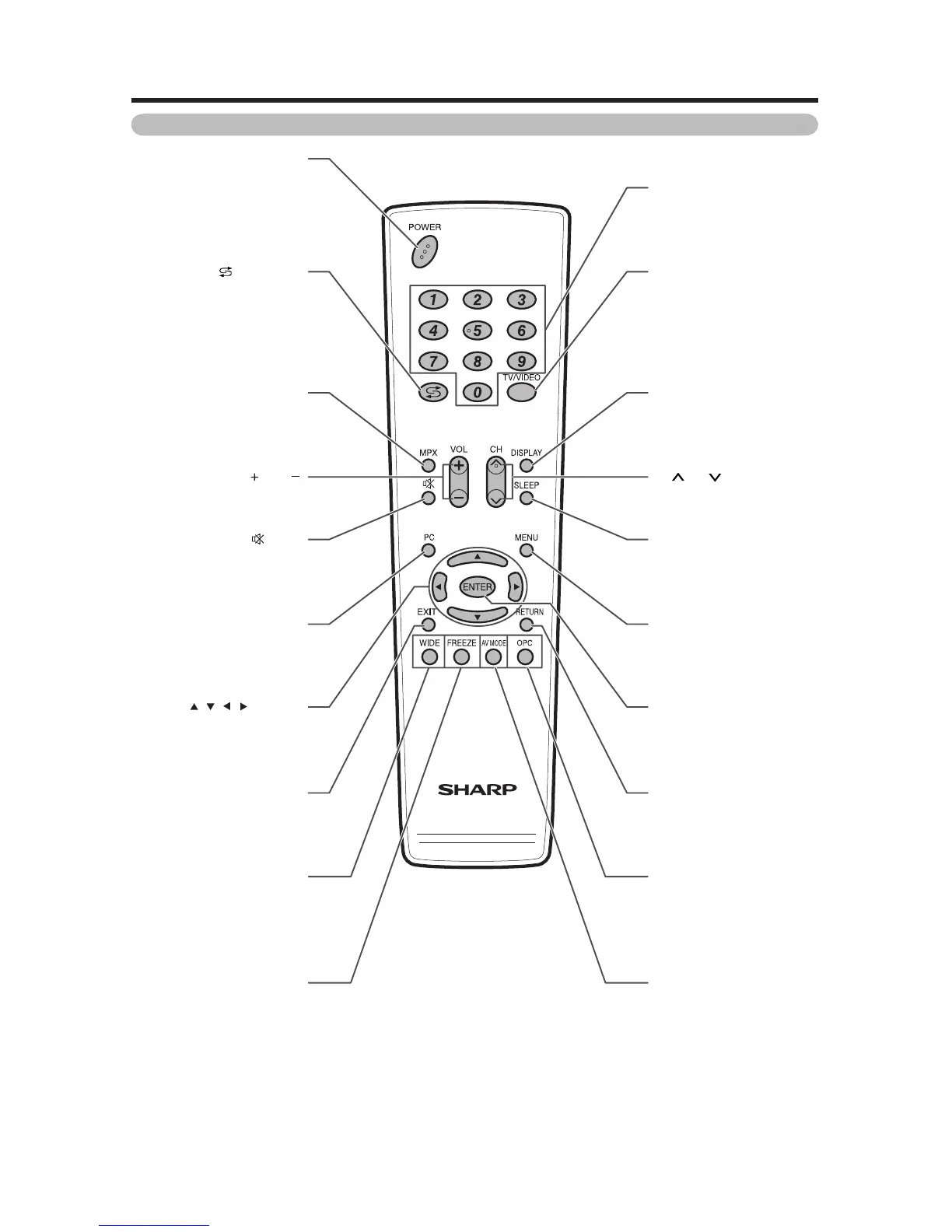
Remote control unit
POWER (STANDBY/ON)
To switch the power on and off.
(Flashback)
Press to return to the previous
selected channel or external
input mode.
MPX
Select the sound
multiplex mode.
VOL /VOL
Set the volume.
(Mute)
Mute the sound.
PC
Directly select the
INPUT 5 terminal.
/ / / (Cursor)
Select a desired item on the
setting screen.
EXIT
Return to the default screen.
WIDE
Change the wide image mode.
FREEZE
Freeze a motion picture
on the screen.
0
_
9
Set the channel.
TV/VIDEO (INPUT SOURCE)
Select an input source. (TV,
INPUT 1, INPUT 2, INPUT 3,
INPUT 4, INPUT 5 (PC))
DISPLAY
Display the channel or input
information.
CH /CH
TV input mode: Select the
channel.
SLEEP
Set the Sleep timer.
MENU
Display the menu screen.
ENTER
Execute a command.
RETURN
MENU mode: Return to the
previous menu screen.
OPC
To switch the Optical Picture
Control on and off.
AV MODE
Select an audio and video
setting : AV MODE
(STANDARD, MOVIE, GAME,
USER, DYNAMIC (FIXED),
DYNAMIC), PC MODE
(STANDARD, PC, USER).






 To Next Page