49
LC-32LB370U/LC-50LB370U Sharp 32"/50" LED TV
4 Press
S
or
T
to highlight Cable/Satellite Box, Cable from
the wall, or Antenna, then press ENTER.
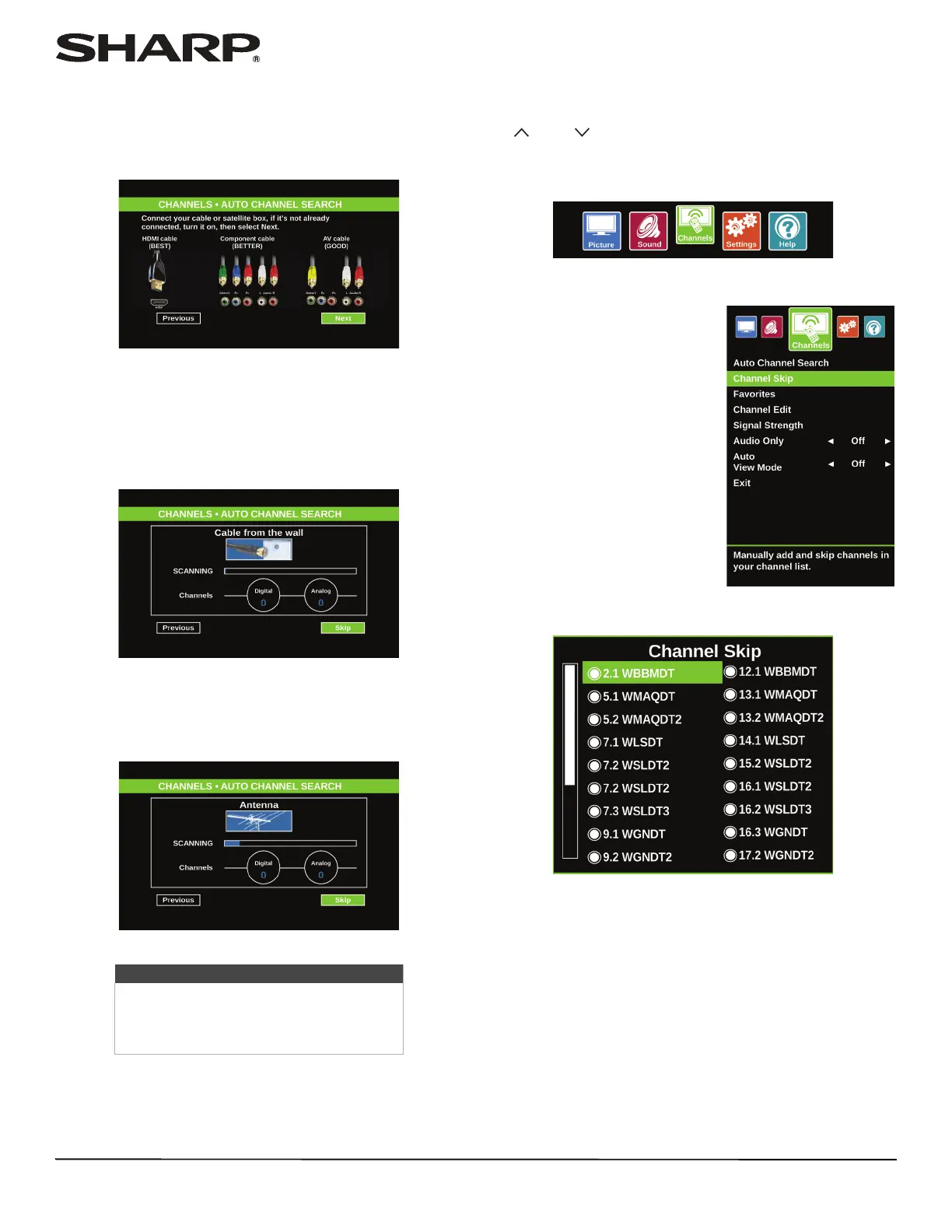
A If you select Cable/Satellite Box, a screen opens to
show the ways you can connect a cable or satellite
box.
Press ENTER. A message tells you that setup is
complete. Press ENTER to close the menu.
B If you select Cable from the wall, your TV scans for
channels. The scan may take several minutes. When
a message tells you that setup is complete, press
ENTER to close the menu.
C If you select Antenna, your TV scans for available
channels. The scan may take several minutes. When
a message tells you that setup is complete, press
ENTER to close the menu.
Hiding channels
You can hide channels in the channel list. When you press
CH or CH , your TV skips the hidden channels. You can
still tune to a hidden channel by pressing the number buttons
for the channel.
1 Press MENU.
2 Press
W
or
X
to highlight Channels, then press ENTER.
3 Press
S
or
T
to highlight Channel Skip, then press ENTER
or
X
to access the option.
Note
You can press EXIT to stop the auto
channel search, but you will need to run
the auto channel search again to create a
channel list.













 To Next Page