LC-60/70EQ10U,SQ10U/15U/17U,TQ15U,UQ17U
6 – 17
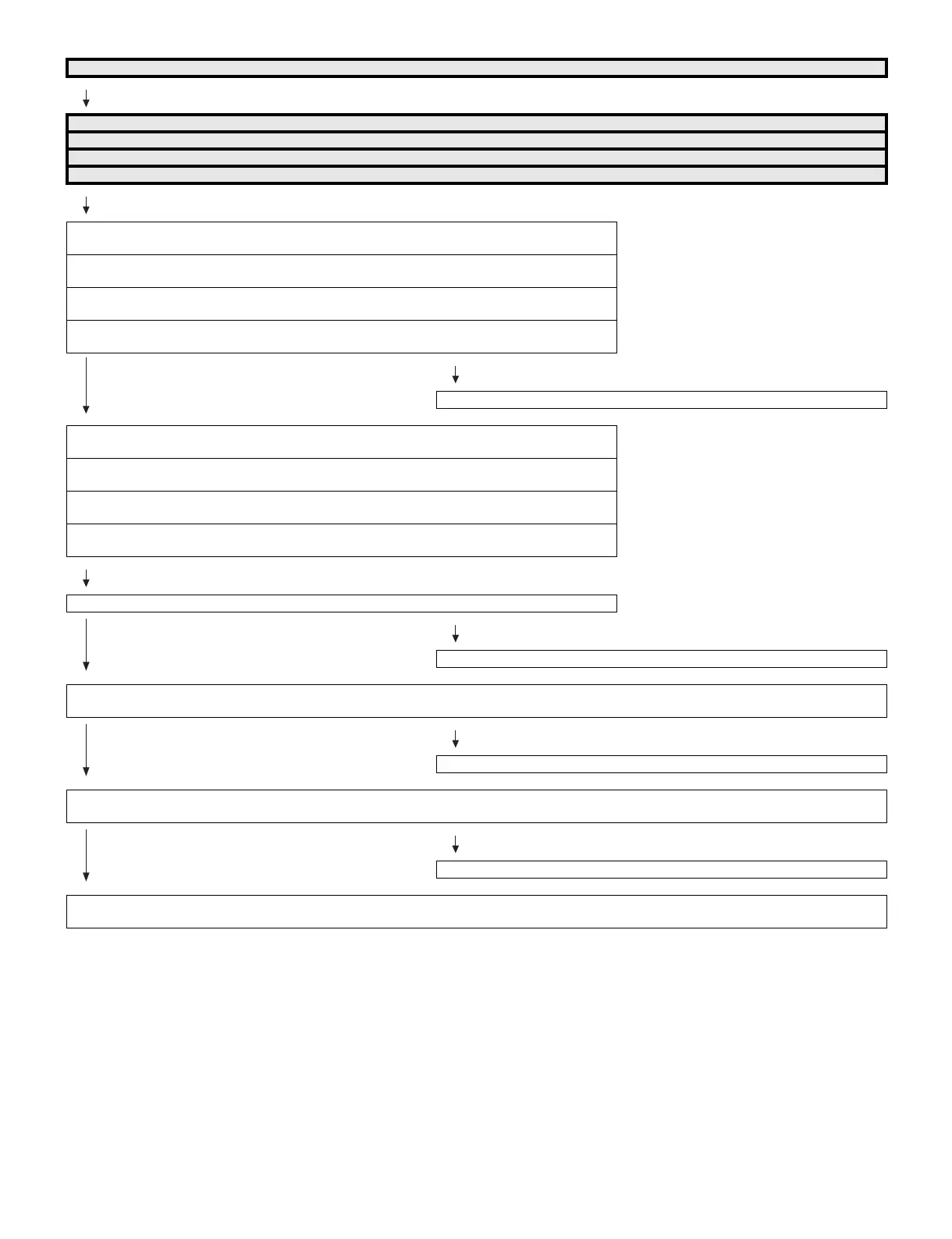
No audio (4)
HDMI1 No audio (HDMI connected)
HDMI2 No audio (HDMI connected)
HDMI3 No audio (HDMI connected)
HDMI4 No audio (HDMI connected)
[HDMI1 input]
Is INPUT-1 selected on the input select menu screen?
[HDMI2 input]
Is INPUT-2 selected on the input select menu screen?
[HDMI3 input]
Is INPUT-3 selected on the input select menu screen?
[HDMI4 input]
Is INPUT-4 selected on the input select menu screen?
YES
NO
Refer to “: No external input video [HDMI1/2/3/4]”.
[HDMI1 input]
If no video appears, refer to “No external input video (HDMI) [HDMI1]”.
[HDMI2 input]
If no video appears, refer to “No external input video (HDMI) [HDMI2]”.
[HDMI3 input]
If no video appears, refer to “No external input video (HDMI) [HDMI3]”.
[HDMI4 input]
If no video appears, refer to “No external input video (HDMI) [HDMI4]”.
Is the audio output selected for “VARIABLE” on the menu screen?
YES
NO
Set the audio output to “FIXED”.
Does the digital audio signal come from pins(AR11/AP11/AN9)(CPU_AOBCK/AOLRCK/AOSDATA0) of IC3301(CPU) to pins(8/9/7)(SP_BCLK/
SP_LRCLK/SP_DATA) of IC1702(Audio DSP)?
YES
NO
Check the line between IC3301 and IC1702 and their peripheral circuits.
• About the L/R Speakers.
Does the digital audio signal come from pins (27/29/32/34) of IC1702 (Audio DSP) to pin (4/3/2/1) of IC1903 (connector for L/R)?
YES
NO
Check IC1702 and its paripheral circuits.(X1701, etc.)
• About the L/R Speakers.
Check the connector (P1903) L/R speakers and their peripheral circuits.



 To Next Page