MX-C250 ADJUSTMENTS 5 – 14
In case a satisfactory result cannot be obtained by repeating
the above procedures, perform the following procedure.
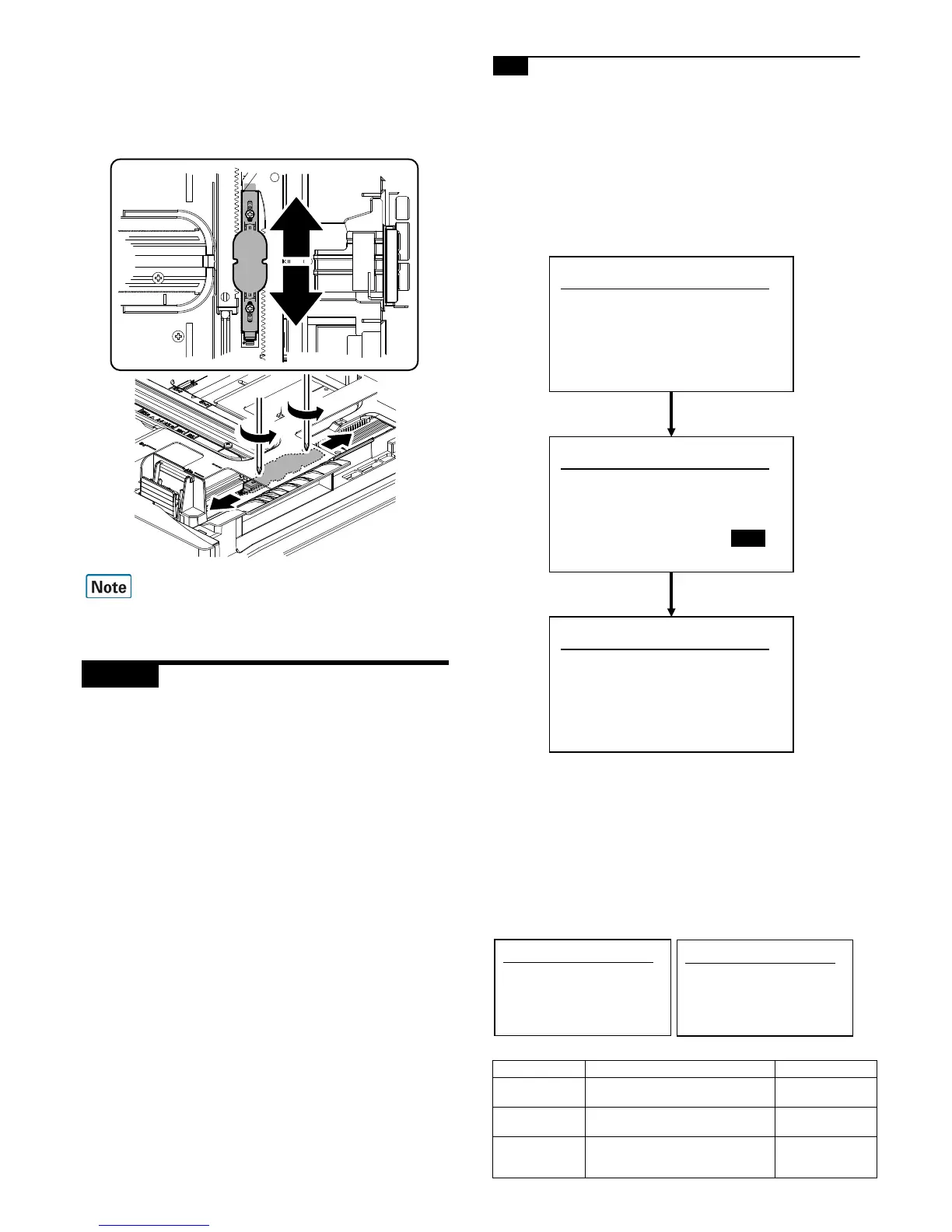
7) Loosen the paper feed tray off-center adjustment screws (2
pcs.) at the center section of the lift plate of the paper feed tray,
and change the gear unit position in the front/rear frame direc-
tion. Repeat the adjustment procedures from 4).
Only when the manual adjustment is required, execute this adjust-
ment.
ADJ 5 Print engine image distortion
adjustment / OPC drum phase
adjustment / Color registration
adjustment
(Print engine section)
This adjustment must be performed in the following cases:
* When the color shift occurs.
* When the LSU is replaced.
* When the LSU is removed from the main unit.
* When the unit is installed or when the installing place is changed.
* When maintenance work is performed. (Replacement of the
OPC drum, the OPC cartridge, the transfer unit, the transfer belt,
etc.)
* When [ADJ 6A] Print engine image magnification ratio adjust-
ment (BK) (main scanning direction) is performed.
* U2 trouble has occurred.
* When the MFP PWB is replaced.
* When the color phase is not proper even after execution of the
color balance adjustment.
* When the OPC drum drive section is disassembled.
* When the primary transfer unit is replaced. (when it is removed
from the machine)
* When the developing unit or the OPC drum unit is removed from
the machine.
5-A Print engine image distortion adjustment
(Manual adjustment) / OPC drum phase
adjustment (Automatic adjustment) /
Color registration adjustment
(Automatic adjustment)
This adjustment performs the print engine image distortion adjust-
ment, the OPC drum phase adjustment, and the color registration
adjustment simultaneously.
1) Enter SIM50-22 mode.
2) Press [OK] key.
[EXECUTE] is highlighted and the image registration auto-
matic adjustment is started. (It takes about 15 sec to complete
the adjustment.)
3) When the adjustment is completed, [EXECUTE] returns to the
normal display, and the value of the adjustment result is dis-
played.
The current skew level for each color is displayed on the
SKEW display section.
Display/Item Content Display
SKEW_K
Print skew amount calculation result
(Cyan)
-99.9 - 99.9
SKEW_C
Print skew amount calculation result
(Cyan)
-999 - 999
SKEW_C(DIF)
Print skew amount calculation result
(Cyan) (Difference from the previous
adjustment value)
-1999 - 1999


 To Next Page