MX-C250 ADJUSTMENTS 5 – 22
SPF
6) Select an adjustment item with [UP] or [DOWN] keys.
7) Enter an image magnification ratio adjustment value with 10-
key, and press [OK] key.
When the adjustment value is increased, the image magnifica-
tion ratio is increased.
When the adjustment value is changed by 1, the image magni-
fication ratio is changed by 0.1%.
8) Make a normal copy and obtain the copy magnification ratio.
Repeat the procedures of 1) - 8) until a satisfactory result is
obtained.
ADJ 7 Scan image off-center
adjustment
(Manual adjustment)
Only when the manual adjustment is required, execute this adjust-
ment.
7-A Scan image off-center adjustment (Manual
adjustment) (Document table mode)
This adjustment must be performed in the following cases:
* When the scanner (reading) section is disassembled.
* When the scanner (reading) unit is replaced.
* When a U2 trouble occurs.
* MFP PWB is replaced.
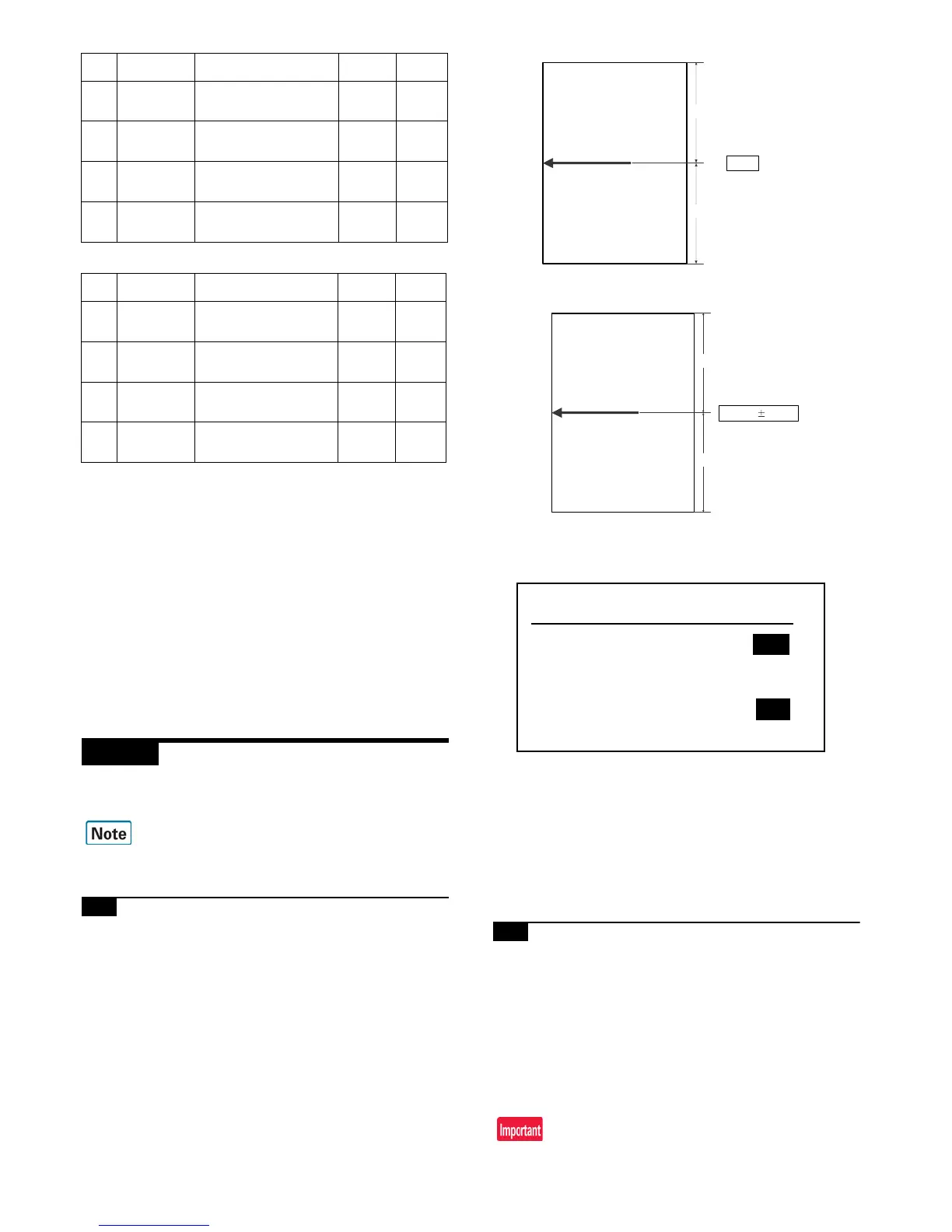
1) Make a copy of the adjustment chart (made by yourself) in the
adjustment mode (document table).
2) Check the copy image center position.
If A - B = +/- 1.0mm, the adjustment is not required.
If the above condition is not satisfied, perform the following
procedures.
3) Enter the SIM 50-12 mode.
4) Select the adjustment mode OC with [UP] or [DOWN] keys.
5) Enter the adjustment value with 10-key, and press [OK] key.
The entered value is set.
When the set value is increased, the main scanning print posi-
tion is shifted to the front side by 0.1mm.
6) Go to the copy mode, and make a copy.
Repeat the procedures of 1) - 6) until the above condition is satis-
fied.
7-B Scan image off-center adjustment
(Manual adjustment) (RSPF mode)
This adjustment must be performed in the following cases:
* When the MFP PWB is replaced.
* When the EEPROM on the MFP PWB is replaced.
* When the scanner (reading) section is disassembled.
* When the scanner (reading) section is replaced.
* When U2 trouble occurs.
* When the RSPF section is disassembled.
* When the RSPF unit is replaced.
3 SPF(MAIN)
RSPF document front sur-
face magnification ratio
adjustment (Main scan)
1 - 99 50
4 SPF(SUB)
RSPF document front sur-
face magnification ratio
adjustment (Sub scan)
1 - 99 50
5 SPFB(MAIN)
RSPF document back sur-
face magnification ratio
adjustment (Main scan)
1 - 99 50
6 SPFB(SUB)
RSPF document back sur-
face magnification ratio
adjustment (Sub scan)
1 - 99 50
Item Display Content
Setting
range
Default
value
1CIS(MAIN)
SCAN main scanning mag-
nification ratio adjustment
(CIS)
1 - 99 50
2CIS(SUB)
SCAN sub scanning mag-
nification ratio adjustment
(CIS)
1 - 99 50
3 SPF(MAIN)
RSPF document front sur-
face magnification ratio
adjustment (Main scan)
1 - 99 50
4 SPF(SUB)
RSPF document front sur-
face magnification ratio
adjustment (Sub scan)
1 - 99 50
SPF (SUB) Sub scanning direction image magnification ratio
(Front surface)
SPFB (SUB) Sub scanning direction image magnification ratio
(Back surface)
Item Display Content
Setting
range
Default
value


 To Next Page