3–12
DGB
2
1345
2
1
AUTO
2
1
AUTO
AUTO
2
1345
TONER SAVE MODE
TONERSPARMODUS
This mode reduces toner consumption by approxi-
mately 10% in the automatic (
Z
) and manual (
=
)
exposure modes. Copies will be lighter but still ade-
quate for general use. Selection of this mode does not
affect the photo (
6
) mode. Follow the procedure
below for setting the toning level.
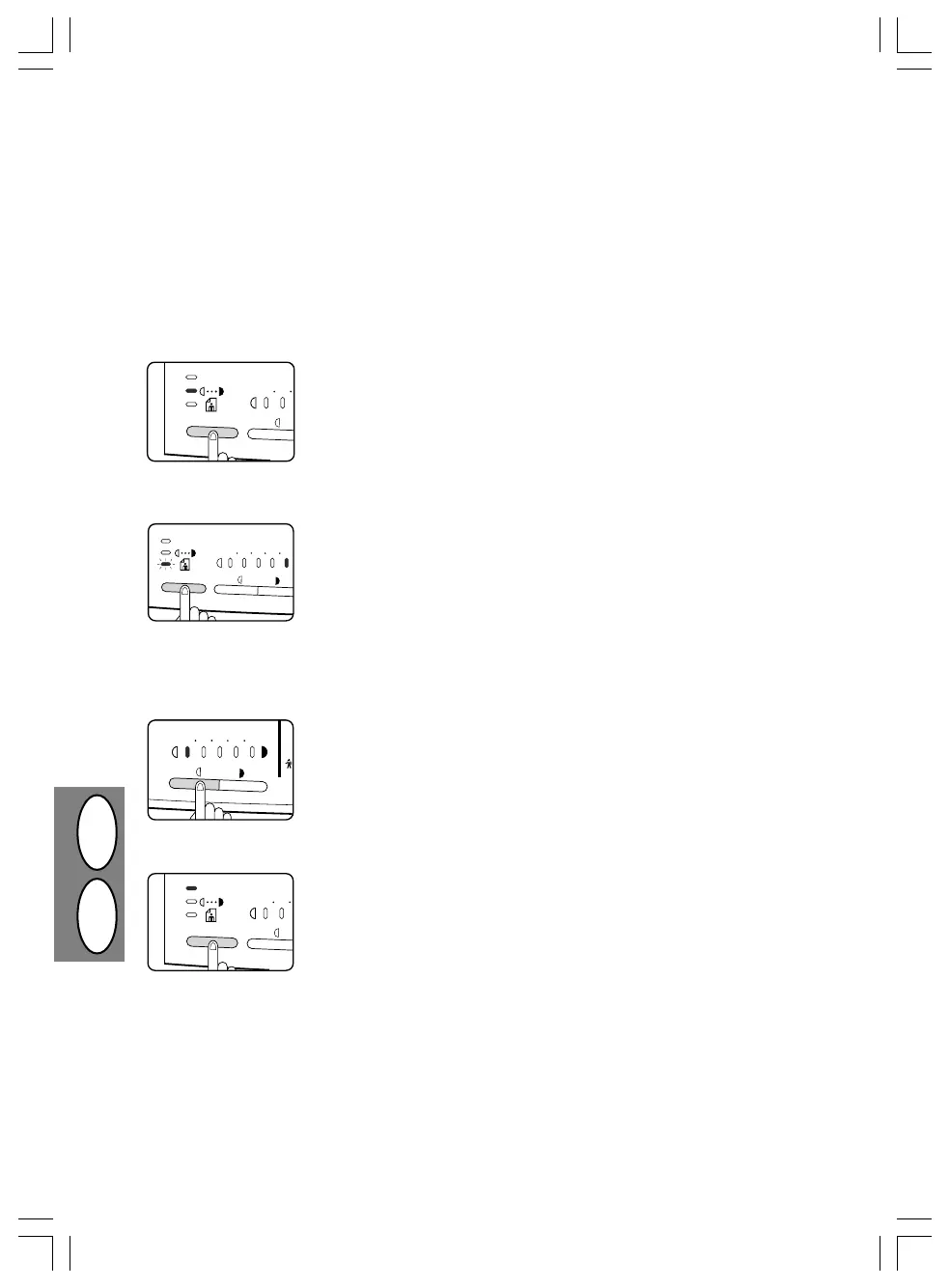
2. Press and hold the exposure mode
selector key for approximately 5 se-
conds.
• The manual (
=
) indicator will go
out and the photo (
6
) indicator will
begin to blink.
• The exposure indicator marked “5”
will light up, indicating the standard
toner mode is active.
3. To enter the toner save mode, press
the light (
{
) key.
• The exposure indicator marked “1”
will light up, indicating the toner
save mode is selected.
1. Press the exposure mode selector
key to select the manual (
=
) mode.
4. Press the exposure mode selector
key twice.
• The photo (
6
) indicator will stop
blinking and the auto (
Z
) indicator
will light up steadily. The toner save
mode is now active.
• To return to the standard mode,
repeat the procedure but use the
dark (
}
) key to select exposure
level “5” in step 3.
Durch den Tonersparmodus wird der Tonerverbrauch
im Automatik-Modus (
Z
) und im manuellen Belich-
tungsmodus (
=
) um etwa 10% verringert. Die Ko-
pien sind dann etwas heller, aber für den allgemeinen
Gebrauch immer noch ausreichend. Diese Auswahl
betrifft jedoch nicht den Fotomodus (
6
). Zur Einstel-
lung der Tonerstärke ist nach folgenden Schritten zu
verfahren.
2. Wahltaste für den Belichtungsmodus
etwa fünf Sekunden lang gedrückt
halten.
• Die Manuell-Anzeige (
=
) er-
lischt und die Photo-Anzeige (
6
)
beginnt zu blinken.
• Zur Anzeige des normalen Toner-
betriebs leuchtet die Belichtungs-
anzeige „5“ auf.
3. Zur Eingabe des Tonersparmodus die
Helltaste (
{
) drücken.
• Zur Anzeige des Tonersparmodus
leuchtet die Belichtungsanzeige „1“
auf.
1. Wahltaste für den Belichtungsmodus
drücken und den manuellen Modus
(
=
) wählen.
4. Wahltaste für den Belichtungsmodus
zweimal drücken.
• Die Photo-Anzeige (
6
) blinkt nicht
mehr und die Auto-Anzeige (
Z
)
leuchtet ständig. Der Tonerspar-
modus ist nun aktiviert.
• Um zur Standardeinstellung zu-
rückzukehren, die oben genannten
Schritte wiederholen, dabei bei
Schritt 3 die Dunkeltaste (
}
)
drücken, damit wieder Belichtungs-
stufe „5“ eingestellt ist.
SF-2x14 xEU.P65 18.07.97, 12:5612
Downloaded from: http://www.usersmanualguide.com/



 To Next Page