XL-E75H_OM_EN.fm
E-13
2009June 1
LT (8)
HU (7)
GR (6)
RO (5)
SK (4)
CZ (3)
PL (2)
EN (1)
UA (9)
DVD playback
Note:
During operate FM/AUX, OPEN/CLOSE CD tray will change to DVD
function.
To interrupt playback:
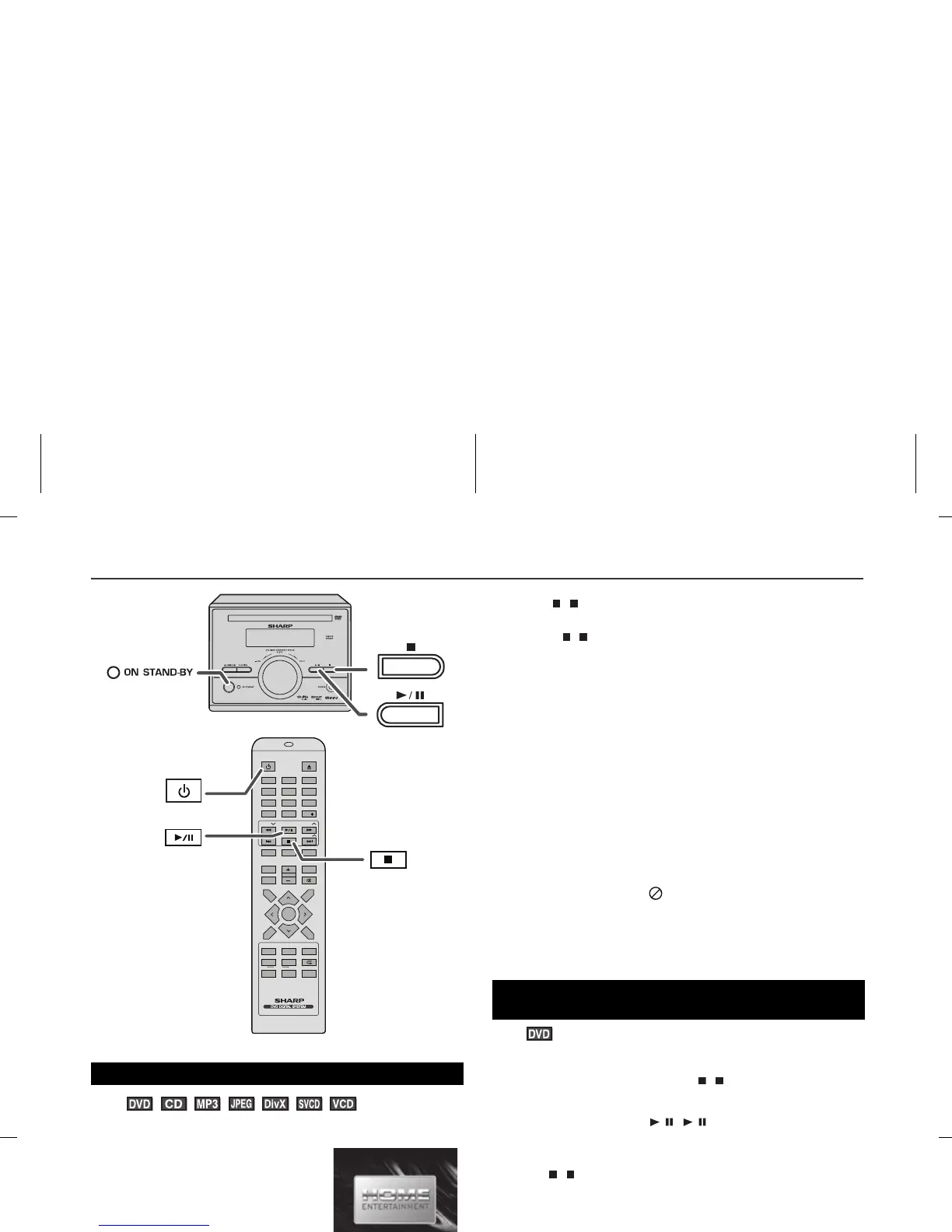
Press the / ( / ) button.
To resume playback from the same point, press the / ( / )
button.
To stop playback
DVD:
Press the ( ) button twice.
Audio CD/MP3/JPEG
Press the ( ) button.
When the unit is left unoperated for more than 5 minutes after
pressing the ( ) button, a screen saver appears (see page 8 when
the screen saver setting is “ON”).
Press any button on the main unit or remote control. The startup
screen returns.
Caution:
z Close the disc tray when not in use. Otherwise, dust may
accumulate inside and cause malfunction.
z The unit gets slightly warm when used for a long time. It does not
mean the unit is damaged.
z When attempting to play discs with scratches or of a different
region number, or unplayable or restricted (*1) discs, an error
message will appear on the TV display and the disc will not play.
(*1) Viewing is prohibited on some DVDs according to the audience
age.
Notes:
z During disc initialisation, the volume cannot be adjusted.
z Stop positions may be recorded on some discs. When you play
such a disc, playback stops there.
z During an operation, “ ” may appear indicating that the
operation is disabled by the disc.
z The main unit detects loaded discs automatically and then the
indicators light up.
You can resume playback from the point playback is stopped.
To cancel the resume playback:
Press the ( ) button twice.
Notes:
z The resume playback feature is disabled on some discs.
z Depending on the disc, playback may resume from slightly
before the stopped position.
The following are examples of operation indicators that appear
during DVD playback.
Playback
1 Press the ON/STAND-BY button to turn the power on.
2 When the input is not set to the disc
mode, press the FUNCTION button
repeatedly to display the startup
screen.
The startup screen appears.
3 Press the ( ) button to open the disc tray.
4 Place the disc on the disc tray, label side up.
Be sure to place 8 cm (3") discs in the middle of the disc position.
5 Press the ( ) button to close the disc tray.
Discs supporting auto start will start to play once you close the
disc tray even if you do not press the / ( / ) button.
6 If playback does not start in step 5, press the / ( / ) button.
/
ON /
To resume playback after stopping
(resume play)
1 Whilst a disc is playing, press the ( ) button.
The system stores the point you stopped.
2 To restart play, press the / ( / ) button.
Play resumes from the point you stopped.
DVD mode operation indicators
Operation TV screen Unit display
When the power
is on without a
disc.
Disc data is being
read.
Stop
Play
Pause
NO DISC
TITLE CHP
A-B
REPEAT 1SLEEPPROGPRESETTRK
KHz
MHz
LOADING
A-B
REPEAT 1SLEEPPROGCHPPRESETTRKTITLE
KHz
MHz



 To Next Page