4 Turn
on
your
system
Conexi6n de
/a
a/imentaci6n de
su
sistema
Listening
to
a
CD
(CDs)
Audici6n de un disco
CD
(discos CD)
~
6~~~g,.
10
«)
«)
5"
(12 cm)
3"
(8 cm)
12
em
8cm
:~
.cJ
~~
o'----I
-...J
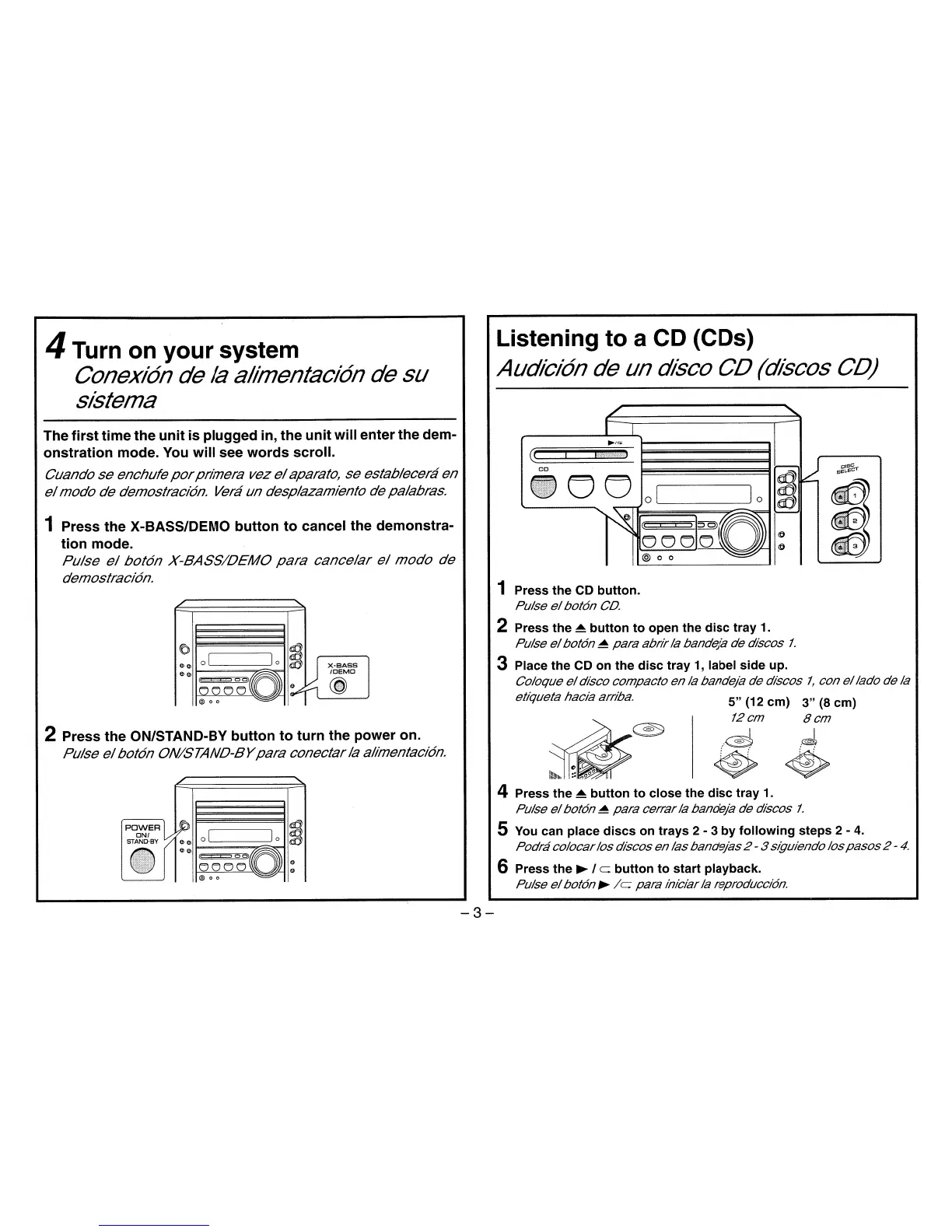
1 Press
the
CD
button.
Pulse
el
bot6n
CD.
2 Press
the
~
button
to
open
the
disc
tray
1.
Pulse
el
bot6n
~
para
abrirla bandeja de discos
1.
3 Place
the
CD
on
the
disc
tray
1, label
side
up.
Coloque
el
disco compacto enla bandeja de discos
1,
con
ellado
de la
etiqueta hacia arriba.
~
0 I I0
~
U
X-BASS
I
e>
e>
/DEMO
=;'0
I~r-l
(j
@ 0 0
2 Press
the
ON/STAND-BY
button
to
turn
the power on.
Pulse
el
bot6n ON/STAND-BY
para
conectarla alimentaci6n.
The
first
time
the
unit
is
plugged
in,
the
unit
will
enter
the
dem-
onstration
mode. You
will
see
words
scroll.
Cuando
se
enchufe
por
primera vez
el
aparato, se establecera en
el
modo de demostraci6n. Vera un desplazamiento de palabras.
1 Press
the
X-BASS/DEMO
button
to
cancel the demonstra-
tion
mode.
Pulse
el
bot6n
X-BASS/DEMO
para
cancelar
el
modo
de
demostraci6n.
4 Press
the
~
button
to
close
the
disc
tray
1.
Pulse
el
bot6n
~
para
cerrarla bandeja de discos
1.
S You can place
discs
on
trays
2 - 3
by
following
steps
2 -
4.
Podracolocarlos discos enlasbandejas2 - 3 siguiendo los
pasos
2 -
4.
6 Press
the
~
I
c:
button
to
start
playback.
Pulse
el
bot6n
~
/c
para iniciarla reproducci6n.
-3-


 To Next Page