03/12/18 XL-S10(U)2.fm
17
XL-S10
TINSEA018SJZZ
CD Playback
Programmed play
You can choose up to 32 selections for playback in the order you
like.
Adding tracks to the program:
If a program has been previously stored, the "MEMORY" indicator
will be displayed. Then follow steps 1 - 2 to add tracks. The new
tracks will be stored after the last track of the original program.
Notes:
!
Opening the CD compartment automatically cancels the pro-
grammed sequence.
! Even if you press the ON/STAND-BY button to enter the stand-by
mode or the function is changed from CD to some other function,
the programmed selections will not be cleared.
! During program operation, random play is not possible.
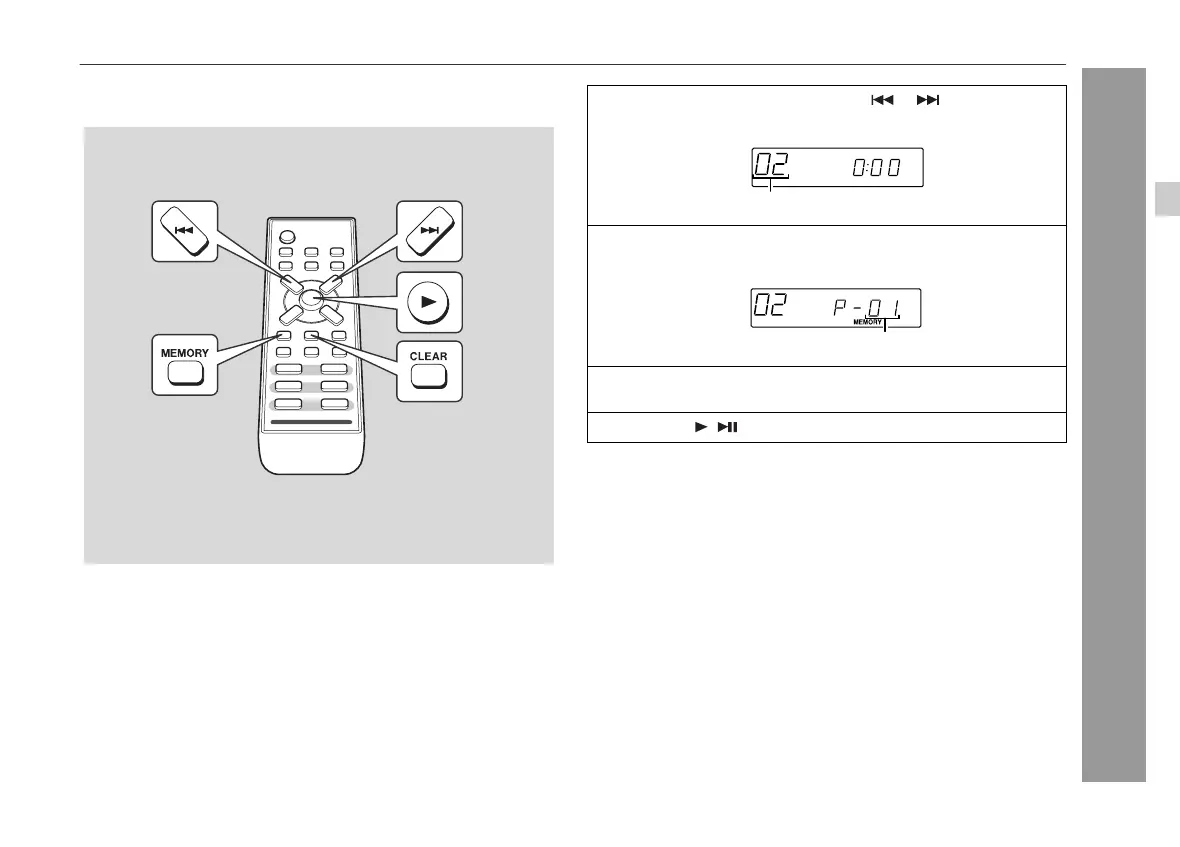
1
While in the stop mode, press the or button to select
the desired track.
Selected track number
2
Press the MEMORY (MEMORY/SET) button to save the
track number.
Playback order
3
Repeat steps 1 - 2 for other tracks. Up to 32 tracks can be
programmed.
4
Press the ( ) button to start playback.
To clear the programmed selections:
Press the CLEAR button while the "MEMORY" indicator is lit.
Each time the button is pressed, one track will be cleared, beginning
with the last track programmed.
4








 To Next Page