03/12/18 XL-S10(U)3.fm
25
XL-S10
TINSEA018SJZZ
Advanced Features
Enhancing your system
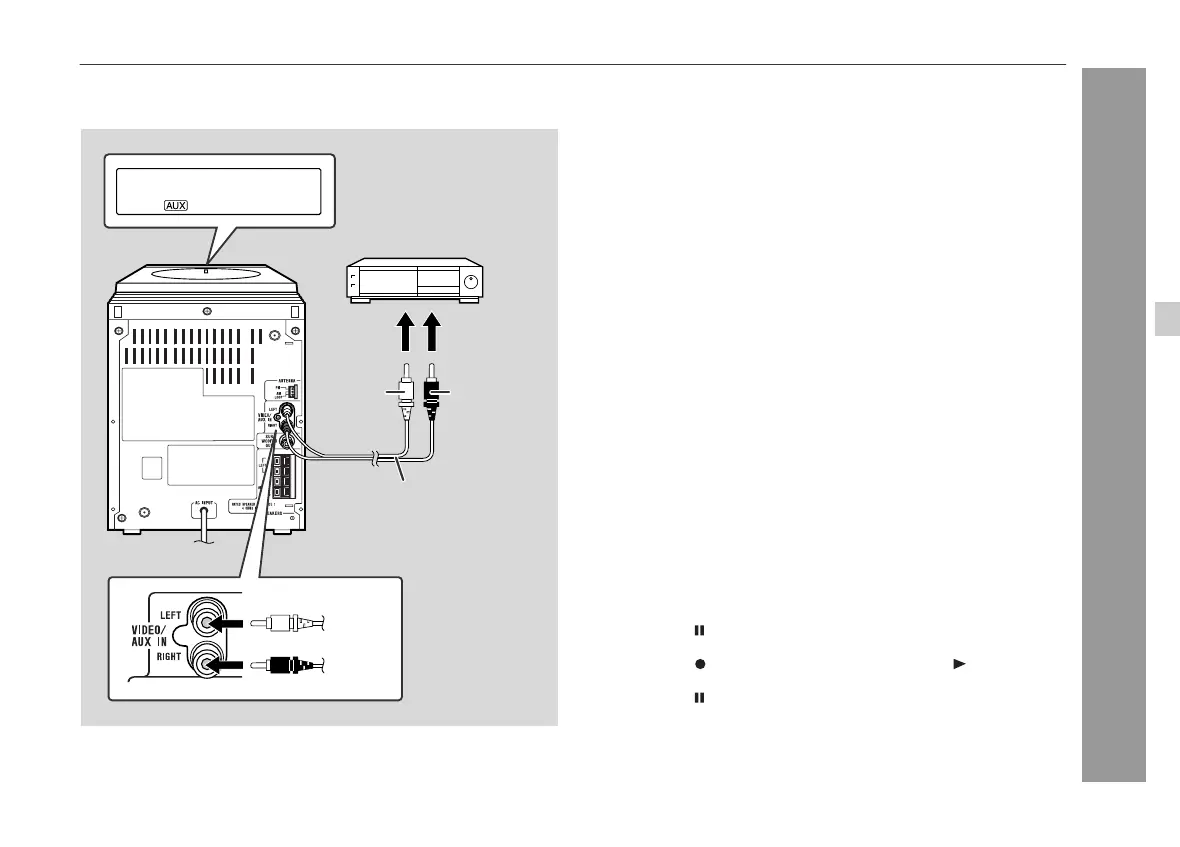
The connection cord is not included. Purchase a commercially avail-
able cord as shown below.
" Listening to the playback sounds from VCR,
DVD, etc.
Note:
To prevent noise interference, place this unit away from a television.
" To record on a tape
VCR, DVD, etc.
To the line
output jacks
RCA cord
(not supplied)
Red
White
Red
White
1
Use a connection cord to connect the VCR, DVD, etc. to the
VIDEO/AUX IN jacks.
When using video equipment, connect the audio output to this
unit and the video output to a television.
2
Press the ON/STAND-BY button to turn the power on.
3
Press the FUNCTION button until "AUX" appears on the
display.
When operating with the remote control, press the VIDEO/AUX
button.
4
Play the connected equipment.
1
Insert a cassette in the cassette compartment.
2
Press the FUNCTION button until "AUX" appears on the
display.
When operating with the remote control, press the VIDEO/AUX
button.
3
Press the button.
4
Press the button, which also engages the button.
5
Press the button again to cancel the pause mode.
6
Play the VCR, DVD, etc.
7







 To Next Page