03/12/18 XL-S10(U)3.fm
20
XL-S10
TINSEA018SJZZ
Tape Playback
Listening to a cassette tape
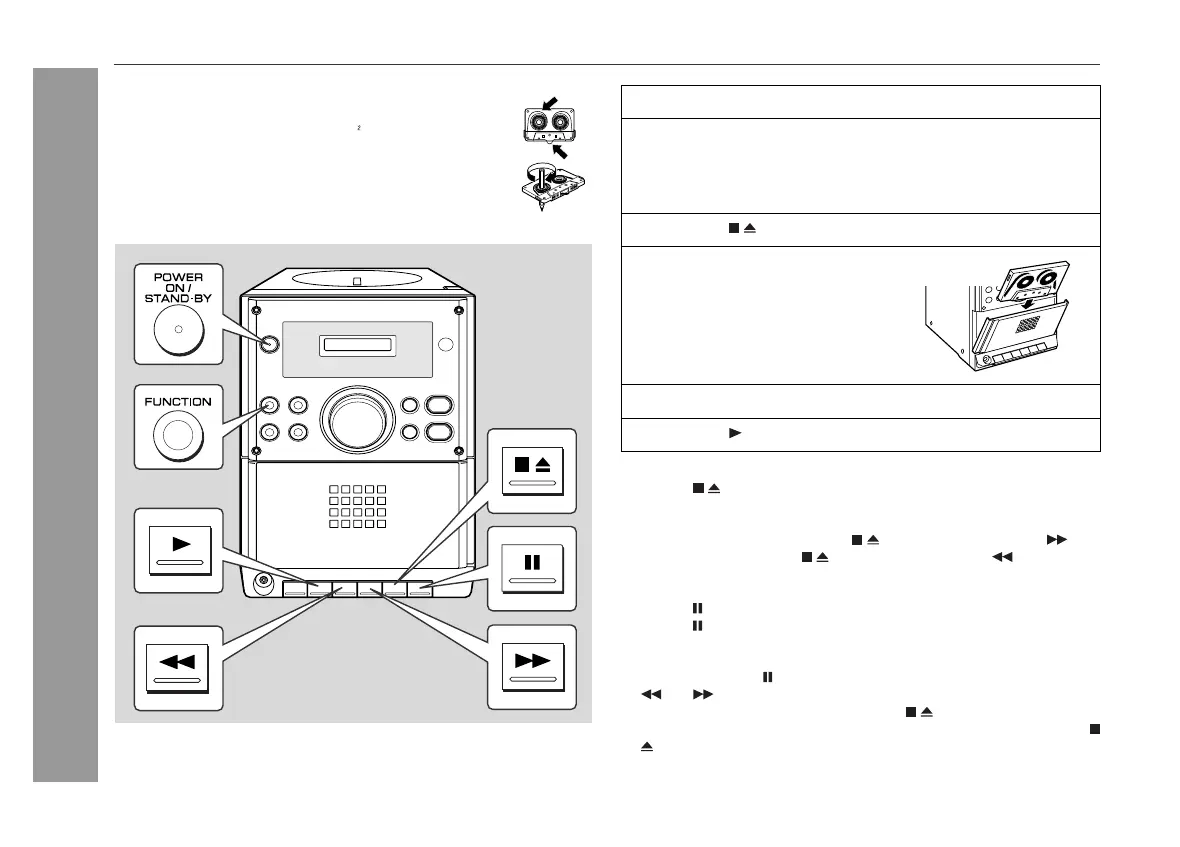
To stop playback:
Press the button.
Fast forward/rewind:
To advance the tape, press the button, then press the but-
ton. To rewind, press the button, then press the button.
To interrupt playback:
Press the button during playback.
Press the button again to resume playback.
Caution:
! Do not press the button while fast forwarding or rewinding. The
or button will not be released when the tape end is
reached. Once this occurs, press the button.
!
Before changing from one tape operation to another, press the
button.
Before playback:
!
For playback, use normal or low-noise tapes for
the best sound. (Metal or CrO tapes are not rec-
ommended.)
!
Do not use C-120 tapes or poor-quality tapes, as they
may cause malfunctions.
!
Before loading a tape into the cassette compartment,
tighten the slack with a pen or a pencil.
1
Press the ON/STAND-BY button to turn the power on.
2
Press the FUNCTION button until "TAPE" appears on the
display.
When operating with the remote control, press the TAPE but-
ton.
3
Press the button to open the cassette compartment.
4
Load a cassette into the cas-
sette compartment with the
side to be played facing to-
ward you.
5
Close the cassette compartment.
6
Press the button to start playback.







 To Next Page