42
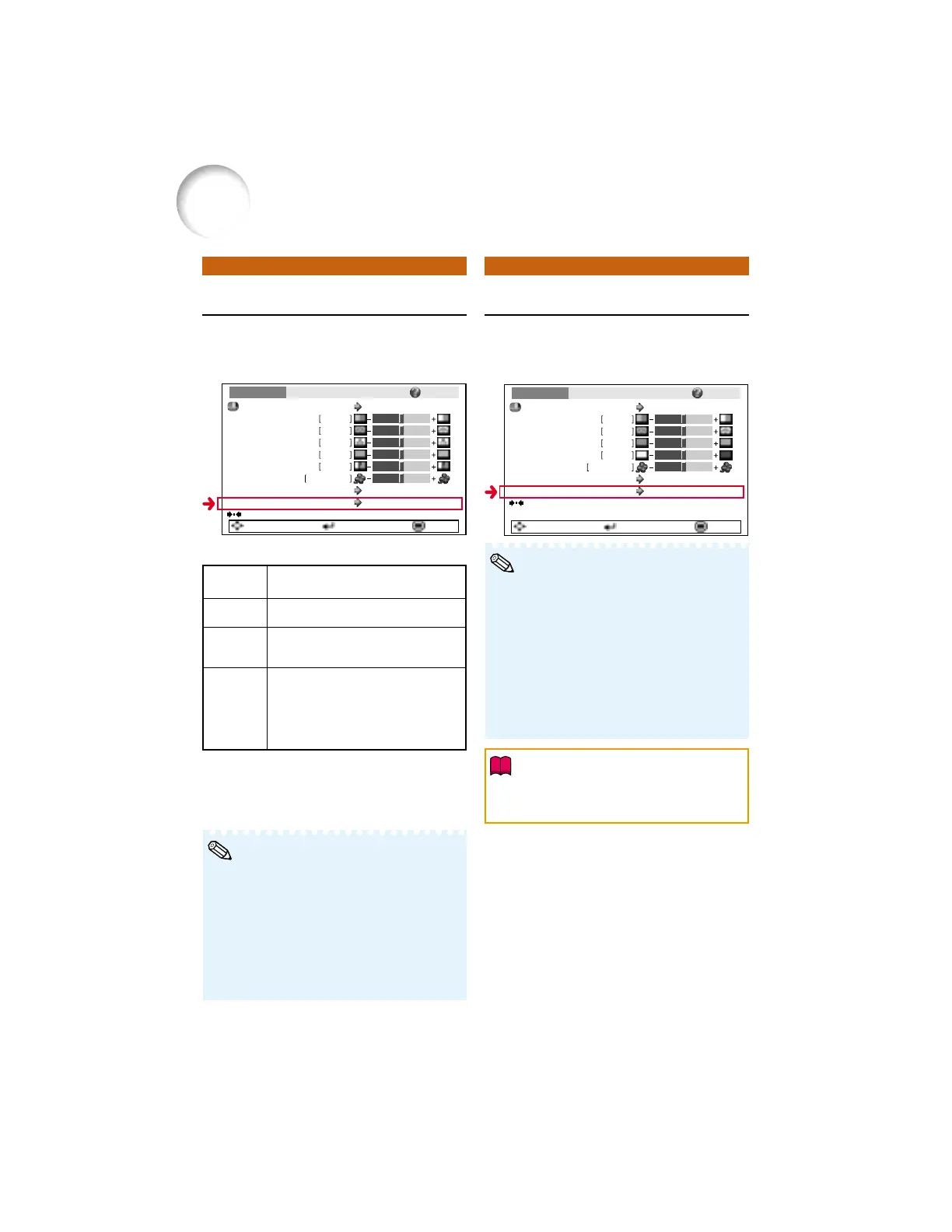
Progressive sRGB Setting
Q Example: “Picture” screen menu for
INPUT 2 mode
• In NTSC or PAL60Hz, even if the 3D Progres-
sive mode has been set, the three-two pull
down enhancement will be enabled automati-
cally when the film source has been entered.
• When the image is blurred or noisy, switch to
the optimal mode.
• When using progressive inputs, inputs are di-
rectly displayed so that 2D Progressive, 3D
Progressive and Film Mode cannot be se-
lected.
Menu operation n Page 38
Q Example: “Picture” screen menu for
INPUT 1 (RGB) mode
• When “sRGB” is set to “On”, the projected
image may become dark, but this does not
indicate a malfunction.
Menu operation n Page 38
Picture
Picture Mode
Contrast 0
0
0
0
K7500
SCR - ADJ PRJ - ADJ Help
Bright
Color
Tint
0Sharp
CLR Temp
Bright Boost
Progressive
Off
3D Progressive
Standard
Reset
SEL./ADJ. ENTER END
Picture
Picture Mode
Contrast 0
0
0
0
K7500
SCR - ADJ PRJ - ADJ Help
Bright
Red
Blue
CLR Temp
Bright Boost
sRGB
Off
Standard
Off
Reset
SEL./ADJ. ENTER END
Description of Items
* The film source is a digital video recording with the
original encoded as is at 24 frames/second. The
projector can convert this film source to progres-
sive video at 60 frames/second with NTSC and
PAL60Hz or at 50 frames/second with PAL50Hz
and SECAM to play back a high-definition image.
Selectable
items
2D
Progressive
3D
Progressive
Film Mode
Description
Useful to display fast-moving images
such as sports and action films.
Useful to display relatively slow-
moving images such as drama and
documentary more clearly.
Reproduces the image of film source*
clearly. Displays the optimized image of
film transformed with three-two pull down
(NTSC and PAL60Hz) or two-two pull
down (PAL50Hz and SECAM) enhance-
ment to progressive mode images.
Note
Info
Picture Adjustment (“Picture” menu) (Continued)
• An international standard of color reproduc-
tion regulated by the IEC (International
Electrotechnical Commission). As the fixed
color area has been decided by the IEC, the
images are displayed in a natural tint based
on an original image, when “sRGB” is set to
“ON”.
• For additional information about the sRGB
function, visit “http://www.srgb.com/”.
• You cannot set the items, “Red”, “Blue”, “CLR
Temp”, “Bright Boost”, when “sRGB” is set to
“On”.
Note



 To Next Page