71 | P a g e
USER MAINTENANCE (CONTINUED)
Continued on next page
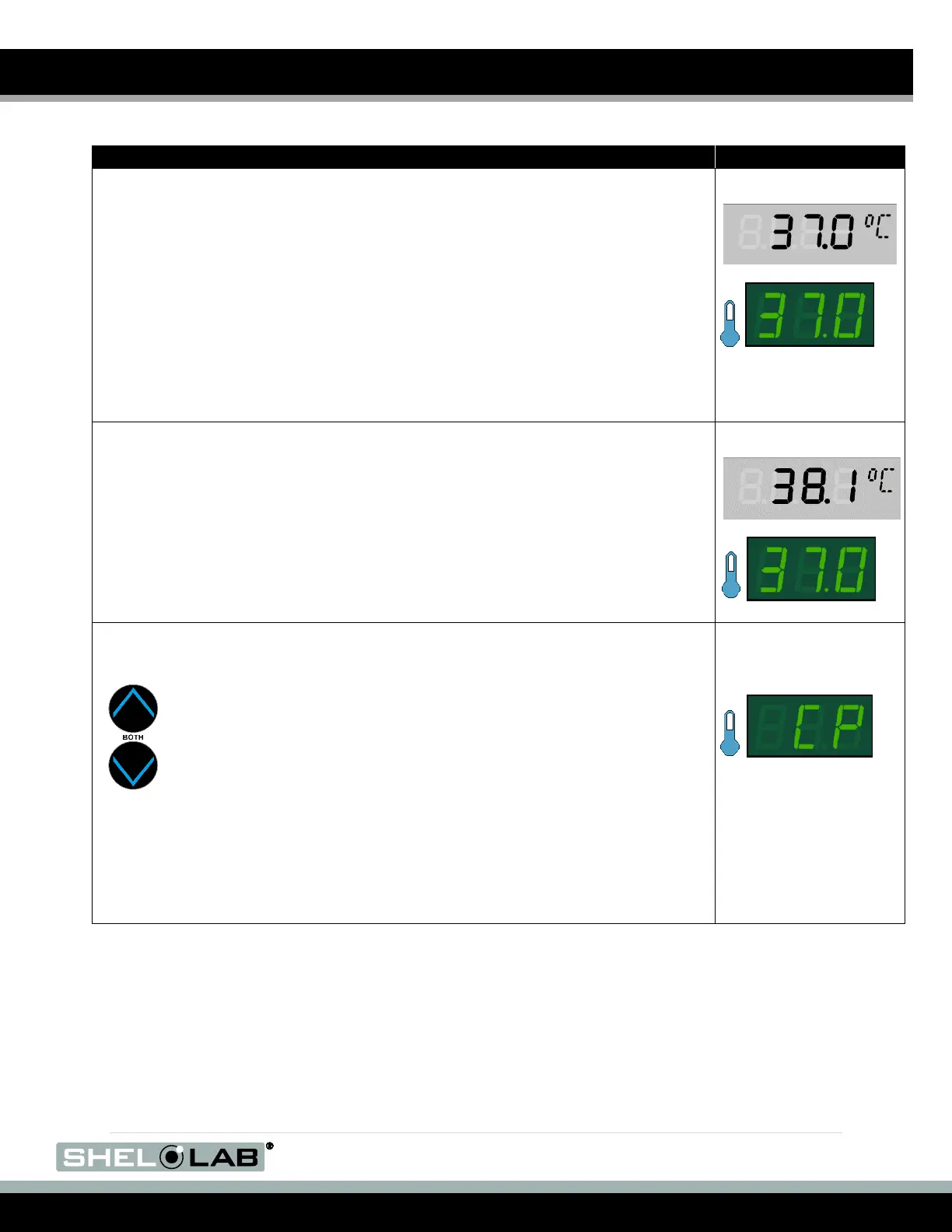
1. Once the incubator temperature has stabilized, compare the reference
device and incubator temperature display readings.
a. If the readings are the same, or the difference between the
two (2) falls within the acceptable range of your protocol, the
display is accurately showing the test space chamber air
temperature. The Temperature Calibration procedure is
now complete.
b. If a difference falls outside of your protocol range, advance to step
2.
2. A display calibration adjustment must be entered to match the display to
the reference device. See next step.
3. Place the display in its temperature calibration mode.
a. Press and hold both the UP and DOWN temperature arrow
buttons simultaneously for approximately 5 seconds.
b. Release the buttons when the temperature display shows the
letters “CP”. The display will begin flashing the current
temperature display value.
Note: If an arrow key is not pressed for five seconds, the display will
cease flashing, and store the last displayed number as the new current
chamber temperature value.


 To Next Page