72 | P a g e
USER MAINTENANCE (CONTINUED)
Continued on next page
Temperature Calibration (Continued)
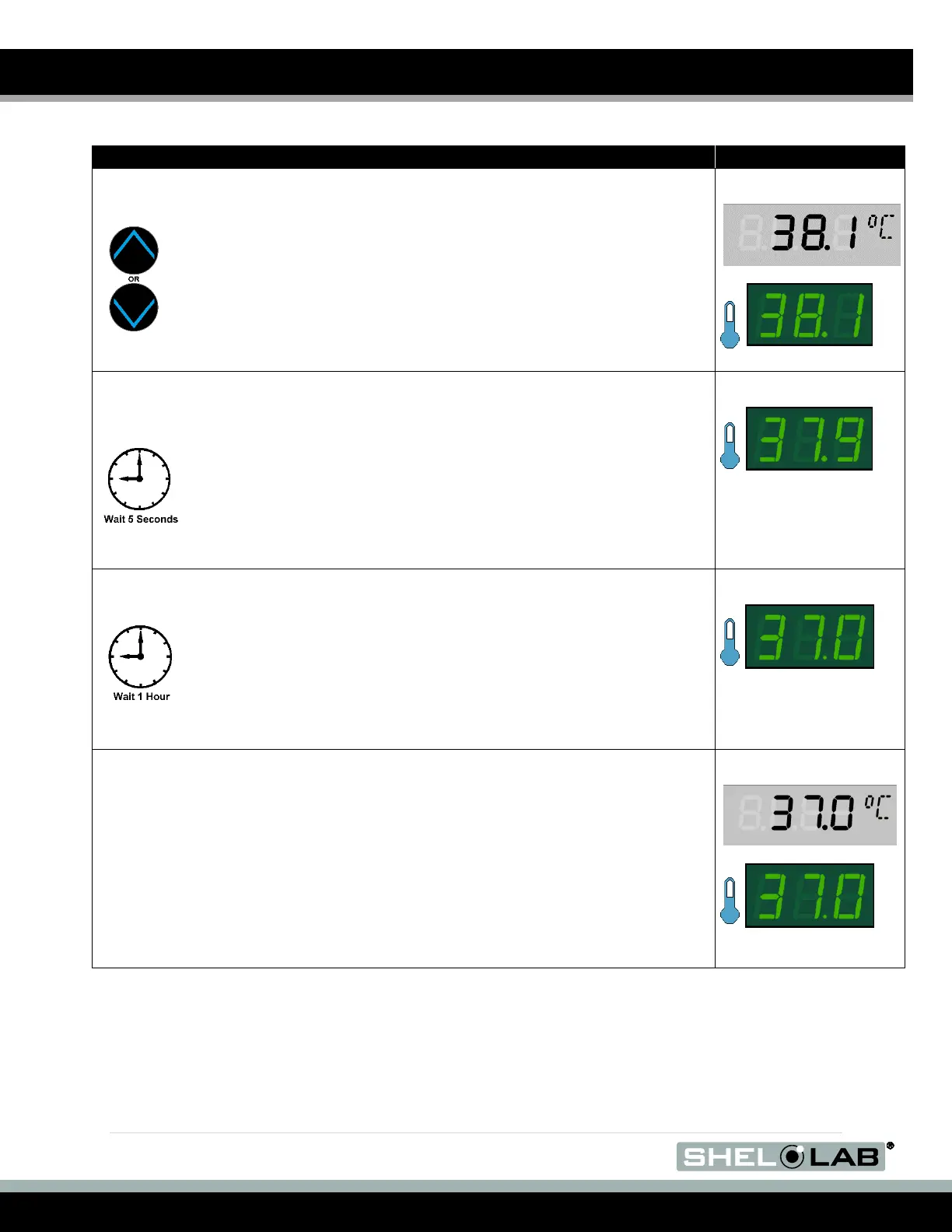
4. Use the Up or Down arrows to adjust the current display
temperature value until it matches the reference device
temperature reading.
5. After matching the display to the reference device, wait 5 seconds.
a. The temperature display will cease flashing and store the
corrected chamber display value.
b. The incubator will now begin heating or passively cooling in
order to reach the set point with the corrected display value.
6. Allow the BACTRON sit for at last one 1 hour undisturbed to
stabilize after the incubator has achieved the corrected
temperature set point.
a. Failure to wait until the incubator is fully stabilized will
result in an inaccurate reading.
7. Compare the reference device reading with the chamber temperature
display again.
a. If the reference device and the chamber temperature display
readings are the same or the difference falls within the range of your
protocol, the incubator is now calibrated for temperature.
b. See the next step if the readings fail to match or fall outside of your
protocol range.


 To Next Page