CHAPTER 2. ALPY 600 - SPECTROSCOPY IN SLIT MODE
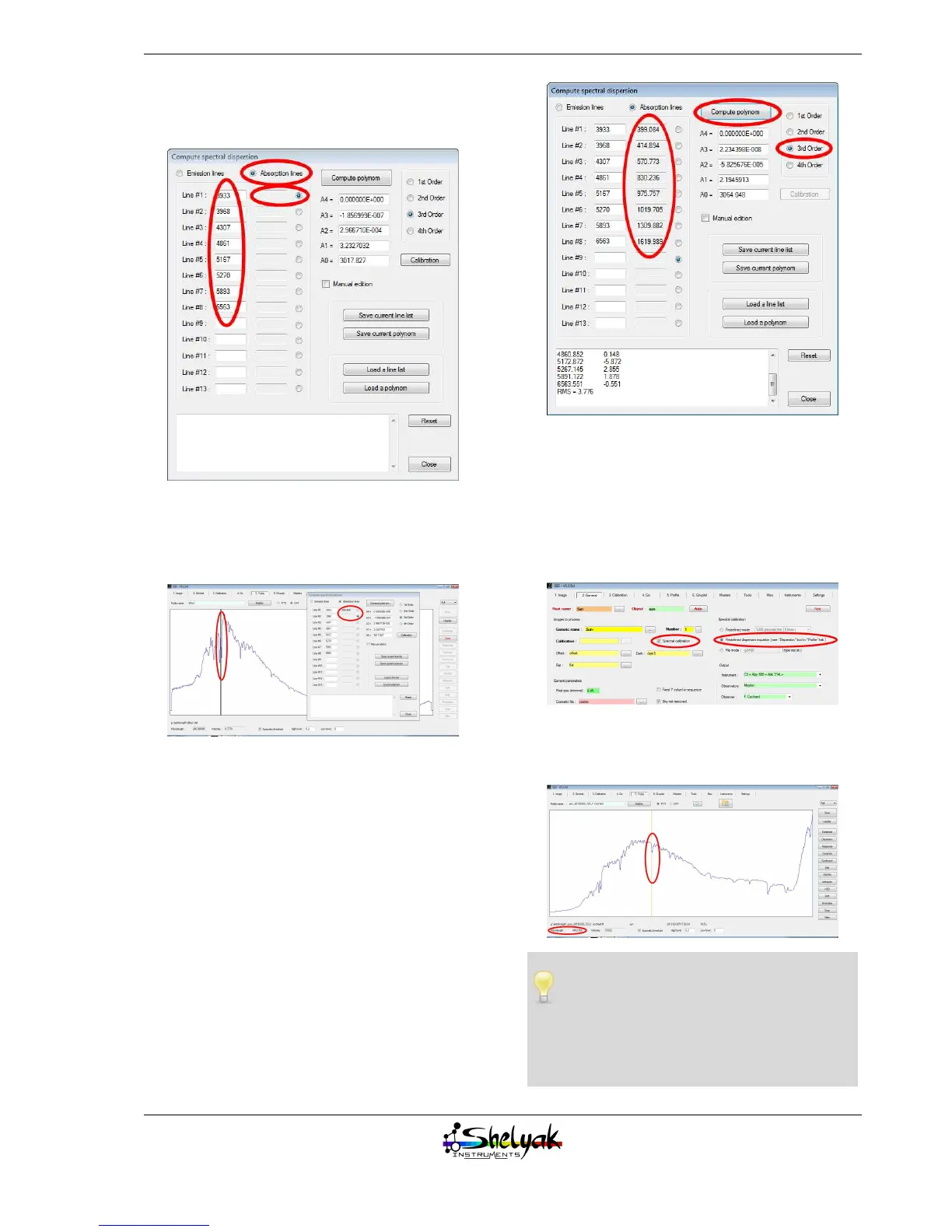
the wavelengths above, select “absorption line” and
click on the first radio button (matching 3933 Å):
Now, double click in the profile, on each side of the
absorption line at 6563A. This will measure precisely
the center of the line (in pixels). The next line will be
automatically selected.
Repeat the same operation for each recorded line.
When it is done, select “3rd order” option, and click
on button “Compute polynomial”. Based on the lines
you’ve selected, it calculates the dispersion polyno-
mial law.
In the bottom area, you have the RMS error re-
sulting from the calibration. It should be around few
Å(here, the error is of 3,7 Å)
Now re-run the reduction process, but selecting the
“Spectral calibration” button in the “2. General” tab.
You also have to select “Predefined dispersion equa-
tion” in the “spectral calibration” panel:
Display the spectrum: you can see that it is now cal-
ibrated in wavelength:
The calibration law can be established from
any spectrum containing several known fea-
tures. It is highly recommended to use a calibra-
tion light to do this when working in slit mode:
the more lines you can identify, the more precise
the calibration law will be.
23


 To Next Page