Alpy 600 - user guide
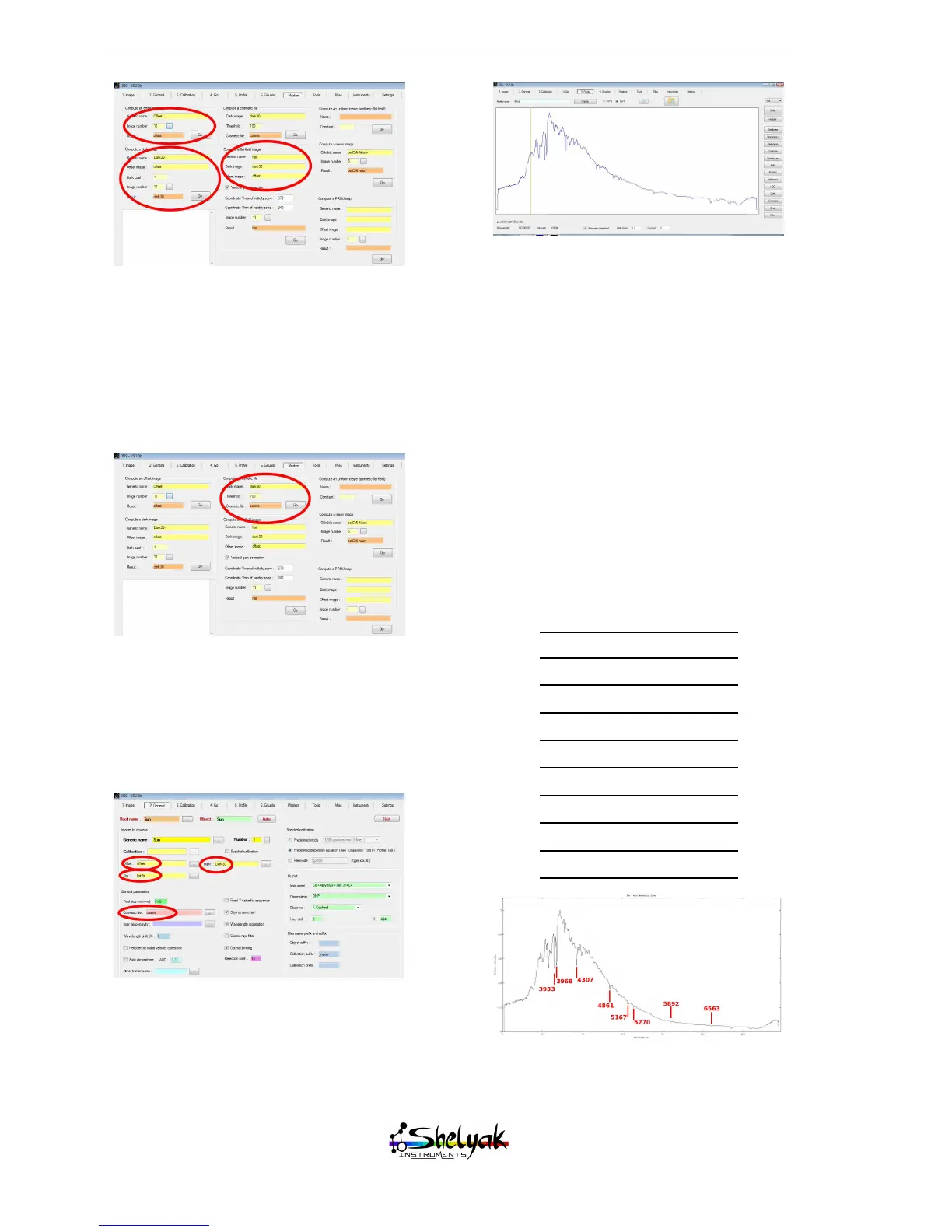
Also create a cosmetic file, which records all the hot
pixels in your camera. Hot pixels are pixels that react
differently from the others; we consider they are de-
fective and the processing will replace their value by
the average of the surroundig pixels. The cosmetic file
is made from the dark image (set up the threshold in
such a way that you get around 200-300 hot pixels -
this is a reasonable value):
2.5.2 First pass : raw profile
The first pass is very similar to your first spectrum
preview (section 2.3), but you can now include the
master files for pre-processing. In the “2. General”
tab, select offset, dark, flat and cosmetic master files:
Then, switch to the “4. Go” tab, and click on Go.
Display the resulting profile:
The profile is significantly different from the initial
one made with no reference images at all. This differ-
ence is mainly due to the flat field correction.
2.5.3 Second pass : wavelength
calibration
You now have to establish the calibration law (the
relationship between pixel position and wavelength),
to display the spectrum in wavelength units. The more
lines you have, the more precise is the calibration.
The dispersion law is usually a 3rd order polynomial.
To reduce the Sun spectrum, you will proceed in a
special mode : in the Sun spectrum itself, there is a list
of known absorption lines that can be used for the cal-
ibration. It is not the simplest way (some lines can be
quite difficult to identify), but this is a reference spec-
trum that you can use without any additional mea-
surements. Of course, if you have access to a calibra-
tion lamp, you can use it in preference.
wavelength Line
3933 Å Calcium K line
3968 Å Calcium H line
4307 Å G band (molecular)
4861 Å Hβ (balmer line)
5167 Å Magnesium triplet
5270 Å Iron (Fe) line
5893 Å Sodium doublet
6563 Å Hα (balmer line)
Click on the button “Dispersion”, in the right side
of the screen. The dispersion panel appears. Fill in all
22


 To Next Page