EasyManua.ls Logo

Sherwood RD-6108 - User Manual

Sherwood RD-6108
25 pages
Print Icon
To Next Page IconTo Next Page
Loading...
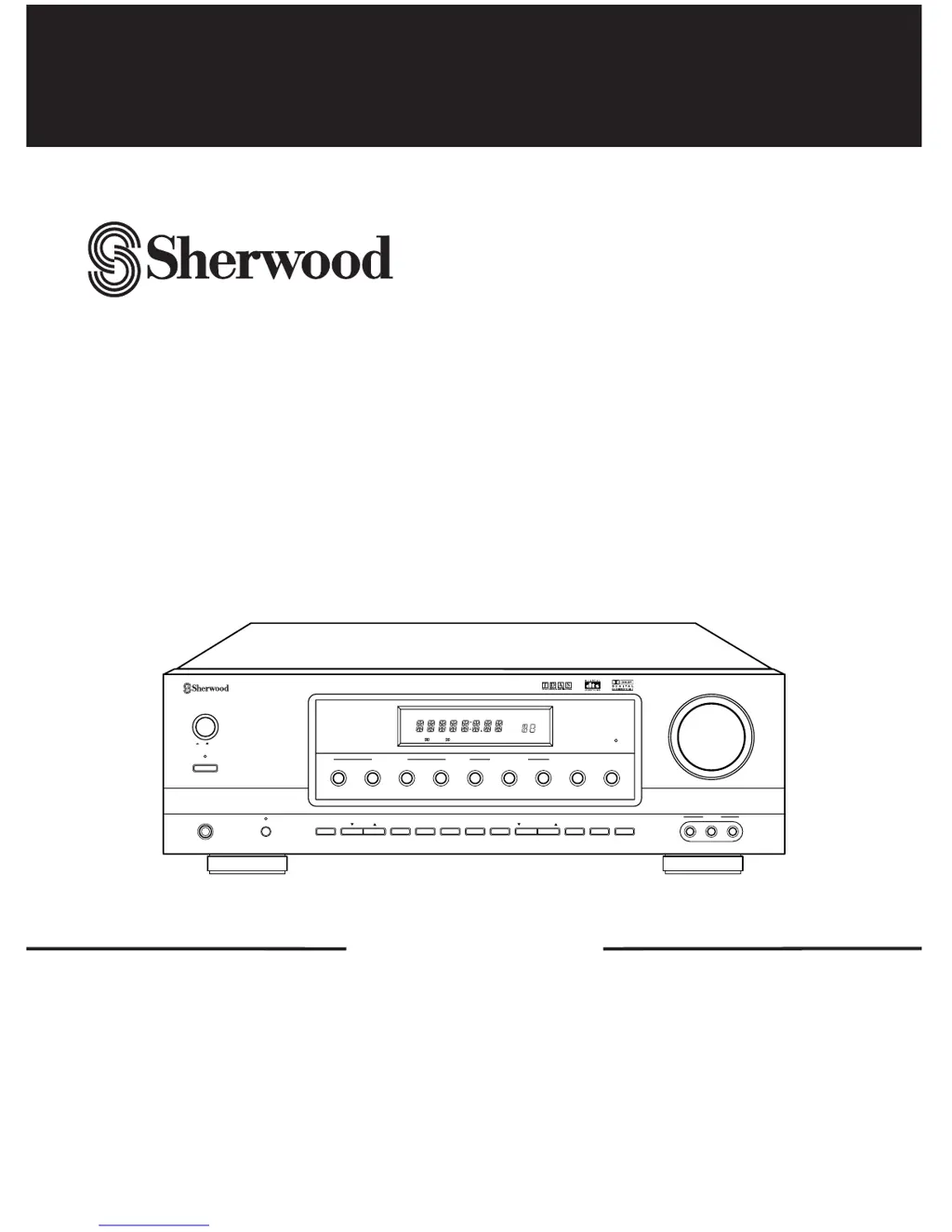
REMOTE
SENSOR
MASTER VOLUME
TONE
DIRECT
ON/STANDBY
MAIN POWER
STANDBY
ON/ OFF
TUNING/PRESETADJUST
PHONES
CHANNEL
SELECTOR
VIDEO L
-
AUDIO
-
R
VIDEO 3
BANDFM MODET/P MODETONE MODE
SPEAKER
MODE
DYNAMIC
RANGE
MEMO/ENTERCINEMA EQ
ON/OFF
SPEAKER
INPUT SELECTOR
AUDIO
VIDEO TAPE MON.
6CH DIRECT DSP MODEAUTO STEREO
DIGITAL
INPUTS
TONE
DIRECT
SURROUND MODE
ST TUNED TAPE M PRESET
Pro LogicDIGITAL
DTS
THEATER HALL SLEEP
dB
kHz
MHz
MEM
ms
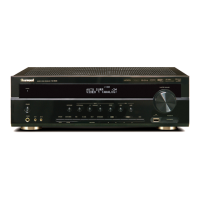
AUDIO/VIDEO RECEIVER RD-6108
RD-6108
AUDIO/VIDEO RECEIVER
OPERATINGINSTRUCTIONS

Other manuals for Sherwood RD-6108

Questions and Answers

  • C
    Cynthia HatfieldAug 16, 2025
    How to troubleshoot a Sherwood Receiver with no power?
    • K
      Kathleen JenkinsAug 16, 2025
      If your Sherwood Receiver has no power, there are a couple of things you can check. First, ensure that the AC input cord is securely connected. If it is, then verify that the AC wall outlet is working by testing it with a lamp or another appliance. It's possible the outlet is inactive or has a poor connection.
  • N
    Nicholas MartinAug 19, 2025
    Why is there no sound coming from my Sherwood RD-6108?
    • C
      carla38Aug 19, 2025
      If you're not getting any sound from your Sherwood Receiver, here are some things to check: * Make sure the speaker cords are properly connected. * Adjust the master volume to an audible level. * Ensure the MUTE button on the remote is not activated. * Verify that the speakers are switched on by pressing the SPEAKER button. * Select the correct input source. * Confirm that all components are connected correctly.
  • J
    James BrooksAug 22, 2025
    What to do if the Sherwood Receiver remote control is not working?
    • D
      Dana SalasAug 22, 2025
      If the remote control for your Sherwood Receiver isn't working, first, replace the batteries. If that doesn't solve the issue, make sure nothing is obstructing the remote sensor on the receiver.
  • P
    Patrick FieldsAug 26, 2025
    How to fix Sherwood RD-6108 Receiver when it cannot receive stations?
    • J
      Jeffrey MatthewsAug 26, 2025
      If your Sherwood Receiver isn't picking up any stations, make sure an antenna is connected. Then, tune in the desired station frequency. Finally, try moving the antenna to a different position and retry tuning.
  • C
    chambersevanAug 28, 2025
    How to improve poor FM reception on Sherwood RD-6108 Receiver?
    • C
      Christopher KingAug 28, 2025
      If you're experiencing poor FM reception on your Sherwood Receiver, first ensure that an antenna is connected. If an antenna is connected, try changing its position to improve reception.
  • J
    Juan BrownAug 31, 2025
    Why is there no sound from the rear speakers on my Sherwood Receiver?
    • M
      Manuel DavisAug 31, 2025
      If you're not hearing sound from the rear speakers on your Sherwood Receiver, check these things. Ensure that a surround mode is selected instead of stereo mode. Adjust both the master volume and the rear level to appropriate settings. Make sure you're using a stereo or surround source, not a monaural one. Also, verify that the rear speaker setting is correctly configured and not set to “N”.
  • M
    Maurice MillerSep 3, 2025
    What to do if Sherwood RD-6108 Receiver has no sound from the center speaker?
    • S
      Susan ThorntonSep 3, 2025
      If there's no sound coming from the center speaker of your Sherwood Receiver, first, check that you've selected a surround mode and not stereo mode. Next, make sure the center speaker setting isn't set to “N”. Finally, adjust the master volume and center level to ensure they're not too low.
  • C
    cody79Sep 6, 2025
    Why can't my Sherwood RD-6108 receive preset stations?
    • M
      mahoneyjeffreySep 6, 2025
      If your Sherwood Receiver isn't receiving preset stations, it could be due to an incorrect station frequency being memorized. In this case, memorize the correct station frequency. It's also possible the memorized stations were cleared, so try memorizing the stations again.
  • S
    Samantha FrazierSep 9, 2025
    How to stop continuous hissing noise during FM reception on Sherwood Receiver?
    • L
      lopezjohnathanSep 9, 2025
      If you're experiencing a continuous hissing noise during FM reception on your Sherwood Receiver, especially with stereo broadcasts, it could be due to weak signals. Try changing the position of the antenna. Consider installing an outdoor antenna.
  • M
    Michele RiceSep 12, 2025
    What causes continuous hissing noise during AM reception on Sherwood RD-6108?
    • P
      Philip KentSep 12, 2025
      If you're hearing continuous or intermittent hissing noise during AM reception on your Sherwood Receiver, especially at night, it's likely due to interference from motors, fluorescent lamps, or lightning. Try keeping the receiver away from these noise sources. Consider installing an outdoor AM antenna.

Summary

Introduction

Unpacking and Installation

Guide to unpacking the receiver and preparing it for installation and use.

Operating Precautions

Voltage and Safety Information

Details on voltage requirements and safety precautions for different regions.

System Connections

Connecting Antennas

Instructions for connecting FM and AM antennas for optimal reception.

Connecting Audio;Video Components

Guide for connecting external audio and video devices to the receiver.

Connecting 6 CH Direct Inputs

How to connect analog outputs from 6 CH decoders or DVD players.

Subwoofer Pre Out Connection

Details on connecting a powered subwoofer for enhanced bass.

Connecting Digital Inputs

Instructions for connecting digital audio sources like CD players or DVD players.

Connecting Speakers

Guidance on correctly connecting front, rear, and center speakers.

Front Panel Controls

Control Layout and Functions

Overview of buttons, indicators, and displays on the receiver's front panel.

Remote Controls

Remote Control Operation

Detailed explanation of buttons and their functions on the remote control unit.

Remote Control Operation Range

Specifies the optimal range and angles for using the remote control.

Loading Batteries

Instructions on how to properly insert batteries into the remote control.

Operations

Listening to a Program Source

Steps to select input sources, turn on the unit, and play audio or video.

Selecting Digital or Analog Input

Guide to selecting digital (optical/coaxial) or analog inputs for audio sources.

Adjusting Volume and Muting

How to control the master volume and mute the sound output.

Using Headphones

Instructions for listening privately using headphones and downmixing.

Adjusting Tone (Bass and Treble)

How to adjust bass and treble levels for desired sound quality.

Tone Direct Function

Enabling or disabling the tone bypass circuit for pure sound.

Surround Sound

Surround Sound Modes Explained

Details on DTS, Dolby Digital, Dolby Pro Logic II, and other surround sound modes.

Speaker Placement and Configuration

Guidance on optimal speaker placement for surround sound effects.

Delay Time Adjustment

Adjusting speaker delay times for better audio imaging.

Enjoying Surround Sound

Selecting Decoding and Surround Modes

How to choose decoding modes (IN-AUTO, IN-DTS, IN-PCM) and surround modes.

Adjusting Dolby Pro Logic II Parameters

Customizing parameters for Dolby Pro Logic II Music and Custom modes.

Adjusting Speaker Settings

Configuring speaker sizes (Large/Small) and subwoofer settings.

Checking Speaker Settings

How to verify current front-center-rear and subwoofer settings.

Adjusting Channel Levels

Setting individual speaker channel volume levels for balanced sound.

Adjusting Channel Levels with Test Tone

Using the test tone to equalize speaker output levels.

Adjusting Speaker Delay Times

Fine-tuning delay times for Dolby Digital, Pro Logic II, and Virtual modes.

Downmixing into 2 Front Channels

Reproducing multi-channel audio through two speakers or headphones.

Listening to Radio Broadcasts

Auto Tuning

Automatically scanning and tuning to radio stations.

Manual Tuning

Manually tuning to specific radio frequencies.

Presetting Radio Stations

Storing favorite radio stations in memory for quick access.

Tuning to Preset Stations

Selecting and playing stored radio stations.

Listening to FM Stereo Broadcasts

Switching between stereo and mono modes for FM reception.

Scanning Preset Stations in Sequence

Sequentially scanning through stored radio stations.

Recording

Recording with Tape Monitor

How to record audio sources using the tape monitor function.

Dubbing from Video Components onto Video 1

Copying video content from one input to Video 1.

Dubbing Audio and Video Separately

Recording video from one source and audio from another onto Video 1.

Other Functions

Compressing Dynamic Range

Adjusting the dynamic range for Dolby Digital sources to improve dialogue clarity.

Operating the Sleep Timer

Setting the receiver to automatically turn off after a specified time.

Adjusting Fluorescent Display Brightness

Changing the brightness of the receiver's front panel display.

Troubleshooting Guide

Problem and Solution Table

Common issues, possible causes, and remedies for receiver malfunctions.

Specifications

Amplifier and Tuner Specifications

Technical details for amplifier section, digital audio, FM, AM tuners, and general features.

Sherwood RD-6108 Specifications

Amplifier Section IconAmplifier Section
power output, stereo mode2 x 100 W
total harmonic distortion0.09%
intermodulation distortion0.1%
input sensitivity200 mV
signal to noise ratio92 dB
frequency response+0 dB, -3 dB
output level200 mV
pre out1.0 V
bass/treble control+10 dB
front power output125 W+125 W
center power output125 W
rear power output125 W+125 W
Digital Audio Section IconDigital Audio Section
sampling frequency32, 44.1, 48, 96 kHz
digital input level, coaxial0.5 Vp-p
digital input level, optical-15_-21 dBm
FM Tuner Section IconFM Tuner Section
tuning frequency range87.5~108 MHz
usable sensitivity12.8 dBf
50 dB quieting sensitivity, mono/stereo20.2/45.3 dBf
signal to noise ratio, mono/stereo70/65 dB
total harmonic distortion, mono/stereo0.5/0.8%
frequency response--+3dB
stereo separation42 dB
capture ratio4 dB
IF rejection ratio80 dB
AM Tuner Section IconAM Tuner Section
tuning frequency range520_1710 kHz
usable sensitivity500/zV/m
signal to noise ratio40 dB
selectivity25 dB
General IconGeneral
power supplyAC 120 V, 60 Hz
power consumption200 W
dimensions440 × 141 × 330 mm
weight9.6 kg

Related product manuals