EasyManua.ls Logo

Sherwood RD-6106 - User Manual

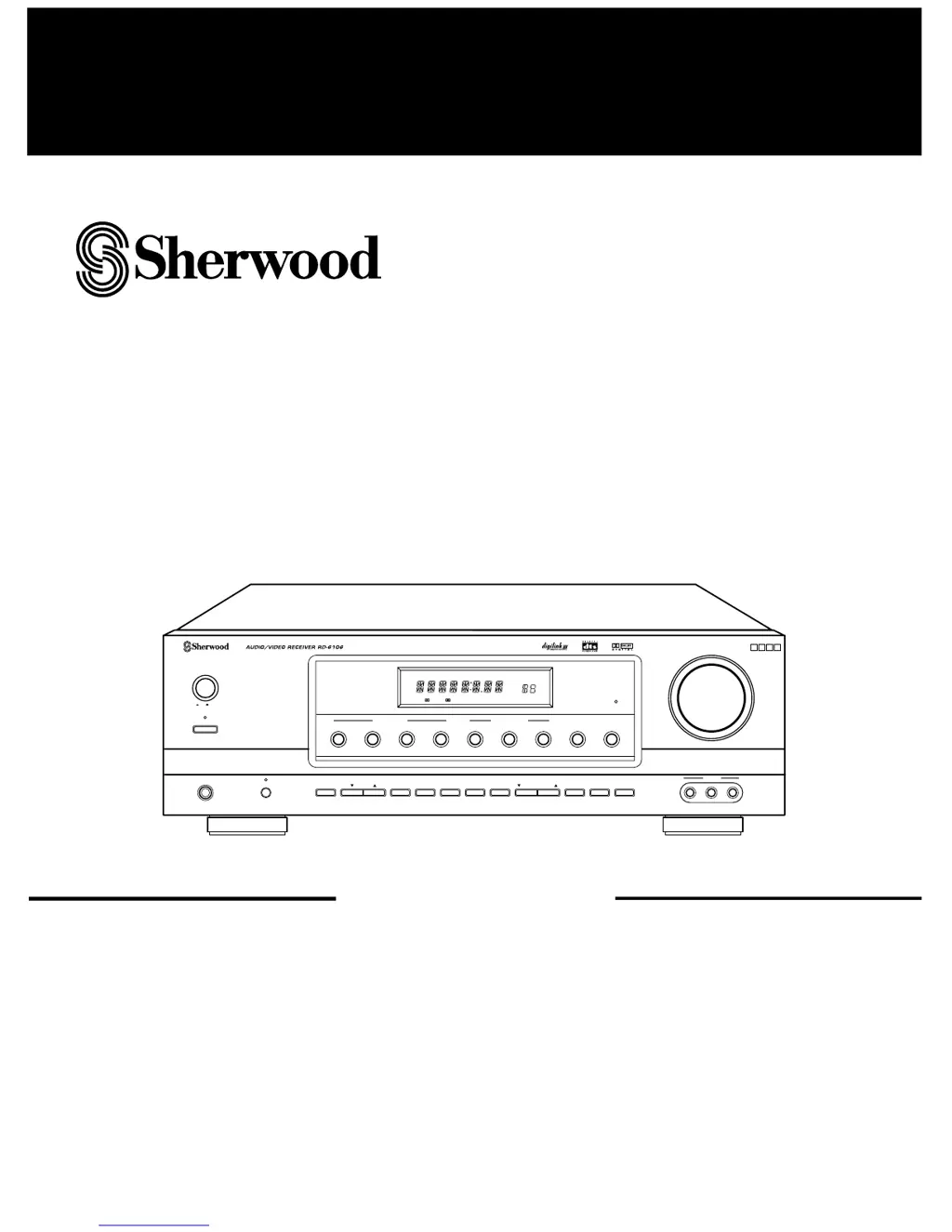
Sherwood RD-6106
25 pages
Print Icon
To Next Page IconTo Next Page
Loading...
REMOTE
SENSOR
MASTER VOLUME
TONE
DIRECT
ON/STANDBY
MAIN POWER
STANDBY
ON/ OFF
TUNING/PRESETADJUST
PHONES
CHANNEL
SELECTOR
VIDEO L
-
AUDIO
-
R
VIDEO 3
BANDFM MODET/P MODETONE MODE
SPEAKER
MODE
DYNAMIC
RANGE
MEMO/ENTERCINEMA EQ
ON/OFF
SPEAKER
INPUT SELECTOR
AUDIO
VIDEO TAPE MON.
6CH DIRECT DSP MODEAUTO STEREO
DIGITAL
INPUTS
TONE
DIRECT
SURROUND MODE
TOTALLY DISCRETE AMPLIFIER STAGE
TDAS
ST TUNED TAPE M PRESET
Pro LogicDIGITAL
DTS
THEATER HALL SLEEP
dB
kHz
MHz
MEM
ms
RRDD--66110066
AUDIO/VIDEO RECEIVER
OPERATINGINSTRUCTIONS

Questions and Answers

  • Y
    ychanAug 17, 2025
    What to do if my Sherwood RD-6106 has no power?
    • K
      Kimberly StoutAug 17, 2025
      If your Sherwood Receiver isn't powering on, first ensure the AC input cord is securely connected. Also, check the AC wall outlet by testing it with a lamp or another appliance to rule out a faulty outlet.
  • T
    Tanner CampbellAug 20, 2025
    How to fix no sound on my Sherwood RD-6106?
    • R
      Ronald OlsonAug 20, 2025
      If you're not getting any sound from your Sherwood Receiver, try these steps: * Check the speaker wire connections. * Adjust the master volume to an audible level. * Ensure the MUTE button on the remote is not activated. * Make sure the speakers are switched on by pressing the SPEAKER button. * Verify that you've selected the correct input source. * Confirm that all connections between components are correct.
  • K
    Kathleen AdamsAug 22, 2025
    Why can't I receive stations on my Sherwood RD-6106?
    • J
      jasmine20Aug 23, 2025
      If your Sherwood Receiver isn't picking up any stations, make sure an antenna is connected. Then, tune in the desired station frequency. If that doesn't work, try repositioning the antenna and retry tuning.
  • D
    Darius CampbellAug 26, 2025
    Why is there no sound from the rear speakers on my Sherwood RD-6106?
    • A
      Amy TranAug 26, 2025
      If you're not hearing sound from the rear speakers of your Sherwood Receiver, ensure that a surround mode is selected, as the receiver might be in normal stereo mode. Also, check that the master volume and rear level are appropriately adjusted. Verify that you are using a stereo or surround source, not a monaural one, and confirm the rear speaker setting is correct.
  • R
    Roy SmithAug 28, 2025
    Why is there no sound from the center speaker on my Sherwood RD-6106 Receiver?
    • L
      Laura ShafferAug 28, 2025
      If there's no sound coming from the center speaker of your Sherwood Receiver, first check that you've selected a surround mode. Also, verify the center speaker setting and adjust the master volume and center level to appropriate levels.
  • J
    Janet TuckerAug 31, 2025
    How to improve poor FM reception on Sherwood Receiver?
    • T
      Teresa MarshallAug 31, 2025
      To improve poor FM reception on your Sherwood Receiver, ensure that an antenna is connected. You may also need to change the position of the antenna to find the best reception.
  • J
    Jeremiah RobinsonSep 3, 2025
    What to do if my Sherwood RD-6106 Receiver remote control doesn't operate?
    • W
      William CookSep 3, 2025
      If the remote control for your Sherwood Receiver isn't working, replace the batteries. Also, make sure there's nothing obstructing the remote sensor on the receiver.
  • N
    Nicole SmithSep 5, 2025
    Why can't I receive preset stations on my Sherwood RD-6106?
    • J
      Joseph KempSep 5, 2025
      If your Sherwood Receiver isn't receiving preset stations, it could be due to an incorrect station frequency being memorized. In that case, memorize the correct station frequency. It's also possible that the memorized stations were cleared, so you may need to memorize the stations again.
  • M
    mcdonalddeniseSep 8, 2025
    Why is there continuous hissing noise during FM reception on my Sherwood RD-6106 Receiver?
    • L
      lisadavisSep 8, 2025
      If you're experiencing continuous hissing noise during FM reception on your Sherwood Receiver, especially with stereo broadcasts, the signals may be weak. Try changing the position of the antenna or installing an outdoor antenna.
  • S
    sdavisSep 12, 2025
    Why is there continuous hissing noise during AM reception on my Sherwood Receiver?
    • L
      Lee SmithSep 12, 2025
      If you hear continuous or intermittent hissing noise during AM reception on your Sherwood Receiver, especially at night, it could be due to noise from motors, fluorescent lamps, or lightning. Try keeping the receiver away from these noise sources or installing an outdoor AM antenna.

Summary

Introduction

UNPACKING AND INSTALLATION

Covers unpacking, installation, and placement for proper ventilation and operation.

READ THIS BEFORE OPERATING YOUR UNIT

FOR U.S.A. AND CANADA

Safety precautions and voltage requirements for USA and Canada.

FOR EUROPE AND AUSTRALIA

Safety precautions and voltage requirements for Europe and Australia.

AC VOLTAGE SELECTION

How to select the correct AC voltage for the unit.

System Connections

CONNECTING ANTENNAS

How to connect FM and AM antennas.

CONNECTING AUDIO;VIDEO COMPONENTS

Connecting various audio/video devices like DVD players, VCRs, etc.

CONNECTING DIGITAL INPUTS

Connecting digital audio sources like CD players via optical or coaxial.

CONNECTING SPEAKERS

How to connect front, center, rear speakers and subwoofer.

Front Panel Controls

Operations

LISTENING TO A PROGRAM SOURCE

Step-by-step guide to selecting and playing audio sources.

Adjusting the tone (bass and treble)

SURROUND SOUND

Surround modes

Details the 6 available surround sound modes.

Delay time

Explains how to adjust speaker delay for synchronization.

ENJOYING SURROUND SOUND

Select the desired surround mode

Steps to choose a surround mode.

Speaker placement

Guidelines for optimal speaker positioning for surround sound.

Adjusting the speaker settings

Select the desired speaker setting

Choosing from 11 speaker configuration presets.

Adjusting each channel level

Select the desired channel

Choosing which speaker channel to adjust.

Adjust the level of the desired channel

Modifying the volume level of a selected channel.

Adjusting the delay time

Adjust the delay time

Modifying delay times for speakers.

Downmixing into 2 front channels

Reproducing multi-channel audio through two speakers or headphones.

LISTENING TO RADIO BROADCASTS

Auto tuning

Automatically searching for radio stations.

Presetting radio stations

Storing favorite radio stations.

LISTENING TO RADIO BROADCASTS

Tuning to preset stations

Selecting stored radio stations.

RECORDING

Troubleshooting Guide

No power

Steps to resolve no power issues.

No sound

Troubleshooting steps for no audio output.

Remote control unit does not operate

Troubleshooting remote control issues.

Specifications

Sherwood RD-6106 Specifications

General IconGeneral
Frequency Response10Hz-100kHz (+0.5dB, -3dB)
Total Harmonic Distortion0.08% (20Hz-20kHz, 100W)
Dimensions17.1 x 5.7 x 13.8 inches (W x H x D)
Weight22.5 lbs
Tuning rangeFM, MW
Input sensitivity2.5mV (MM), 150mV (line)
Impedance8 ohms
Power Output100W per channel (8 ohms, 20Hz-20kHz, 0.08% THD)
Speaker load impedance8 ohms
Speaker Impedance8 ohms

Related product manuals