34
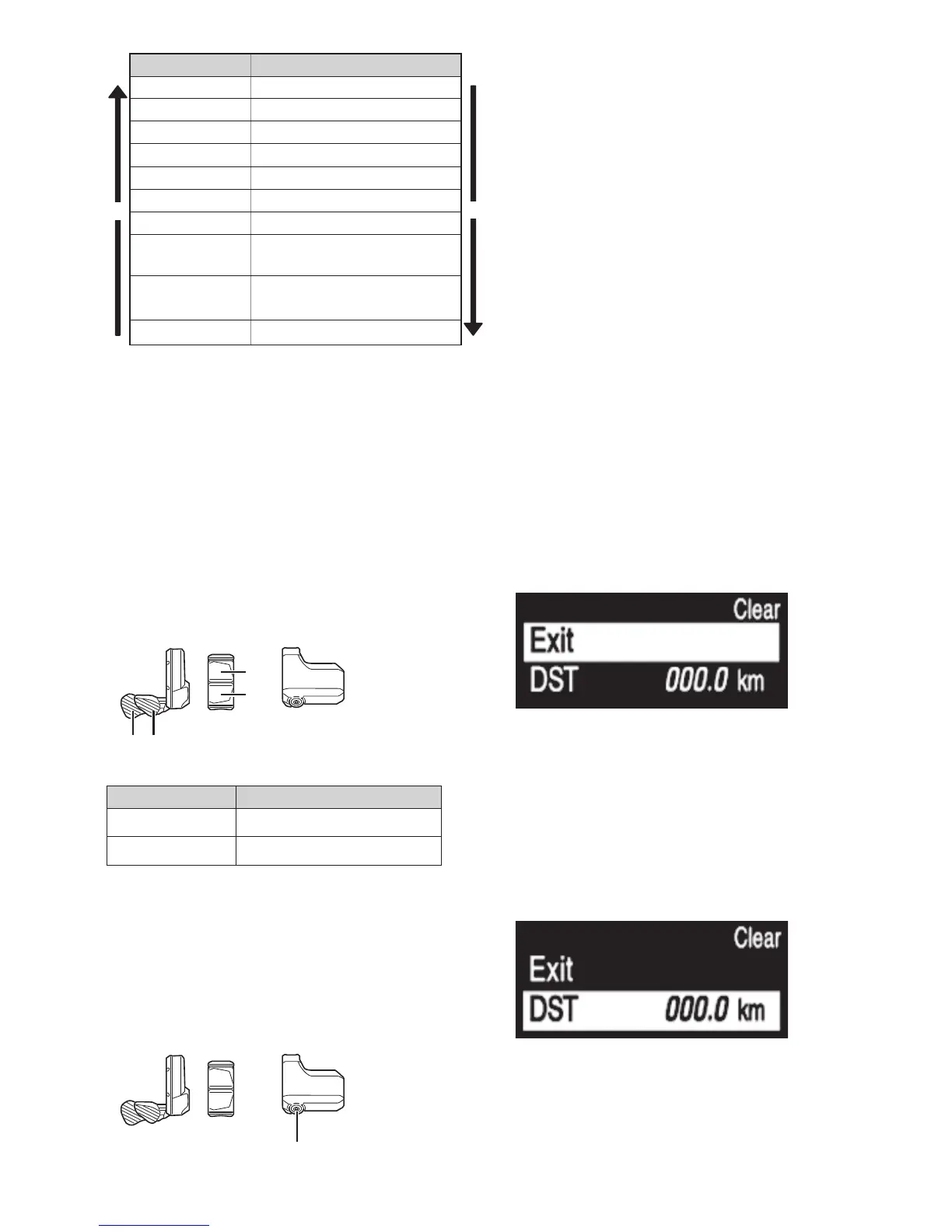
Configurable items Details
X
[Clear] Clear settings
Y
[Clock] Clock setting
[Light] Turning the light on/off
[Beep] Turning the beep noise on/off
[Unit] Switching between km and miles
[Language] Language setting
[Font color] Font color setting
[Shift timing]*1
Adjusting the electronic gear
shifting unit
[RD protection
reset]*2
Activating RD Protection Reset
[Exit] Return to the main screen
*
1 Not used.
*
2 Only if rear derailleur is a electronic gear shifting
unit.
Clear
Reset the traveling distance to default.
When the traveling distance is cleared, [TME], [AVG] and [MAX] are also cleared.
1.
Enter the [Clear] menu.
(1) Launch the setting menu.
(2) Press Assist-X or Assist-Y to select [Clear], then
press A.
2.
Press Assist-X or Assist-Y to select [DST].
Assist
XY
X
Y
Configurable items
Details
[Exit] Return to the menu list screen
[DST] Clearing the traveling distance
3.
Press A to confirm.
After resetting, the screen will automatically return to
the menu list screen.
•
When the traveling distance is cleared, [TME], [AVG]
and [MAX] are also cleared.
Assist
A



 To Next Page