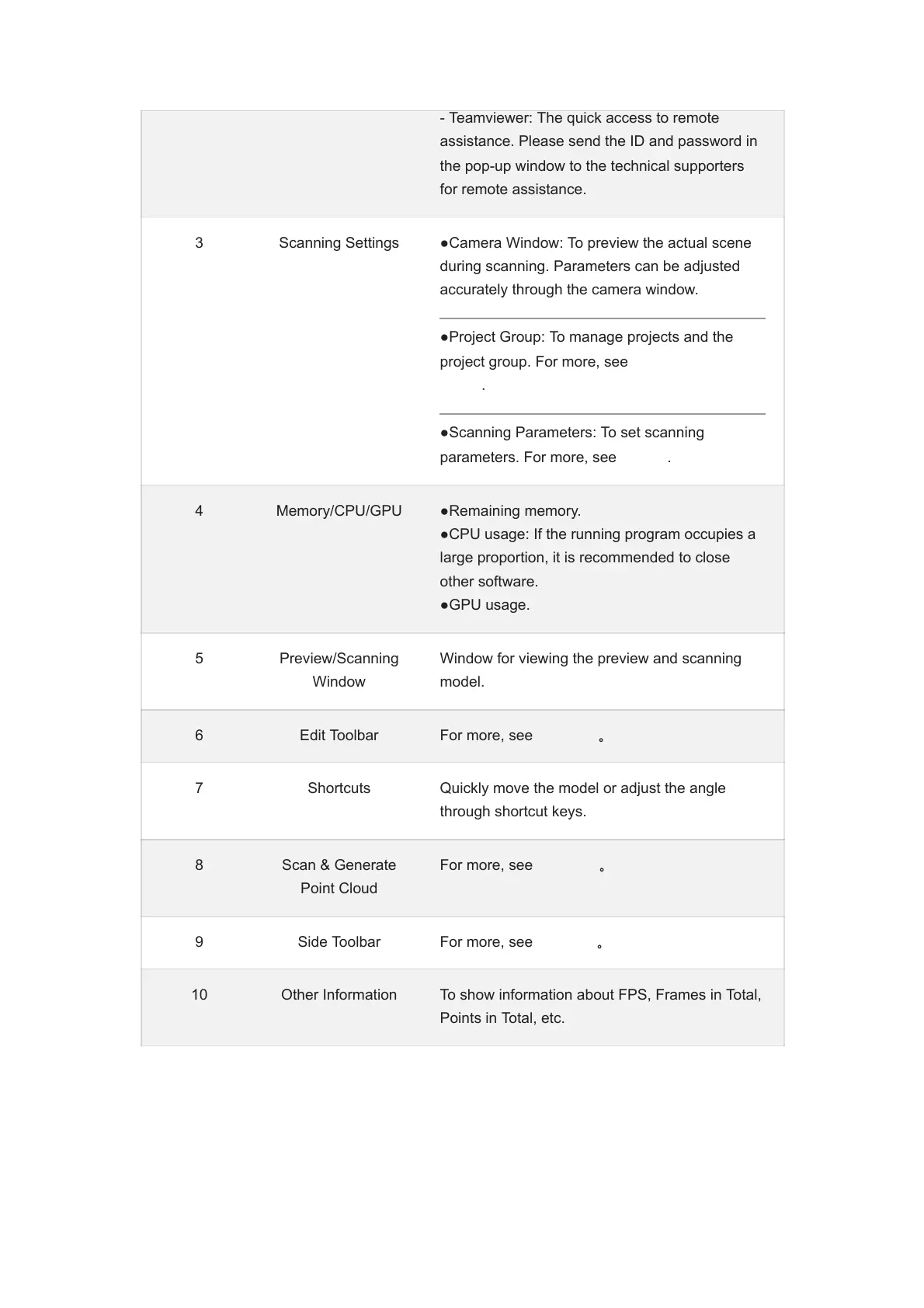
- Teamviewer: The quick access to remote
assistance. Please send the ID and password in
the pop-up window to the technical supporters
for remote assistance.
3 Scanning Settings ●Camera Window: To preview the actual scene
during scanning. Parameters can be adjusted
accurately through the camera window.
●Project Group: To manage projects and the
project group. For more, see Project and Project
Group.
●Scanning Parameters: To set scanning
parameters. For more, see Setting.
4 Memory/CPU/GPU ●Remaining memory.
●CPU usage: If the running program occupies a
large proportion, it is recommended to close
other software.
●GPU usage.
5 Preview/Scanning
Window
Window for viewing the preview and scanning
model.
6 Edit Toolbar For more, see Data Edit。
7 Shortcuts Quickly move the model or adjust the angle
through shortcut keys.
8 Scan & Generate
Point Cloud
For more, see Scanning。
9 Side Toolbar For more, see functions。
10 Other Information To show information about FPS, Frames in Total,
Points in Total, etc.














 To Next Page