Page 7 of 23
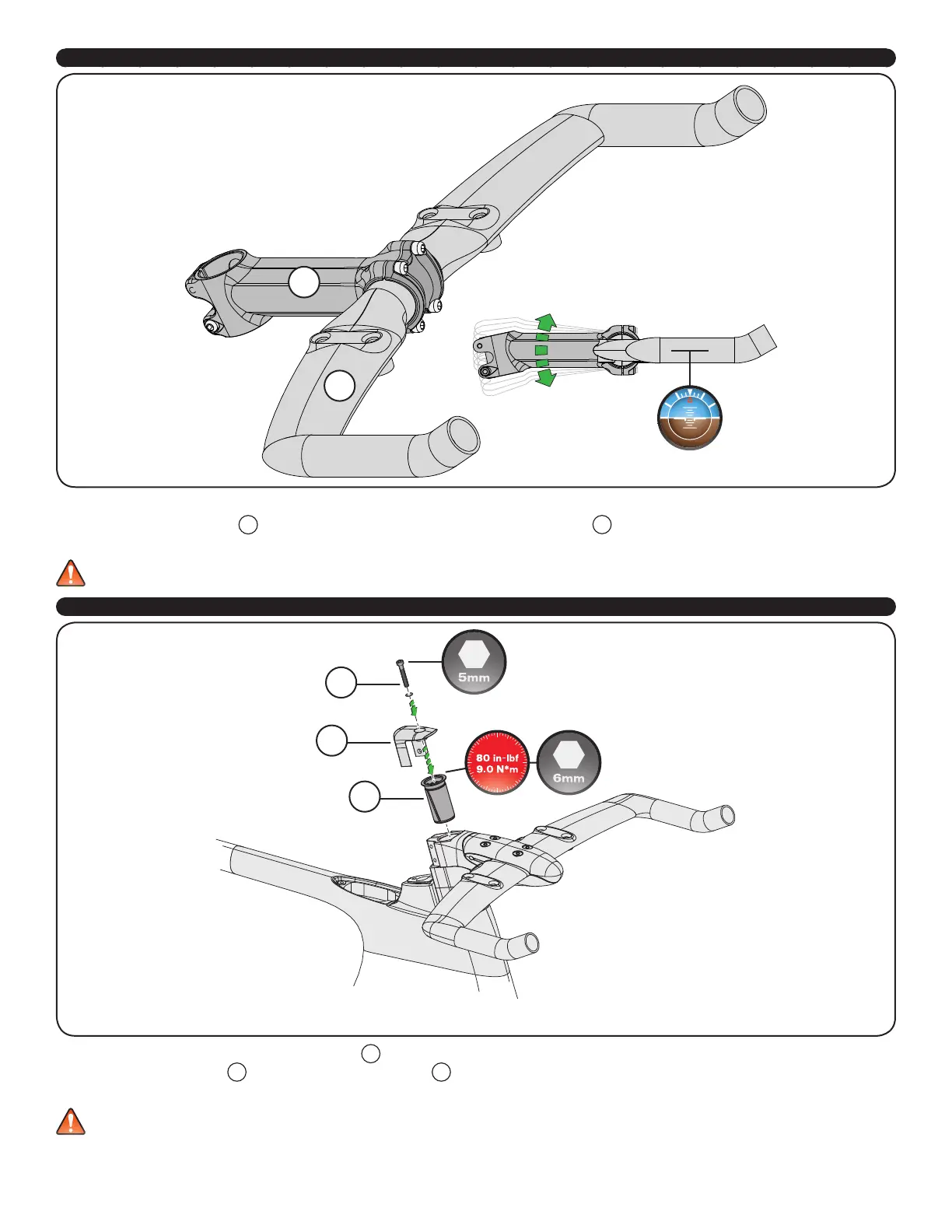
3. INSTALLING THE ALLOY HANDLEBAR WITH A STANDARD 31.8MM STEM
N
M
STANDARD 31.8MM STEM:
15. Determine the desired stem
M
length and angle, then place the Specialized aero handlebar
N
into the stem.
16. Orient the handlebar position horizontally, then torque the stem faceplate bolts to the manufacturer’s specifications.
WARNING! Do not grease the interface between the stem and the alloy handlebar. Grease may cause the handlebar to slip, which can
result in a loss of control.
4. INSTALLING THE EXPANDER PLUG AND TOP CAP
O
P
Q
17. Install the Specialized 48mm Long Expander Plug
O
into the steerer tube, then torque to 80 in-lbf (9.0 Nm).
18. Install the preload top cap
P
, followed by the bolt with washer
Q
, then preload the headset bearings to remove any play.
19. Torque the stem bolts to the manufacturer’s specifications.
WARNING! Carbon fiber steerer tubes require the use of the Long Expander Plug assembly supplied with the fork. Do not use a star nut,
as it can damage the inside surface of the steerer tube. Damage to the steerer tube can result in failure, causing serious personal injury
or death.



 To Next Page